
AZ-120 · Question #50
Drag and Drop Question You have a large and complex SAP environment on Azure. You are designing a training landscape that will be used 10 times a year. You need to recommend a solution to create the…
The correct answer is Build the training landscape; Deliver the training; Take a snapshot of the virtual machine disks; Create a custom image by using the snapshot; Shut down and delete the virtual machines. SAP Training Landscape on Azure - Ordering Explained The Core Logic The goal is to build once, reuse cheaply. For the first session, you construct the environment, use it, preserve it as a reusable image, then tear it down to avoid idle costs. --- Step-by-Step Breakdown 1…
Question
Exhibit
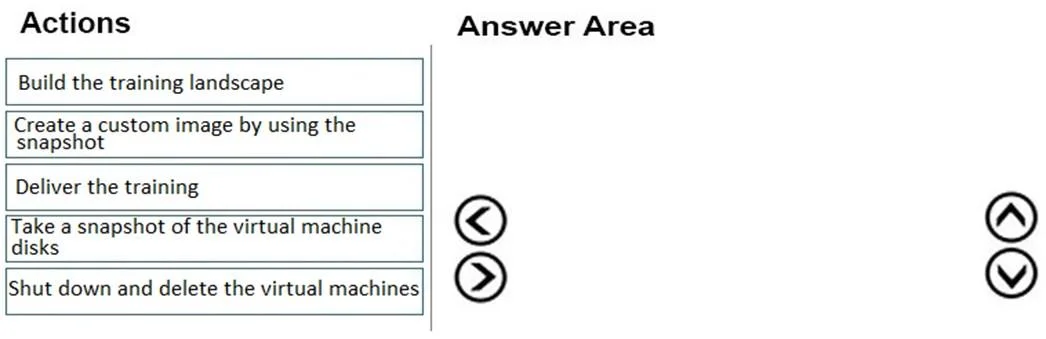
Answer Area
Drag items
Correct arrangement
- Build the training landscape
- Deliver the training
- Take a snapshot of the virtual machine disks
- Create a custom image by using the snapshot
- Shut down and delete the virtual machines
Explanation
SAP Training Landscape on Azure - Ordering Explained
The Core Logic
The goal is to build once, reuse cheaply. For the first session, you construct the environment, use it, preserve it as a reusable image, then tear it down to avoid idle costs.
Step-by-Step Breakdown
1. Build the training landscape This must come first - no image or snapshot exists yet for the first session. You have to construct the full SAP environment manually. This is the only time you'll do this from scratch.
2. Deliver the training Training happens before any preservation steps. You need the environment running and validated before you capture it. Taking a snapshot of an unvalidated environment would be premature.
3. Take a snapshot of the virtual machine disks After training, you capture the current disk state. This is a point-in-time copy of the working training environment, serving as the raw material for the reusable image. It must come after training (confirmed working state) and before deletion.
4. Create a custom image by using the snapshot You convert the snapshot into a managed custom image. This is what future sessions (2–10) will deploy from, eliminating the need to rebuild from scratch. The image depends on the snapshot existing first - strict dependency.
5. Shut down and delete the virtual machines Once the environment is preserved as an image, the running VMs are no longer needed. Deleting them stops compute and disk billing between sessions - directly satisfying "minimize costs."
Why This Satisfies Both Requirements
| Requirement | How it's met |
|---|---|
| Minimize effort | Sessions 2–10 deploy from the custom image instead of rebuilding |
| Minimize costs | VMs are deleted when not in use; only active during 10 sessions/year |
Common Mistakes
- Snapshotting before training: Technically possible but captures an unvalidated state. The exam expects you to confirm the environment works (by running training) before preserving it.
- Skipping the image step: Snapshots alone are less portable and harder to deploy from at scale. The image is what enables fast, repeatable deployments.
- Not deleting VMs: Leaving VMs running between sessions is the single biggest cost mistake - stopped-but-allocated VMs still incur disk costs; deleted VMs do not.
- Reversing steps 3 and 4: You cannot create an image from a snapshot that doesn't exist yet - the dependency is strict.
Topics
Community Discussion
No community discussion yet for this question.