
AZ-120 · Question #49
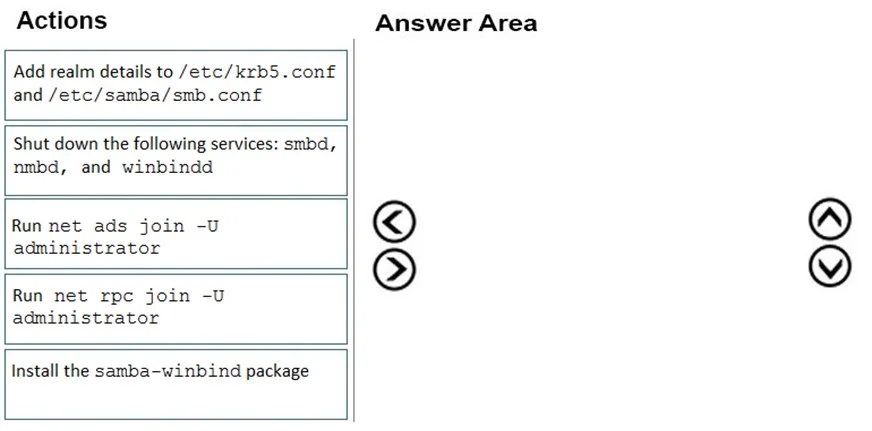
Drag and Drop Question Your on-premises network contains an Active Directory domain. You have an SAP environment on Azure that runs on SUSE Linux Enterprise Server (SLES) servers. You configure the…
The correct answer is Install the samba-winbind package; Add realm details to /etc/krb5.conf and /etc/samba/smb.conf; Run net ads join -U administrator. Joining SLES to Active Directory: Explained This task uses Samba + Winbind to integrate Linux into AD. The three steps follow a strict dependency chain: install → configure → join. --- Step 1: Install the samba-winbind package Why first: You cannot configure or use tools that…
Question
Exhibit
Answer Area
Drag items
Correct arrangement
- Install the samba-winbind package
- Add realm details to /etc/krb5.conf and /etc/samba/smb.conf
- Run net ads join -U administrator
Explanation
Joining SLES to Active Directory: Explained
This task uses Samba + Winbind to integrate Linux into AD. The three steps follow a strict dependency chain: install → configure → join.
Step 1: Install the samba-winbind package
Why first: You cannot configure or use tools that don't exist yet. samba-winbind provides:
- The
netcommand used in Step 3 - The
winbindddaemon for AD authentication - Kerberos integration libraries
Common mistake: Assuming SLES ships with Winbind by default. It doesn't - it's a separate package that must be explicitly installed.
Step 2: Add realm details to /etc/krb5.conf and /etc/samba/smb.conf
Why second: Before attempting to join, the system needs to know where and what the domain is:
/etc/krb5.conf- tells Kerberos the realm name and KDC (Key Distribution Center, i.e., your domain controller)/etc/samba/smb.conf- tells Samba the workgroup/domain name and AD realm
Without this config, net ads join has no context to operate against.
Common mistake: Skipping or reversing config and install. Neither file references make sense without the package installed, and the join will fail without the config.
Step 3: Run net ads join -U administrator
Why third (and ads not rpc): This is the actual join command. Once config is in place, net ads join uses Kerberos (ADS mode) to authenticate against AD - which is the correct modern method for AD environments.
net rpc join is the wrong choice here - it uses the older NT4-style RPC protocol, not Kerberos. Since the question specifies an Active Directory domain (not an NT4 domain), ads is required.
Why the other items are excluded
| Item | Why excluded |
|---|---|
net rpc join -U administrator | Wrong protocol - RPC is for legacy NT4, not AD |
| Shut down smbd, nmbd, winbindd | Stopping services is a troubleshooting/maintenance step, not part of the initial join procedure |
Key mental model: Think of it as install → configure → execute. Every service setup follows this pattern - you can't configure what isn't installed, and you can't join without valid configuration.
Topics
Community Discussion
No community discussion yet for this question.