
AZ-120 · Question #44
Drag and Drop Question You migrate SAP ERP Central Component (SAP ECC) production and non-production landscapes to Azure. You are licensed for SAP Landscape Management (LaMa). You need to refresh…
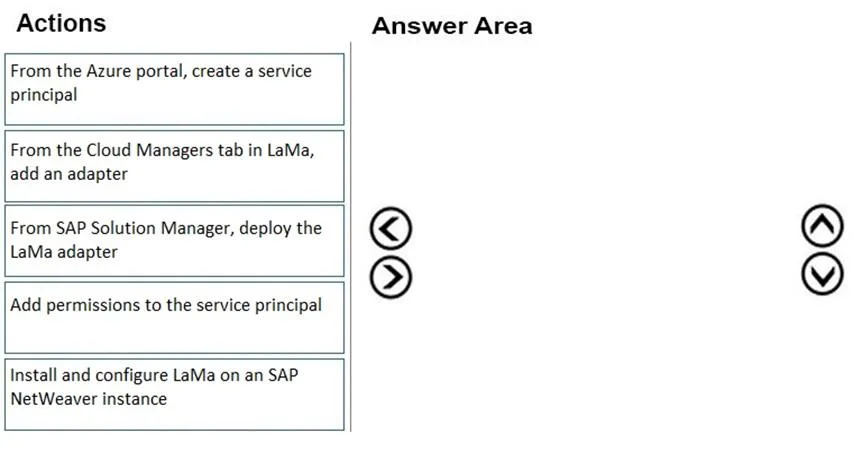
The correct answer is From the Azure portal, create a service principal; Add permissions to the service principal; From the Cloud Managers tab in LaMa, add an adapter; Install and configure LaMa on an SAP NetWeaver instance. SAP LaMa + Azure: System Refresh Setup Context To use SAP LaMa to refresh a non-production landscape from production on Azure, LaMa needs an authenticated connection to Azure's infrastructure APIs. The sequence builds that connection from the outside in - Azure identity first…
Question
Exhibit
Answer Area
Drag items
Correct arrangement
- From the Azure portal, create a service principal
- Add permissions to the service principal
- From the Cloud Managers tab in LaMa, add an adapter
- Install and configure LaMa on an SAP NetWeaver instance
Explanation
SAP LaMa + Azure: System Refresh Setup
Context
To use SAP LaMa to refresh a non-production landscape from production on Azure, LaMa needs an authenticated connection to Azure's infrastructure APIs. The sequence builds that connection from the outside in - Azure identity first, then LaMa integration, then SAP system registration.
Why This Order
1. Create a service principal (Azure portal) A service principal is an Azure AD application identity LaMa will use to authenticate with Azure APIs. It must be created first because everything downstream depends on it existing - you cannot assign permissions or configure LaMa's adapter without a service principal to reference.
2. Add permissions to the service principal A service principal alone has no access rights. You must grant it RBAC roles (typically Contributor on the target resource group or subscription) so LaMa can manage VMs, disks, and snapshots. This step must follow step 1 (object must exist before permissions can be assigned) and precede step 3 (LaMa needs a fully authorized identity, not just any identity).
3. Add an adapter (LaMa → Cloud Managers tab) Now that Azure has a credentialed and authorized service principal, you configure LaMa to use it. Adding an Azure adapter in the Cloud Managers tab requires providing the tenant ID, client ID, and client secret from steps 1–2. Steps 1 and 2 are hard prerequisites - LaMa will fail to connect without them.
4. Install and configure LaMa on an SAP NetWeaver instance This registers the individual SAP NetWeaver systems (production and non-production) with LaMa as managed instances. It comes last because LaMa's Azure connectivity (step 3) must be established before the managed systems can be onboarded under that cloud adapter.
The Excluded Item
"From SAP Solution Manager, deploy the LaMa adapter" - this is a distractor. SAP Solution Manager is a separate ALM/monitoring platform and is not the deployment vehicle for LaMa adapters. LaMa adapters are configured directly within LaMa itself.
Common Mistakes
- Reversing steps 1 and 2 - you cannot add permissions before the identity exists.
- Adding the LaMa adapter before configuring Azure permissions - LaMa will authenticate successfully but fail when it tries to act on resources.
- Choosing the Solution Manager item - SAP Solution Manager sounds plausible in an SAP context, but LaMa has its own adapter management UI and does not depend on Solution Manager for this workflow.
Topics
Community Discussion
No community discussion yet for this question.