
70-663 · Question #29
You have an Exchange Server 2010 organization. Your company's compliance policy states the following: - Delete e-mail messages sent to legal department users that are older than 180 days. - Delete…
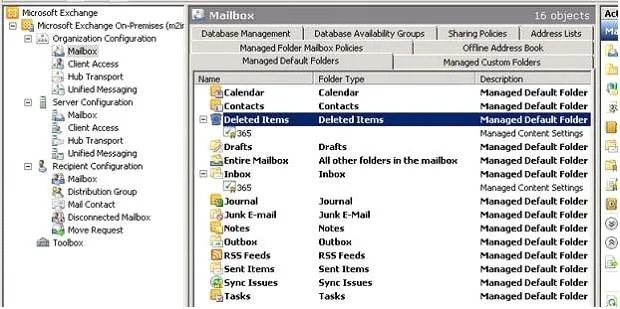
The correct answer is C. Create two Managed Folder mailbox policies. Using managed folders, you can specify retention settings for default folders such as Inbox, Deleted Items, and Sent Items, and create custom managed folders with their own retention settings. Managed folders rely on users to classify messages for retention, and move the…
Question
You have an Exchange Server 2010 organization. Your company's compliance policy states the following:
- Delete e-mail messages sent to legal department users that are older
than 180 days.
- Delete e-mail messages sent to all other uses that are older than 60
days You need to recommend a solution that meets the requirements of the compliance policy. What should you recommend?
Exhibit
Options
- AConfigure deleted item retention for all users.
- BConfigure Personal Archives for legal department users.
- CCreate two Managed Folder mailbox policies.
- DCreate two new message classifications.
How the community answered
(25 responses)- A12% (3)
- B4% (1)
- C80% (20)
- D4% (1)
Explanation
Using managed folders, you can specify retention settings for default folders such as Inbox, Deleted Items, and Sent Items, and create custom managed folders with their own retention settings. Managed folders rely on users to classify messages for retention, and move the messages to appropriate managed folders based on retention requirements. You can define two types of managed folders: Managed default folders Managed default folders are managed folder objects created for default folders such as Inbox, Deleted Items, Sent Items, and others. Exchange 2010 Setup creates a set of managed default folders. You can use these folders or create additional ones for different sets Managed custom folders Managed custom folders are managed folder objects you can use to create custom folders in a user's mailbox. The folders are created under a top-level folder called Managed Folders. First you apply customized Managed Content Settings to the folder type: Then you have to create a Managed Folder Mailbox policy: You can add as many managed folders to each policy as you want, but each user mailbox can have only one managed folder mailbox policy. You can create as many managed folder mailbox policies as you want. And finally you have to apply the policy to a Mailbox: You can apply only one managed folder mailbox policy to a user mailbox.
Topics
Community Discussion
No community discussion yet for this question.