
70-663 · Question #66
You have an Exchange Server 2010 organization. You plan to deploy a public folder access solution that meets the following requirements: - Users in the legal department must be able read e-mail sent…
The correct answer is C. Modify the public folder client permissions. Each public folder has two sets of permissions: client permissions and admin permissions. If you are using Outlook or Outlook Web Access to access a public folder, we only look at the client Client permissions are the ones you see when you get properties on a folder in Outlook…
Question
You have an Exchange Server 2010 organization. You plan to deploy a public folder access solution that meets the following requirements:
- Users in the legal department must be able read e-mail sent to public
folders
- Users in the legal department must not be able to post documents to
public folders by using Outlook Web App (OWA) You need to recommend modification to the organization to meet the requirements of the public folder access solution. What should you recommend?
Exhibit
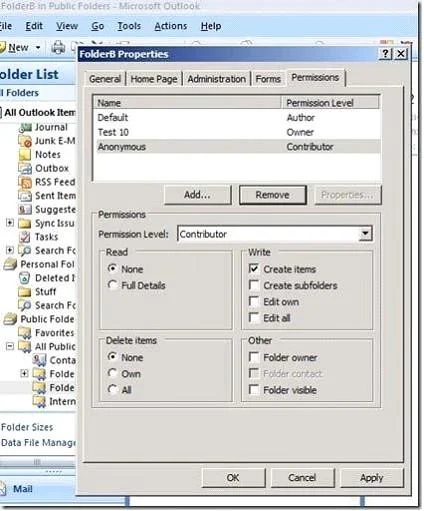
Options
- AModify the mailbox permissions.
- BModify the OWA segmentation settings.
- CModify the public folder client permissions.
- DModify the public folder administrative permissions.
How the community answered
(22 responses)- A14% (3)
- C77% (17)
- D9% (2)
Explanation
Each public folder has two sets of permissions: client permissions and admin permissions. If you are using Outlook or Outlook Web Access to access a public folder, we only look at the client Client permissions are the ones you see when you get properties on a folder in Outlook, or when you use the Get-PublicFolderClientPermission cmdlet, or when you look at Folder Permissions in the ExFolders or PFDAVAdmin tool. Since folders in the hierarchy have typically been created by many different users, the client permissions are often different on each folder. The creator of the folder will be the Owner, and will often change the other rights on the folder as well, so there's no telling what the client permissions will look like throughout the hierarchy. OWA Segmentation settings can only allow or prevent access to PF. Detailed permissions are controlled with client settings:
Topics
Community Discussion
No community discussion yet for this question.