
70-663 · Question #238
You have an Exchange Server 2010 Service Pack 1 (SP1) organization. You need to ensure that when a new mailbox-enabled user is created, the configurations shown in the following table are set by…
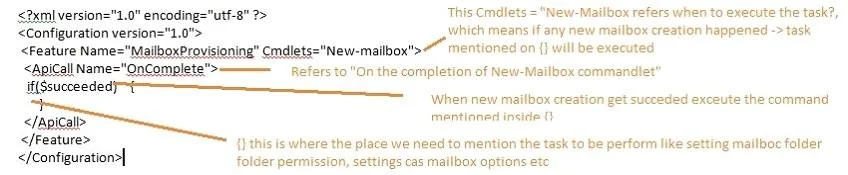
The correct answer is E. a Windows PowerShell script F. cmdlet extension agents. When using Exchange 2010's automatic mailbox provisioning system you never know upfront what mailbox database will be appointed. Cmdlet Extension Agents gives a way to extend cmdlets by adding pre- and postjobs, additional constraints, reporting or override parameters. The…
Question
You have an Exchange Server 2010 Service Pack 1 (SP1) organization. You need to ensure that when a new mailbox-enabled user is created, the configurations shown in the following table are set by default. What should you use? (Each correct answer presents a complete solution. Choose all that apply.)
Exhibit
Options
- AMicrosoft System Center Configuration Manager
- Bemail address policies
- Ca template user account
- DMicrosoft System Center Operations Manager
- Ea Windows PowerShell script
- Fcmdlet extension agents
How the community answered
(30 responses)- B3% (1)
- C7% (2)
- D13% (4)
- E77% (23)
Explanation
When using Exchange 2010's automatic mailbox provisioning system you never know upfront what mailbox database will be appointed. Cmdlet Extension Agents gives a way to extend cmdlets by adding pre- and postjobs, additional constraints, reporting or override parameters. The Scripting Agent is disabled by default. Use the Enable- CmdletExtensionAgent cmdlet to How the Scripting Agent work? 1. Create a file named ScriptingAgentConfig.xml and save it to the CmdletExtensionAgents folder which by default are C:\Program Files\MicrosoftExchange Server\V14\Bin\CmdletExtensionAgents. You can find my sample ScriptingAgentConfig.xml here. You will need to customize the names of the databases, as well as the domain name and the Exchange organization name in the $user.database property. Then you would need to copy the ScriptingAgentConfig.xml to the CmdletExtensionAgents folder on all Exchange 2010 servers in your organization. 2. From the Exchange Management Shell, run Enable-CmdletExtensionAgent "Scripting Agent". This will enable the Scripting Agent, which will use the ScriptingAgentConfig.xml file we created. 3. From the Exchange Management Shell, run Disable-CmdletExtensionAgent "Mailbox Resources Management Agent". The Mailbox Resources Management Agent must be disabled when we want to assign the database for the new mailbox using the Scripting Agent, else the Mailbox Resources Management Agent will take precedence. Alternatively we could have changed the priority of the Scripting Agent.
Topics
Community Discussion
No community discussion yet for this question.