
70-663 · Question #36
You have an Exchange Server 2010 organization. Your company's security policy states that only approved mobile devices can connect by using Exchange ActiveSync. You need to implement a solution that…
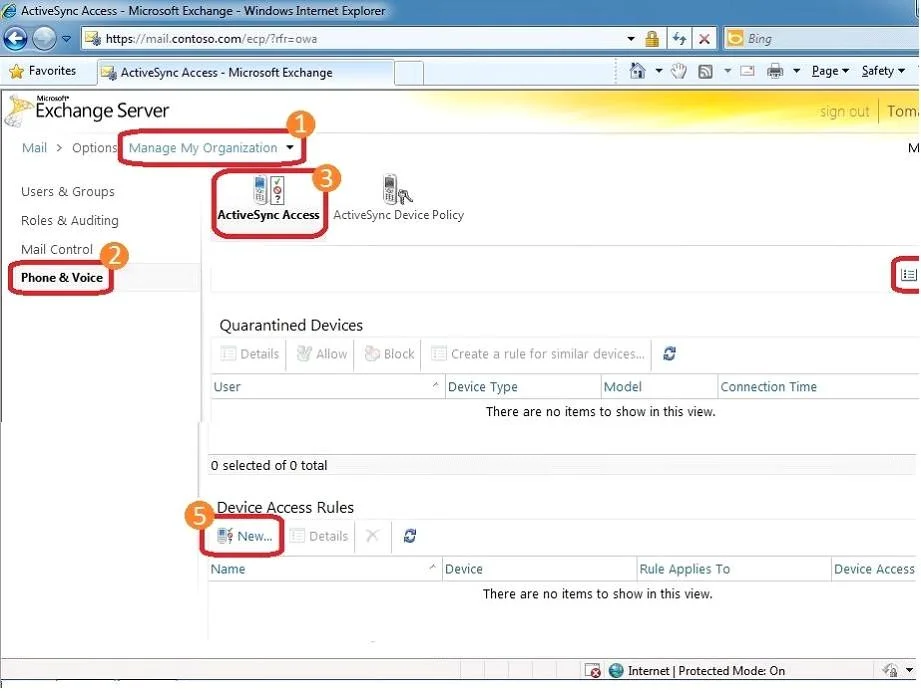
The correct answer is B. a new Exchange ActiveSync device access role. Allow/Block/Quarantine lists Accessing the ABQ settings: 1- Log in to the Exchange Control Panel (ECP) 2- In the ECP, make sure you are managing My Organization (#1 in the screenshot below). Be aware that most users won't see the "My Organization" option -- it's only visible to…
Question
You have an Exchange Server 2010 organization. Your company's security policy states that only approved mobile devices can connect by using Exchange ActiveSync. You need to implement a solution that prevents specified mobile devices from connecting to the Exchange servers. What should you implement?
Exhibit
Options
- Aa new client throttling policy
- Ba new Exchange ActiveSync device access role
- Ca new Exchange ActiveSync policy
- Da new Microsoft Server ActiveSync virtual directory
How the community answered
(30 responses)- A3% (1)
- B77% (23)
- C7% (2)
- D13% (4)
Explanation
Allow/Block/Quarantine lists Accessing the ABQ settings: 1- Log in to the Exchange Control Panel (ECP) 2- In the ECP, make sure you are managing My Organization (#1 in the screenshot below). Be aware that most users won't see the "My Organization" option -- it's only visible to users with Exchange Administrator access. 3- Select Phone & Voice (#2 in the screenshot below) > ActiveSync Access tab (#3 in the screenshot below). This is the Allow/Block/Quarantine configuration screen. 4- Creating a device (or a family of devices) rule: select New from the Device Access Rules section of the ABQ page (#5 in the screenshot above). Accessing ABQ settings from the Exchange Control Panel
Topics
Community Discussion
No community discussion yet for this question.