
70-663 · Question #149
A corporate environment includes Active Directory Domain Services (AD DS). The environment consists of an internal network and a perimeter network. AD DS is deployed only on the internal network…
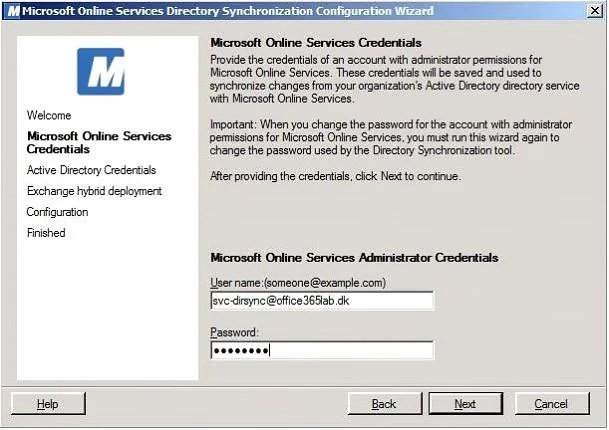
The correct answer is B. Install the directory synchronization tool on a computer on the internal network. C. Create a directory synchronization service account with membership in the Domain Users. On the Microsoft Services Online Credentials page, enter the credentials for tenant account with Global Administrator permissions. It's recommended to create a dedicated service account for this purpose. You can create it directly in Office 365 or in your on-premise Active…
Question
A corporate environment includes Active Directory Domain Services (AD DS). The environment consists of an internal network and a perimeter network. AD DS is deployed only on the internal network. The company intends to utilize a service providers cloud-based Exchange Server 2010 SP1 email service. You have the following requirements:
- Maximize the security of the design.
- Use the minimum permissions required to perform directory
synchronization. You need to recommend a solution for directory synchronization between the corporate environment and the service providers environment. Which two actions should you recommend? (Each correct answer presents part of the solution. Choose two.)
Exhibit
Options
- AInstall the directory synchronization tool on a computer in the perimeter network.
- BInstall the directory synchronization tool on a computer on the internal network.
- CCreate a directory synchronization service account with membership in the Domain Users
- DCreate a directory synchronization service account with membership in the Domain Admins
How the community answered
(15 responses)- A13% (2)
- B80% (12)
- D7% (1)
Explanation
On the Microsoft Services Online Credentials page, enter the credentials for tenant account with Global Administrator permissions. It's recommended to create a dedicated service account for this purpose. You can create it directly in Office 365 or in your on-premise Active Directory. The important thing is that this account is added to the Office 365 Global Administrator role group. Now we need to specify the credentials for an account with administrator permissions in the on- premise Active Directory. You can use any account with such permissions as the credentials are only used to set permissions for the DirSync tool not saved. Hybrid Deployment Requirements There are three basic requirements for configuring an Exchange hybrid deployment with your on- premises Exchange environment. Hybrid servers. You must install one or more hybrid servers running Exchange 2010 Service Pack 2 in your on-premises Exchange environment and configure coexistence hybrid deployment between the on-premises Exchange environment and Exchange Online. Hybrid servers act as a bridge between the on-premises Exchange environment and Exchange Online. Organizations do not need to upgrade on-premises Exchange mailboxes to Exchange 2010 prior to moving them to Exchange Online. The Exchange 2010 Client Access server role on a hybrid server acts a proxy between older Exchange environments and Exchange Online without the need to migrate on- premises Exchange mailboxes to Exchange 2010. Online Services Directory Synchronization Tool. A hybrid Exchange deployment requires the Directory Synchronization tool to be running in the local environment. Directory synchronization write-back is required to enable smooth offboarding of users. For more details, see the Directory Synchronization Tool section of this document. Microsoft Federation Gateway. The Microsoft Federation Gateway is free online service offered by Microsoft that acts as the trust broker between your on-premises Exchange organization and your Exchange Online service. Organizations implementing a hybrid Exchange deployment must create a federation trust with the Microsoft Federation Gateway.
Topics
Community Discussion
No community discussion yet for this question.