
70-663 · Question #150
A corporate environment includes Exchange Server 2007 SP2 and Active Directory Domain Services (AD DS). Journaling is in use for all inbound and outbound email messages. The company intends to…
The correct answer is A. From the Exchange Server 2010 SP1 Hub Transport server, export the journal rules. C. From the Exchange Server 2010 SP1 Hub Transport server, export the transport rules. Use the Export-TransportRuleCollection cmdlet to export a transport rule collection that is used by the Transport Rules agent on a computer that has the Microsoft Exchange Server 2007 Hub Transport server role or the Edge Transport server role installed. You must perform this…
Question
A corporate environment includes Exchange Server 2007 SP2 and Active Directory Domain Services (AD DS). Journaling is in use for all inbound and outbound email messages. The company intends to transition to Exchange Server 2010 SP1. During the coexistence, you will have the following requirements:
- Export new journal and transport rules created in the Exchange Server
2007 SP2 system.
- Ensure that the exported rules are available for import in the
Exchange Server 2010 SP1 environment. You need to recommend a solution that meets the requirements. Which two actions should you recommend? (Each correct answer presents part of the solution. Choose two.)
Exhibit
Options
- AFrom the Exchange Server 2010 SP1 Hub Transport server, export the journal rules.
- BFrom the Exchange Server 2007 SP2 Hub Transport server, export the transport rules.
- CFrom the Exchange Server 2010 SP1 Hub Transport server, export the transport rules.
- DFrom the Exchange Server 2007 SP2 Hub Transport server, export the journal rules.
How the community answered
(39 responses)- A77% (30)
- B15% (6)
- D8% (3)
Explanation
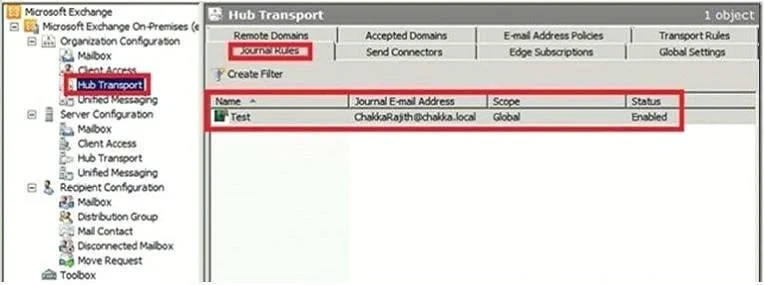
Use the Export-TransportRuleCollection cmdlet to export a transport rule collection that is used by the Transport Rules agent on a computer that has the Microsoft Exchange Server 2007 Hub Transport server role or the Edge Transport server role installed. You must perform this procedure on an Exchange 2010 Hub Transport server because the Exchange 2010 Export- JournalRuleCollection cmdlet is aware of both journal rule formats, and it exports the Exchange 2007 journal rules when you use the ExportLegacyRules switch. $file = Export-JournalRuleCollection -ExportLegacyRules Set-Content -Path "C:\MyDocs\Ex2007-JournalRules.xml" -Value $file.FileData -Encoding Byte the Export-JournalRuleCollection cmdlet is used to export Exchange 2007 journal rules and store them in a variable. In the second step, the Set-Content cmdlet is used to save exported journal rules from the variable to the Ex2007-JournalRules.xml file in the C:\MyDocs folder. Journaling can help your organization respond to legal, regulatory, and organizational compliance requirements by recording inbound and outbound e-mail communications. In an Exchange 2010 organization, all e-mail traffic is routed by the Hub Transport server. All messages traverse at least one Hub Transport server in their lifetime. The Journaling agent is a compliance-focused transport agent that processes messages on Hub Transport servers. All messages sent to or from the journaling recipients you specify in a journaling rule are journaled. If you specify a distribution group as the journaling recipients, all messages sent to and from members of the distribution group are journaled. The journaling mailbox is used for collecting journal reports. You can specify one journaling mailbox to collect messages for all the journal rules configured in the organization, or you can use different journaling mailboxes for different journal rules or sets of journal rules. A journal report is the message that the Journaling agent generates when a message matches a journal rule and is to be submitted to the journaling mailbox. Journal rules are stored in Active Directory and applied by all Hub Transport servers in the Exchange 2010 organization. When you create, modify, or remove a journal rule on a Hub Transport server, the change is replicated to all Active Directory servers in the organization. All Hub Transport servers in the organization then retrieve the updated journal rule configuration from the Active Directory servers and apply the new or modified journal rules. Microsoft Exchange Server 2010 and Exchange Server 2007 use the same X-headers to specify that a message has already been journaled and also to identify journal reports. An Exchange 2010 Hub Transport server won't generate a duplicate journal report for a message that's already been journaled by another Exchange 2010 or Exchange 2007 Hub Transport server. Journaling considerations for organizations that contain Exchange Server 2003 and Exchange 2010 servers are covered in Understanding Journaling in a Mixed Exchange 2003 and Exchange 2010 Although journaling in Exchange 2010 is similar to journaling in Exchange 2007, there are some differences in the journal rule object. When you install the first Exchange 2010 Hub Transport server in an Exchange 2007 environment, Setup creates a new container for Exchange 2010 journal rules, converts all Exchange 2007 journal rules to the Exchange 2010 format, and stores them in this new container in Active Directory. After Setup completes, the Exchange 2010 journal rule collection is identical to the Exchange 2007 journal rule collection. The same journal rules are applied to messages at the first Hub Transport server that handles the messages, regardless of whether it's running Exchange 2010 or Exchange 2007.
Topics
Community Discussion
No community discussion yet for this question.