
70-663 · Question #41
You have an Exchange Server 2010 organization. The company has ten departments. All Active Directory user objects are located in a separate organizational unit (OU) for each department. Each user…
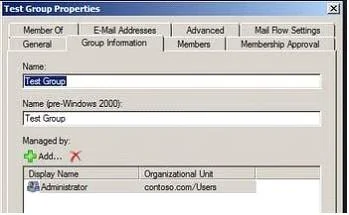
The correct answer is A. For each department distribution group, modify the Managed By settings. Mail Flow Settings tab is used to configure message size or message delivery restrictions for the distribution group. Managed By settings: In Microsoft Exchange Server 2010, users can create and manage distribution groups and distribution group membership. These users are…
Question
You have an Exchange Server 2010 organization. The company has ten departments. All Active Directory user objects are located in a separate organizational unit (OU) for each department. Each user belongs to a separate Exchange distribution group for each department. You need to plan the assignment of administrative rights for organization. The plan must meet the following requirements:
- Managers of all departments must be prevented from charging the mail
flow settings or e-mail address of a group
- Managers of all departments must be able to change the distribution
group membership of their respective departments What should you include in the plan?
Exhibit
Options
- AFor each department distribution group, modify the Managed By settings.
- BFor each department distribution group, modify the message moderation settings.
- CFor each department manager, assign the MyDistributionGroupMembership management
- DOn each departmental OU, assign the department manager the Charge permissions for
How the community answered
(52 responses)- A85% (44)
- B8% (4)
- C2% (1)
- D6% (3)
Explanation
Mail Flow Settings tab is used to configure message size or message delivery restrictions for the distribution group. Managed By settings: In Microsoft Exchange Server 2010, users can create and manage distribution groups and distribution group membership. These users are delegated ownership of the group by the ManagedBy property. The default owner of a distribution group is the user or administrator who creates the group. However, you can use the EMC or the Shell to change the ownership of a distribution group. Set-DistributionGroup -Identity Volunteers -ManagedBy [email protected] To change members in distribution group you need to select in ADUC in properties of this group on tab Managed By select user and check Manager can update membership list. If the group is a distribution group if you set the Managed By property then they can manage the group members from inside Outlook. In Exchange 2010, distribution groups can't be managed by groups - only individual users can The MyDistributionGroupMembership management role enables individual users to view and modify their membership in distribution groups in an organization, provided that those distribution groups allow manipulation of group membership.
Topics
Community Discussion
No community discussion yet for this question.