
350-401 · Question #1255
Lab Simulation 37 Guidelines This is a lab item in which tasks will be performed on virtual devices. - Refer to the Tasks tab to view the tasks for this lab item. - Refer to the Topology tab to…
Lab Simulation 37 - eBGP Configuration Explanation --- Overall Goal R1 sits in AS100 and needs to form eBGP (external BGP) peering sessions with routers in AS200 and AS300, then advertise two of its loopback networks to those peers. The constraint - no address-family command…
Question
Exhibits
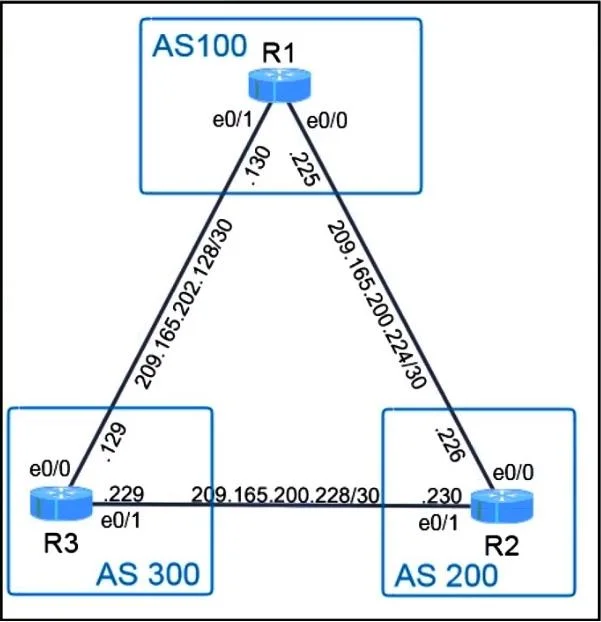
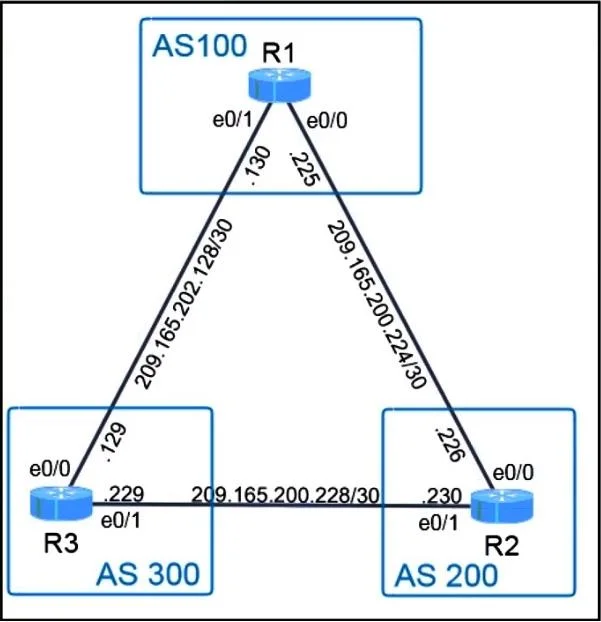
Explanation
Lab Simulation 37 - eBGP Configuration Explanation
Overall Goal
R1 sits in AS100 and needs to form eBGP (external BGP) peering sessions with routers in AS200 and AS300, then advertise two of its loopback networks to those peers. The constraint - no address-family command - means you must use classic BGP syntax (IPv4 unicast is the default, so it's implied without explicitly entering an address-family context).
Step-by-Step Reasoning
Step 1 - router bgp 100
Enters BGP configuration mode and declares R1 as belonging to AS100. BGP is autonomous-system-aware; without specifying the correct AS number, all subsequent BGP config is meaningless and peering will fail (neighbors will reject sessions from an unexpected AS).
Step 2 - bgp router-id <loopback0-ip>
Note: The correct command is
bgp router-id <ip-address>, notrouter-id Loopback0. You supply the IP address assigned to Loopback0, e.g.,bgp router-id 1.1.1.1.
The router-id is a 32-bit identifier BGP uses to uniquely identify the router in the BGP domain and to resolve path selection ties. Using a loopback is best practice because loopbacks are always up - a physical interface going down won't change the router-id mid-session. The question explicitly prohibits address-family, so this command goes directly under router bgp 100.
If skipped: IOS automatically picks the highest IP on a loopback (or highest active interface IP). The lab grader likely checks for a specific router-id, so omitting this explicit config will fail the task.
Step 3 - neighbor 209.165.200.229 remote-as 200
Defines the first eBGP peer. The remote-as value being different from R1's AS (100 ≠ 200) is what makes this eBGP (external BGP). IOS won't initiate a TCP session to a neighbor until this statement exists.
If skipped: No BGP session is established with AS200; none of R1's prefixes reach that AS.
Step 4 - neighbor 209.165.200.230 remote-as 300
Same logic as Step 3, but for the AS300 peer. BGP requires one neighbor statement per peer - there's no wildcard.
If skipped: AS300 never receives R1's routes.
Step 5 - network 100.100.100.0 mask 255.255.255.0 (or /32 depending on topology)
The BGP network command does not create the interface - it tells BGP to advertise that prefix if it already exists in the routing table. The prefix must match exactly (network + mask). Since Loopback 100 is likely a /32 host route (100.100.100.1/32), the command is:
network 100.100.100.1 mask 255.255.255.255
If skipped: Loopback 100's network is never sent to AS200 or AS300.
If the mask is wrong: The network statement is silently ignored - BGP won't advertise a prefix that doesn't exist in the RIB with that exact match.
Step 6 - network 200.200.200.1 mask 255.255.255.255
Identical reasoning to Step 5 for Loopback 200.
Step 7 - end + write memory (or copy run start)
Saves to NVRAM as required by the lab instructions. Forgetting this means the config survives only until reboot - the grader may reload the device.
Complete Config Block
router bgp 100
 bgp router-id 1.1.1.1
 neighbor 209.165.200.229 remote-as 200
 neighbor 209.165.200.230 remote-as 300
 network 100.100.100.1 mask 255.255.255.255
 network 200.200.200.1 mask 255.255.255.255
Key Pitfalls
| Mistake | Result |
|---|---|
Using address-family ipv4 | Fails the explicit lab constraint |
| Wrong router-id source (physical int) | Fails if interface goes down; grader may mark wrong |
network without exact mask | Prefix silently not advertised |
Forgetting write memory | Config lost on reload |
Memory Tip
"RNNN - Router, Neighbor, Neighbor, Network, Network"
- Enter
router bgp <AS> - Set
bgp router-id neighborfor each peer (remote-astells IOS it's eBGP)networkfor each prefix you want to originate
Think of it as: who am I -> who are my peers -> what do I announce.
Topics
Community Discussion
No community discussion yet for this question.