
350-401 · Question #1256
Lab Simulation 38 Guidelines This is a lab item in which tasks will be performed on virtual devices. - Refer to the Tasks tab to view the tasks for this lab item. - Refer to the Topology tab to…
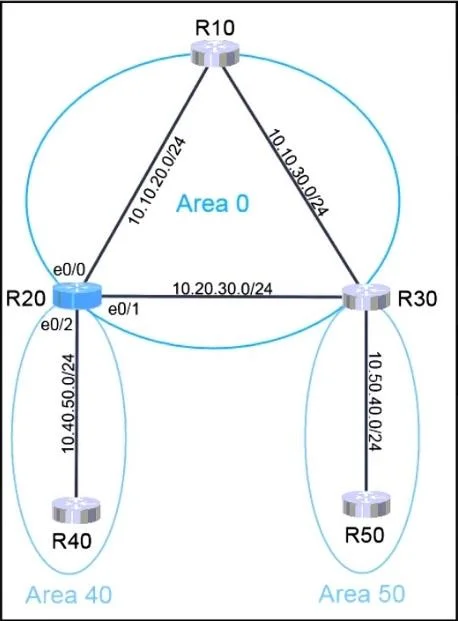
OSPF Lab Simulation 38 - Full Explanation --- Overall Goal R20 is an Area Border Router (ABR) - it sits between Area 0 (backbone) and Area 40 (stub area). The job is to bring R20 into the OSPF domain, make it stable, and then have it advertise a condensed (summarized) view of…
Question
Lab Simulation 38 Guidelines This is a lab item in which tasks will be performed on virtual devices.
- Refer to the Tasks tab to view the tasks for this lab item.
- Refer to the Topology tab to access the device console(s) and perform the tasks.
- Console access is available for all required devices by clicking the device icon or using the
tab(s) above the console window.
- All necessary preconfigurations have been applied.
- Do not change the enable password or hostname for any device.
- Save your configurations to NVRAM before moving to the next item.
- Click Next at the bottom of the screen to submit this lab and move to the next question.
- When Next is clicked, the lab closes and cannot be reopened.
Topology Tasks OSPF is preconfigured on all devices except R20. Configure R20 to complete these tasks. Task 1:
Configure OSPF according to the topology using these requirements:
- Use Process ID 10.
- Use Loopback1 for the Router ID.
- Advertise all networks into OSPF.
o Use network statements under the OSPF process to accomplish this task. Task 2:
Configure a /20 summary route for Area 40.
- Advertise only Type 3 LSAs into Area 0.
Anwer:
Exhibit
Explanation
OSPF Lab Simulation 38 - Full Explanation
Overall Goal
R20 is an Area Border Router (ABR) - it sits between Area 0 (backbone) and Area 40 (stub area). The job is to bring R20 into the OSPF domain, make it stable, and then have it advertise a condensed (summarized) view of Area 40 into the backbone rather than flooding every individual route. This reduces OSPF overhead and is a textbook ABR responsibility.
Step-by-Step Breakdown
Step 1: router ospf 10
Enters OSPF configuration mode and starts the OSPF process with ID 10.
- The process ID is locally significant only - it does not need to match other routers.
- Without this, no OSPF process exists on R20 and nothing else can be configured.
- If you used a different process ID (e.g., 1), the router would still work, but this lab specifies 10 - mismatching matters for grading/verification scripts.
Step 2: router-id [IP of Loopback1]
Syntax note: The answer shows
router-id Loopback1, but the actual IOS command requires the IP address in dotted-decimal notation, not the interface name. You'd runshow ip interface briefto find Loopback1's IP, then use:router-id 1.1.1.1 (example)
Why use Loopback1?
- A loopback interface never goes down (no physical cable to fail), making the Router ID stable.
- If a physical interface were used and it flapped, OSPF would re-elect the Router ID and potentially trigger unnecessary reconvergence across the domain.
- The Router ID uniquely identifies R20 in the OSPF database. Two routers with the same Router ID cause database corruption.
What happens if skipped? OSPF automatically picks the highest active IP (preferring loopbacks). If Loopback1 happens to be the highest IP already, behavior is the same - but on an exam you must explicitly configure it as instructed to guarantee the correct Router ID.
Step 3: network 10.20.30.0 0.0.0.255 area 0
Enables OSPF on the interface(s) matching this network and places them in Area 0 (the backbone).
- The
networkcommand uses a wildcard mask (inverse of subnet mask).0.0.0.255= /24. - This is the link connecting R20 toward Area 0 - it must be in Area 0 because ABRs must have at least one interface in the backbone.
- If this interface were placed in Area 40 instead of Area 0, R20 would not function as an ABR and inter-area routing would break.
Steps 4 & 5: network 10.10.30.0 0.0.0.255 area 40 and network 10.10.20.0 0.0.0.255 area 40
Enables OSPF on R20's interfaces facing Area 40.
- These network statements tell OSPF which interfaces belong to Area 40.
- Because OSPF is multi-area, you must explicitly assign each interface to the correct area - OSPF doesn't assume.
- Skipping these means Area 40 neighbors never form adjacencies with R20, and those networks are never learned or advertised.
Step 6: area 40 range 10.40.0.0 255.255.240.0
Configures inter-area route summarization on the ABR (R20).
This is the most conceptually important step. Here's what it does:
| Without summary | With summary |
|---|---|
| R20 sends one Type 3 LSA per Area 40 network into Area 0 | R20 sends a single Type 3 LSA for 10.40.0.0/20 into Area 0 |
| Area 0 routers hold many specific routes | Area 0 routers hold one summarized route |
/20=255.255.240.0- this supernet covers all the specific Area 40 prefixes.area 40 rangeis configured on the ABR, not on internal or backbone routers.- The requirement "advertise only Type 3 LSAs into Area 0" is precisely what this command achieves: instead of many specific Type 3s, one summary Type 3 exits toward Area 0.
- Type 3 LSAs are the LSA type that ABRs generate for inter-area routes. This command doesn't suppress them - it collapses them into one.
What goes wrong if skipped? All individual Area 40 prefixes flood into Area 0, defeating the purpose of a hierarchical OSPF design and violating the task requirement.
Order Dependency
The commands within router ospf 10 can generally be entered in any order (Cisco IOS applies them all at once when OSPF runs), but router ospf 10 must come first - everything else is a sub-command inside that process. The area range command has no effect until at least one interface is actually in Area 40 (steps 4–5).
Memory Tip
"ID → Interfaces → Summarize"
- Start the process (
router ospf <pid>)- Stabilize your identity (
router-id)- Assign interfaces to areas (
networkstatements)- Clean up what leaves each area (
area rangeon the ABR)
Think of the ABR as a customs checkpoint: it knows all the detail inside Area 40, but only reports a single summarized manifest to the outside world (Area 0).
Final Reminder
Always write memory (or copy running-config startup-config) before clicking Next - the lab explicitly requires saving to NVRAM. Forgetting this means your config is lost on reload and the grader may mark it incorrect.
Topics
Community Discussion
No community discussion yet for this question.