
350-401 · Question #1254
Lab Simulation 36 Guidelines This is a lab item in which tasks will be performed on virtual devices. - Refer to the Tasks tab to view the tasks for this lab item. - Refer to the Topology tab to…
Task 1 Explanation: Modifying the ACL on R10 for EIGRP --- Overall Goal R10 has an existing Access Control List (ACL 150) that is blocking EIGRP routing updates from its neighbors R20 and R30. Without receiving these updates, R10 cannot build a complete routing table. The goal…
Question
Exhibits
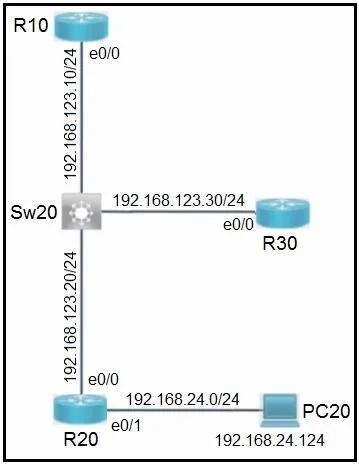
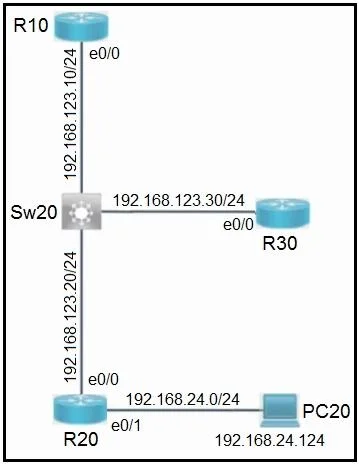
Explanation
Task 1 Explanation: Modifying the ACL on R10 for EIGRP
Overall Goal
R10 has an existing Access Control List (ACL 150) that is blocking EIGRP routing updates from its neighbors R20 and R30. Without receiving these updates, R10 cannot build a complete routing table. The goal is to add permit entries to allow EIGRP protocol traffic through - without removing any existing configuration (which could break other policies already in place).
Why This Approach Is Correct
EIGRP uses IP protocol number 88. Extended ACLs (numbered 100-199, like ACL 150) can filter traffic based on IP protocol type. By explicitly permitting protocol 88 from each neighbor's IP address, we surgically allow only EIGRP without opening up broader traffic flows.
The "do not remove" constraint rules out recreating the ACL from scratch - we must append new permit entries.
Step-by-Step Reasoning
Step 1 - Access R10's console You must be on the correct device. Configuring the wrong router wastes time and can create misconfigurations elsewhere in the lab.
Step 2 - Enter global configuration mode (conf t)
ACL modifications require global config mode. Without it, you're in EXEC mode, which is read-only for configuration purposes.
Step 3 & 4 - Add permit statements for EIGRP from R20 and R30
access-list 150 permit eigrp host 192.168.123.20 any
access-list 150 permit eigrp host 192.168.123.30 any
eigrpis IOS's keyword for IP protocol 88 - no need to type the protocol number manually.host 192.168.123.20pins the permit to R20's specific source IP, satisfying the "only EIGRP routes" constraint. A broaderanysource would allow unintended traffic.- Using
anyas the destination covers multicast (224.0.0.10) and unicast EIGRP packets. - Why two entries? EIGRP neighbors are individually sourced - one entry per neighbor is required.
- Critical ordering note: With numbered ACLs, new lines are appended to the end. If the existing ACL has an explicit
deny ip any anycatch-all, your new permits will never be reached because ACLs are processed top-down and stop at the first match. In that case, you'd need to useip access-list extended 150(named-ACL editing mode) with sequence numbers to insert entries before the deny. The procedure assumes the existing deny does not block EIGRP before these permits are reached.
Step 5 - Exit configuration mode Good hygiene. It also ensures the config is staged and you're not accidentally making additional changes.
Step 6 - Verify with show access-lists
Confirms your entries were accepted and appear in the correct position. You can also check show ip eigrp neighbors to verify R20 and R30 appear as established neighbors after the ACL change.
Step 7 - Save to NVRAM (copy run start or write memory)
The lab explicitly requires saving before moving on. If you don't save, a simulated reload wipes your changes and the task is scored as incomplete.
What Goes Wrong If Steps Are Skipped
| Skipped Step | Consequence |
|---|---|
| Step 3 or 4 | One neighbor's EIGRP traffic still blocked; incomplete routing table |
Wrong protocol keyword (e.g., ip instead of eigrp) | Over-permissive ACL; violates the "only EIGRP" constraint |
| Wrong source IP | Permit doesn't match actual neighbor traffic |
| Step 6 (verification) | Miss ACL ordering issue; silent failure |
| Step 7 (save) | Lab scores the task as failed after submission |
Memory Tip
"88 is EIGRP's jersey number." Protocol 88 = EIGRP. Extended ACLs start at 100. ACL 150 = extended. Permit per neighbor, per protocol - one line per router you want to hear from.
Topics
Community Discussion
No community discussion yet for this question.