
350-401 · Question #1023
Lab Simulation 11 Guidelines This is a lab item in which tasks will be performed on virtual devices. - Refer to the Tasks tab to view the tasks for this lab item. - Refer to the Topology tab to…
Lab Simulation 11 - Detailed Explanation --- Overall Goal This lab tests three core switching technologies working together: | Task | Technology | Goal | |------|-----------|------| | 1 | EtherChannel (LACP) | Bundle physical links into Po1 | | 2 | 802.1Q Trunk / Native VLAN |…
Question
Exhibits
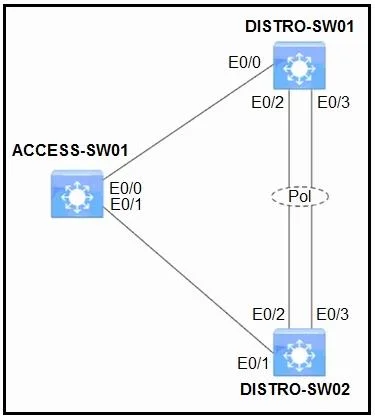
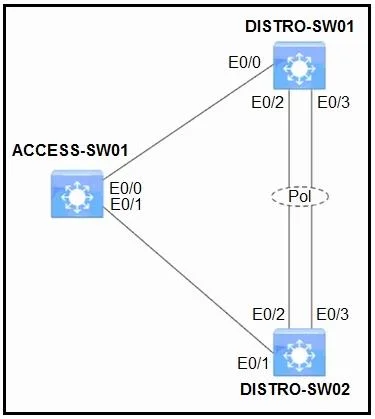
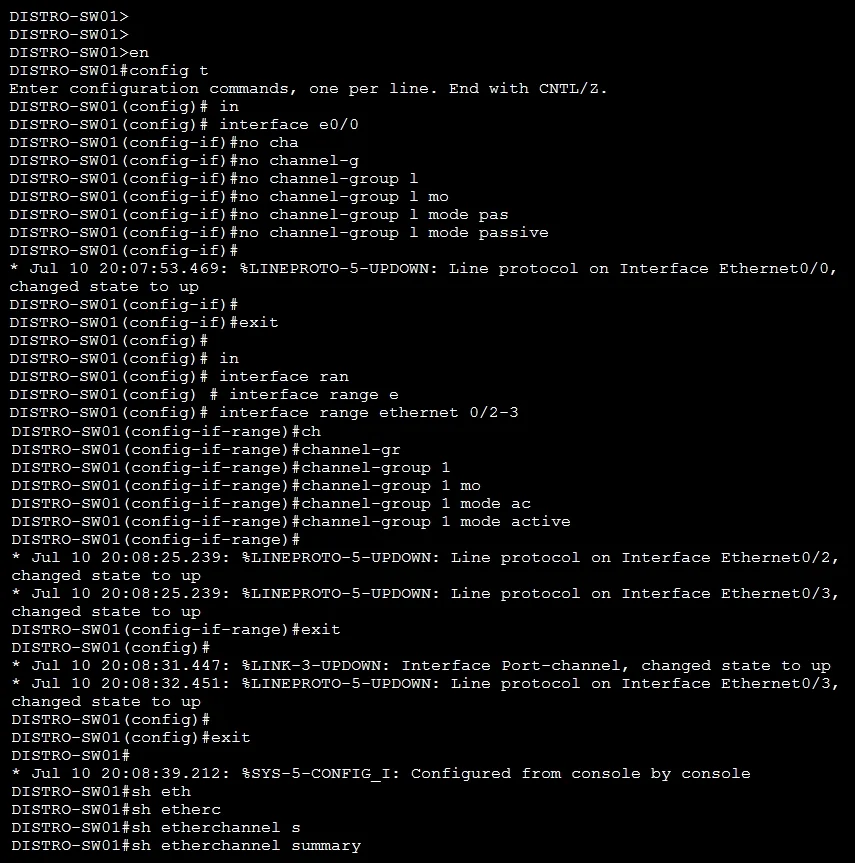
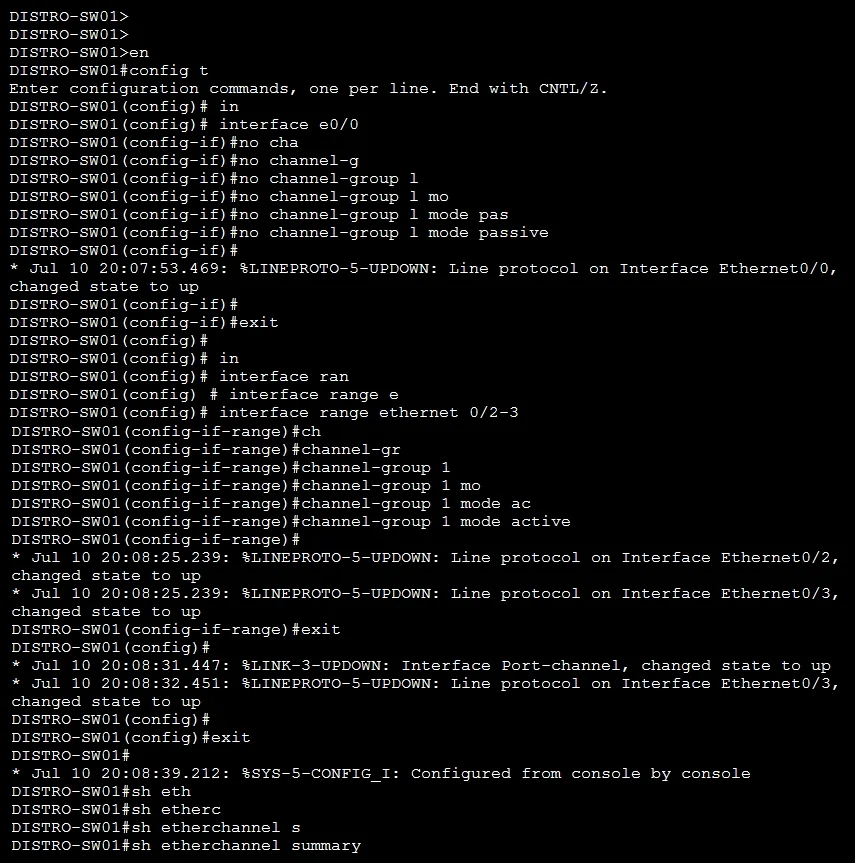
Explanation
Lab Simulation 11 - Detailed Explanation
Overall Goal
This lab tests three core switching technologies working together:
| Task | Technology | Goal |
|---|---|---|
| 1 | EtherChannel (LACP) | Bundle physical links into Po1 |
| 2 | 802.1Q Trunk / Native VLAN | Carry VLAN 10 as untagged |
| 3 | Rapid-PVST+ | Make DISTRO-SW02 the secondary root |
The underlying problem: the pre-existing configuration on DISTRO-SW01 has interfaces in passive LACP mode, and DISTRO-SW02 is also passive - meaning neither side initiates negotiation and the port-channel never comes up.
Task 1 - Fix LACP Port-Channel (DISTRO-SW01)
Why LACP mode matters
LACP has two active modes:
| Mode | Behavior |
|---|---|
active | Sends LACP PDUs - initiates negotiation |
passive | Waits for LACP PDUs - responds only |
Critical rule: If both sides are passive, the channel never forms. At least one side must be active.
The pre-existing config had DISTRO-SW01's interfaces in passive. Since DISTRO-SW02 is also passive (or was being set to passive), the channel was dead.
Step-by-Step: DISTRO-SW01
Steps 1-2: en / conf t
Enter privileged exec then global config. Required to make any configuration changes.
Step 3: int e0/0
Enter interface config for the first physical member of the port-channel.
Steps 4-7: no channel-group 1 mode passive -> channel-group 1 mode passive
           -> no channel-group 1 mode passive -> channel-group 1 mode active
This zigzag represents live troubleshooting, not intentional back-and-forth. What's happening:
no channel-group 1 mode passive- removes the broken passive configchannel-group 1 mode passive- operator tests passive (mistake/curiosity)no channel-group 1 mode passive- removes it again after realizing passive won't workchannel-group 1 mode active- correct fix - SW01 now actively initiates LACP
If skipped: The interface stays passive, LACP PDUs are never sent, Po1 remains down.
Steps 9-13: Repeat the same passive -> active fix on e0/1
Same logic as e0/0. Both physical members of the channel must match the channel-group number and protocol.
If only one interface is fixed: Po1 may come up with reduced bandwidth but is not fully redundant or load-balanced as designed.
Steps 15-16: int range e0/2-3 -> channel-group 1 mode active
This is a shortcut using interface range. e0/2 and e0/3 either had no channel-group config or needed to be added. Setting them directly to active without the back-and-forth suggests these interfaces had no conflicting pre-config.
Why use int range: Applies the same command to multiple interfaces simultaneously - less typing, same result.
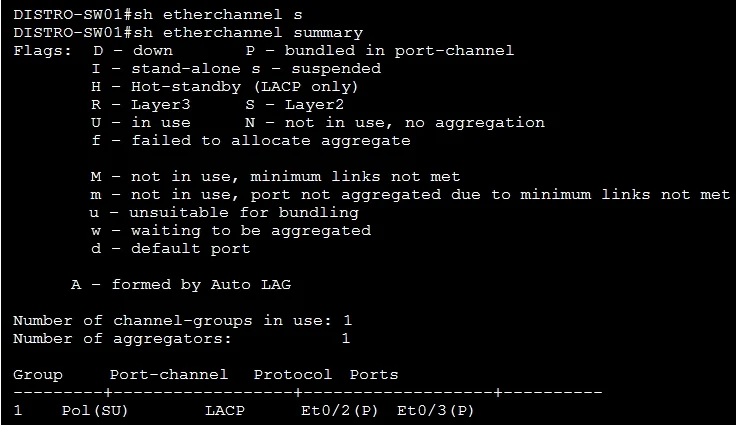
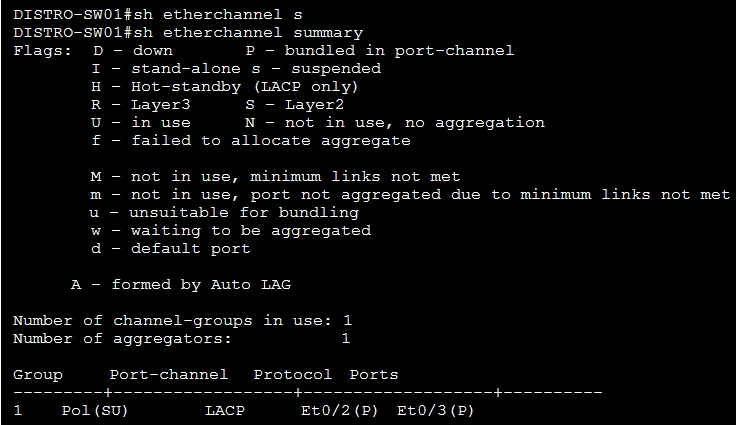
Steps 18-20: sh eth / sh etherchannel summary
Verification. The output should show Po1 as SU (Layer 2, in use) with member interfaces flagged as P (bundled in port-channel). If you see SD (standalone/down), the LACP negotiation failed.
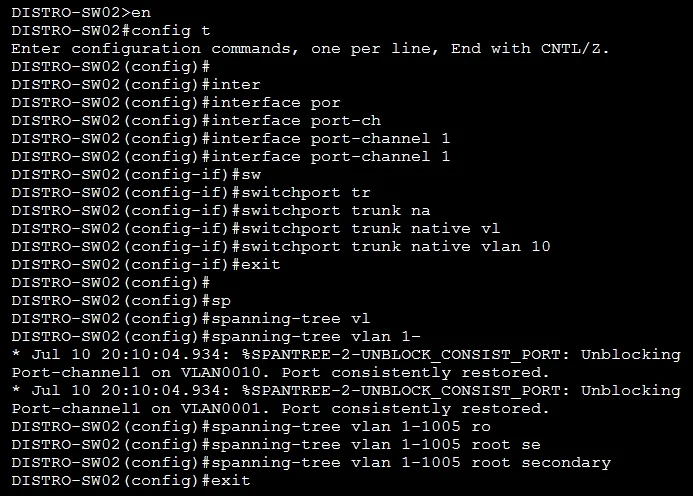
Task 2 - VLAN 10 as Untagged Traffic (DISTRO-SW02)
Steps 26-28: int po1
             switchport mode trunk
             switchport trunk allowed vlan 10
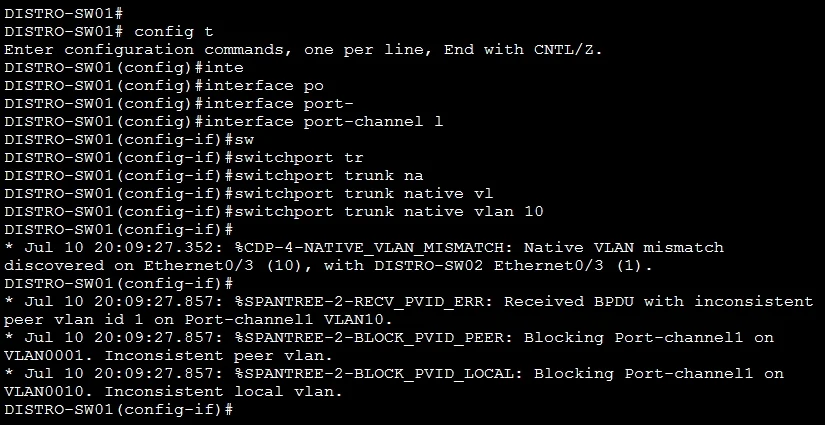
Making VLAN 10 "untagged" means making it the native VLAN on the trunk.
switchport mode trunk- sets Po1 as an 802.1Q trunk (required before any trunk commands)switchport trunk allowed vlan 10- allows VLAN 10 to traverse the trunk
Important gap in the procedure:
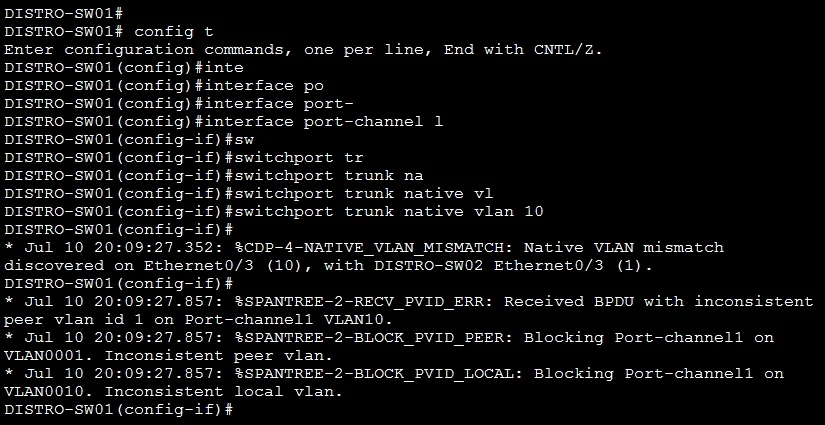
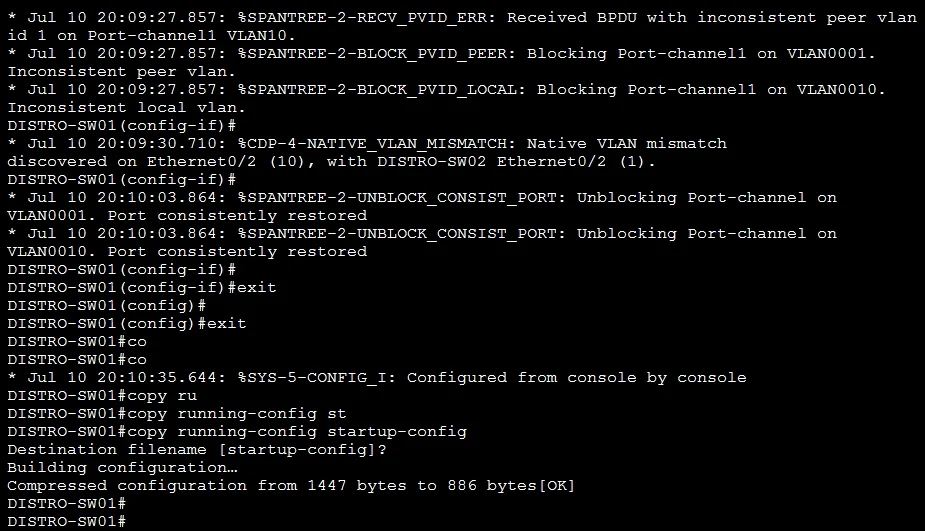
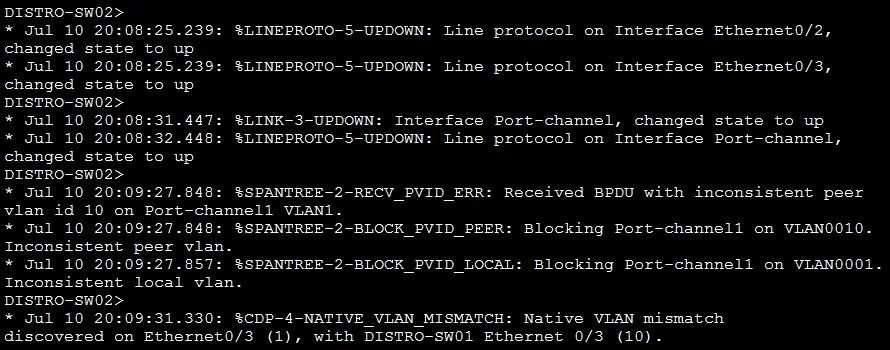
switchport trunk allowed vlan 10puts VLAN 10 in the allowed list but does not make it untagged. The correct command to carry VLAN 10 as untagged is:switchport trunk native vlan 10This must be configured on both switches' Po1 interface. A native VLAN mismatch causes CDP/STP warnings and traffic may be misclassified. The procedure as written is incomplete for Task 2 - you would also need to configure
switchport trunk native vlan 10on DISTRO-SW01's Po1.
Why native VLAN = untagged: On an 802.1Q trunk, the native VLAN is the one VLAN whose frames are sent without a VLAN tag. All other allowed VLANs are tagged.
Task 3 - Rapid-PVST+ Secondary Root (DISTRO-SW02)
Step 30: spanning-tree mode rapid-pvst
Enables Rapid Per-VLAN Spanning Tree Plus. Must be configured before setting priorities - you can't be a secondary root in a mode you haven't enabled. Rapid-PVST+ converges much faster than classic STP (seconds vs. 30-50 seconds).
Step 31: spanning-tree vlan 1-1005 priority 28672
Manually sets the bridge priority for all VLANs 1-1005 to 28672.
STP priority values (in multiples of 4096):
| Role | Priority |
|---|---|
| Primary root | 24576 |
| Secondary root | 28672 |
| Default | 32768 |
Lower = more likely to become root. 28672 makes SW02 second-most-preferred.
Step 32: spanning-tree vlan 1-1005 root secondary
This is a macro command that does the same thing as step 31 - it sets priority to 28672 automatically. Steps 31 and 32 are redundant with each other; either alone achieves the goal.
The reason both appear: the operator may have wanted to be explicit (step 31), then used the convenience macro to confirm (step 32). In an exam,
spanning-tree vlan 1-1005 root secondaryalone is the standard answer.
Why not just set it as primary root? The primary root is presumably DISTRO-SW01 or another switch. The secondary root takes over only if the primary fails - it's the STP failover mechanism.
Steps 34-36: sh eth / sh etherchannel summary
Final verification on SW02. Confirms Po1 is up from SW02's perspective. You'd also want show spanning-tree vlan 1 to confirm SW02 shows as secondary root.
What Goes Wrong if Steps Are Out of Order
| Mistake | Consequence |
|---|---|
| Setting passive on both sides | Po1 never forms - no LACP PDUs sent |
| Configuring trunk on Po1 before Po1 is up | Config applies but doesn't take effect until channel is active |
Setting allowed vlan 10 without native vlan 10 | VLAN 10 is tagged (not untagged) - task fails |
| Setting STP priority before enabling rapid-pvst | Priority applies to wrong STP mode |
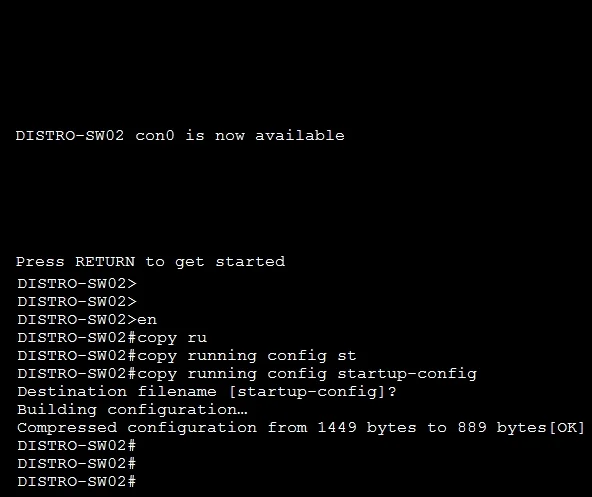
| Not saving config (copy run start) | Config lost on reload |
Memory Tips
LACP: "Active starts the conversation. Passive just listens. Two listeners = silence."
Native VLAN: "Native = naked (no tag). Use native vlan X to go tagless."
STP Priority shortcut: root secondary = 28672 = default (32768) minus one step (4096). Think: "secondary is one step below default."
EtherChannel verification: show etherchannel summary - look for SU on the port-channel line and P on member interfaces. Any other letter means something is broken.
Topics
Community Discussion
No community discussion yet for this question.