
350-401 · Question #500
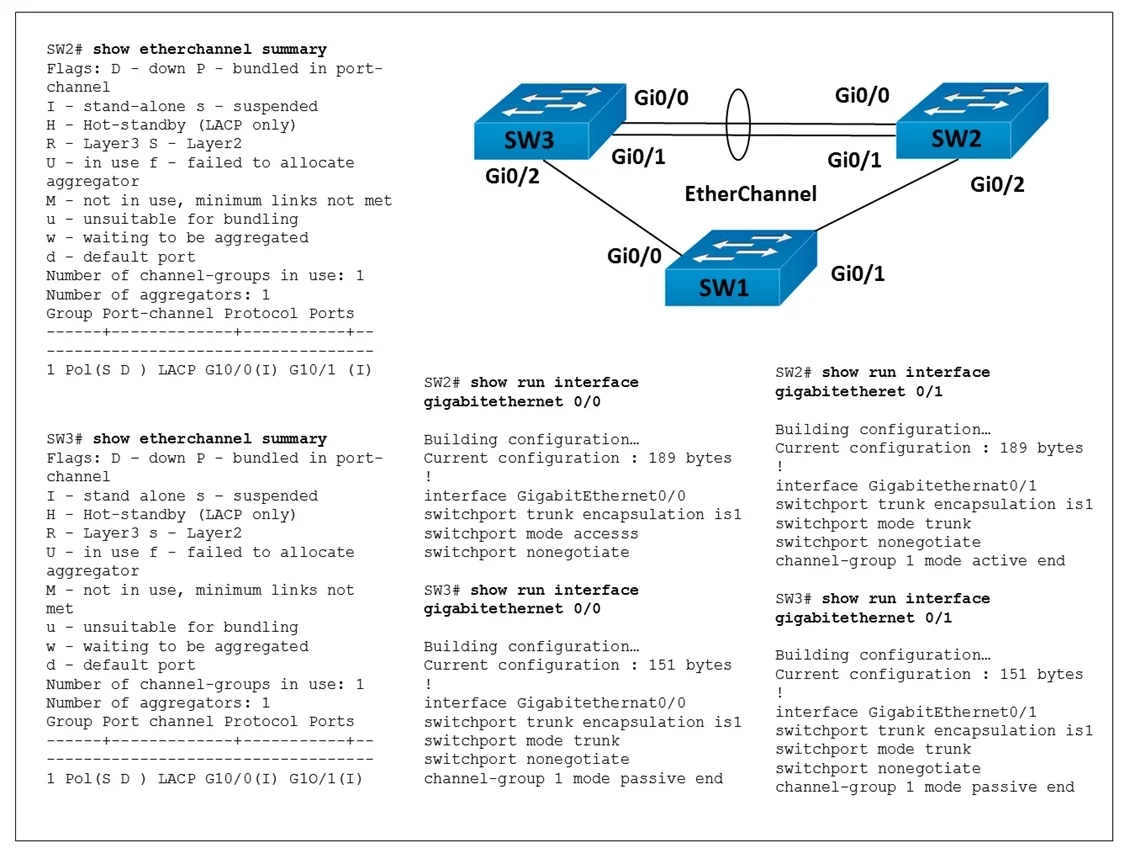
Refer to the exhibit. The EtherChannel between SW2 and SW3 is not operational which action resolves this issue?
The correct answer is C. Configure the mode on SW2 Gi0/0 to trunk. EtherChannel Troubleshooting Explanation Configuring SW2 Gi0/0 to trunk mode resolves the issue because EtherChannel bundles require all member ports to share the same configuration, including switchport mode. If Gi0/0 is set to access while the other ports in the bundle are…
Question
Exhibits
Options
- AConfigure the channel-group mode on SW2 Gi0/1 and Gi0/1 to on.
- BConfigure the channel-group mode on SW3 Gi0/1 to active
- CConfigure the mode on SW2 Gi0/0 to trunk
- DConfigure the mode on SW2 Gi0/1 to access.
How the community answered
(65 responses)- A12% (8)
- B3% (2)
- C80% (52)
- D5% (3)
Explanation
EtherChannel Troubleshooting Explanation
Configuring SW2 Gi0/0 to trunk mode resolves the issue because EtherChannel bundles require all member ports to share the same configuration, including switchport mode. If Gi0/0 is set to access while the other ports in the bundle are trunks (or vice versa), the EtherChannel will fail to form - consistent trunk configuration across all bundled ports is mandatory.
Why the distractors are wrong:
- Option A is incorrect because setting both ends to "on" (static/forced) mode can work, but the root cause shown in the exhibit is a mode mismatch, not a negotiation protocol issue
- Option B is incorrect because changing SW3 Gi0/1 to "active" (LACP) doesn't address the underlying port configuration mismatch on SW2
- Option D is incorrect because setting a port to access mode would worsen the problem, creating further inconsistency within the EtherChannel bundle
Memory Tip
Think of EtherChannel as a chain - every link must be identical in mode (trunk/access), VLAN, speed, and duplex. A single mismatched port breaks the entire bundle. When troubleshooting, always check port uniformity first.
Topics
Community Discussion
No community discussion yet for this question.