
350-401 · Question #1253
Lab Simulation 35 Guidelines This is a lab item in which tasks will be performed on virtual devices. - Refer to the Tasks tab to view the tasks for this lab item. - Refer to the Topology tab to…
To resolve the 'Active' BGP state and ensure stable eBGP peering for R1 using Loopback 0 as the router-id, the update-source Loopback0 and ebgp-multihop commands must be added for both eBGP neighbors.
Question
Exhibits
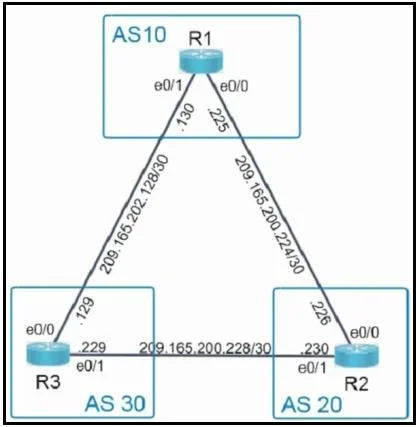
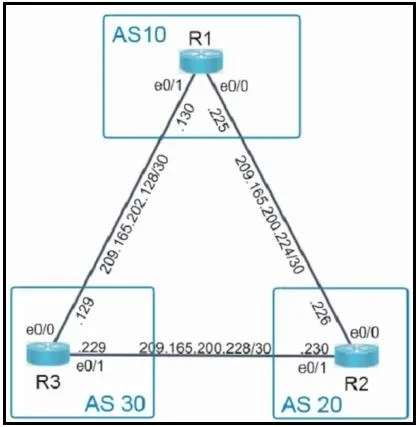
Explanation
To resolve the 'Active' BGP state and ensure stable eBGP peering for R1 using Loopback 0 as the router-id, the update-source Loopback0 and ebgp-multihop commands must be added for both eBGP neighbors.
Approach. The core problem is that R1's BGP sessions with R2 and R3 are stuck in the 'Active' state, indicating a failure in TCP connection establishment. The tasks require configuring eBGP using Loopback 0 for the router-id and advertising specific networks. While the bgp router-id 10.10.10.1 command fulfills the router-id requirement, merely setting the router-id to a loopback does not automatically make BGP source its packets from that loopback. By default, BGP sources packets from the IP address of the outgoing physical interface.
For BGP sessions to establish successfully, especially when a loopback is designated as the router-id (implying a preference for loopback stability), it's common practice to explicitly configure the BGP process to source its updates from that loopback interface. When update-source Loopback0 is configured for a directly connected eBGP neighbor, BGP's default directly-connected check fails because the source IP (Loopback0) is not on the same subnet as the destination IP (the physical interface of the neighbor). To overcome this, the ebgp-multihop command must also be added, even if the routers are physically directly connected, to disable the default TTL=1 check.
Therefore, the correct interaction is to enter the following commands under router bgp 10 for each neighbor:
configure terminal
router bgp 10
 neighbor 209.165.200.226 update-source Loopback0
 neighbor 209.165.200.226 ebgp-multihop
 neighbor 209.165.202.129 update-source Loopback0
 neighbor 209.165.202.129 ebgp-multihop
end
copy running-config startup-config
These commands ensure that R1 attempts to establish BGP sessions sourcing from its Loopback0, satisfying the stability aspect implied by 'using Loopback 0 for the router-id', and allows the BGP process to establish the session despite the source being a non-directly-connected subnet address.
Common mistakes.
- common_mistake. 1. No changes: The BGP sessions are in the 'Active' state, indicating a configuration problem that prevents peering. No changes would leave the task incomplete.
- Only adding
update-source Loopback0: This command alone would cause the BGP session to remain in the 'Active' state or even prevent it from attempting to connect. When theupdate-sourceis changed to a loopback, BGP performs a directly-connected check which will fail if the loopback IP is not on the same subnet as the neighbor's IP. This requiresebgp-multihopto bypass the TTL=1 check. - Changing neighbor IPs to loopbacks: While using loopbacks for both source and destination BGP peering is a common stable design, the topology and the current configuration explicitly use the physical interface IPs for neighbors (209.165.200.226 and 209.165.202.129). The exam task for R1 does not provide R2's or R3's loopback IPs, making this approach impractical and contradictory to the given information.
- Adding
no synchronizationorno auto-summary: These commands primarily affect BGP route advertisement (when and how routes are placed into the IP routing table or advertised) and do not directly address issues with BGP session establishment (TCP port 179 connection failure), which is indicated by the 'Active' state.
Concept tested. The underlying technical concepts being tested are:
- eBGP Peer Establishment: Understanding the states of BGP, particularly the 'Active' state and its implications for TCP connection failures.
- BGP Router-ID: How to configure a stable router-id, typically using a loopback interface.
- BGP
update-sourceCommand: The purpose and effect of explicitly specifying the source interface for BGP packets, especially when using a loopback interface. - BGP
ebgp-multihopCommand: The necessity of this command when the BGP session source is a loopback interface (or any non-directly connected IP) even for physically directly connected eBGP peers, to overcome the default directly-connected check (TTL=1). - Troubleshooting BGP Peering Issues: Diagnosing and resolving common eBGP peering problems based on BGP state information.
Topics
Community Discussion
No community discussion yet for this question.