
350-401 · Question #1250
Lab Simulation 32 Guidelines This is a lab item in which tasks will be performed on virtual devices. - Refer to the Tasks tab to view the tasks for this lab item. - Refer to the Topology tab to…
Lab Simulation 32 - Expert Walkthrough Overall Goal SW10 has three broken or misconfigured elements that need fixing: 1. Spanning-tree cost method - must use 32-bit (long) values instead of the default 16-bit short values 2. Trunk to SW30 - the link carrying traffic to PC1 is…
Question
Exhibits
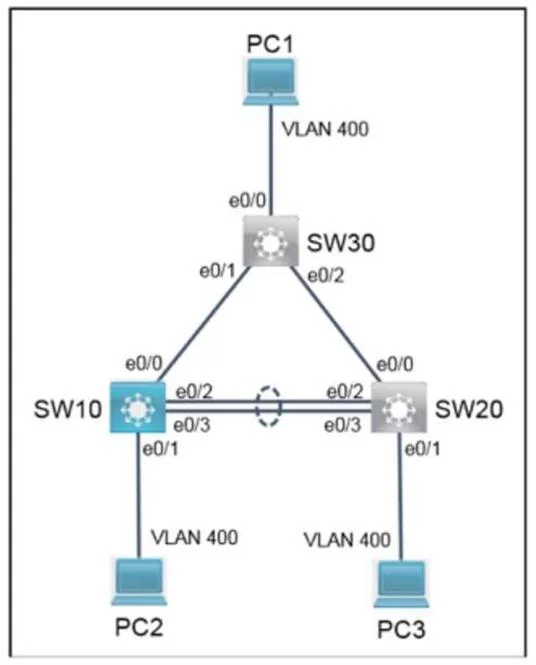
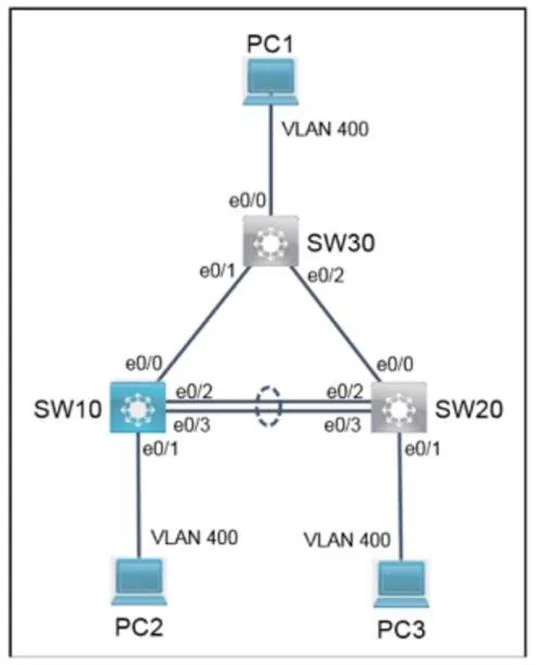
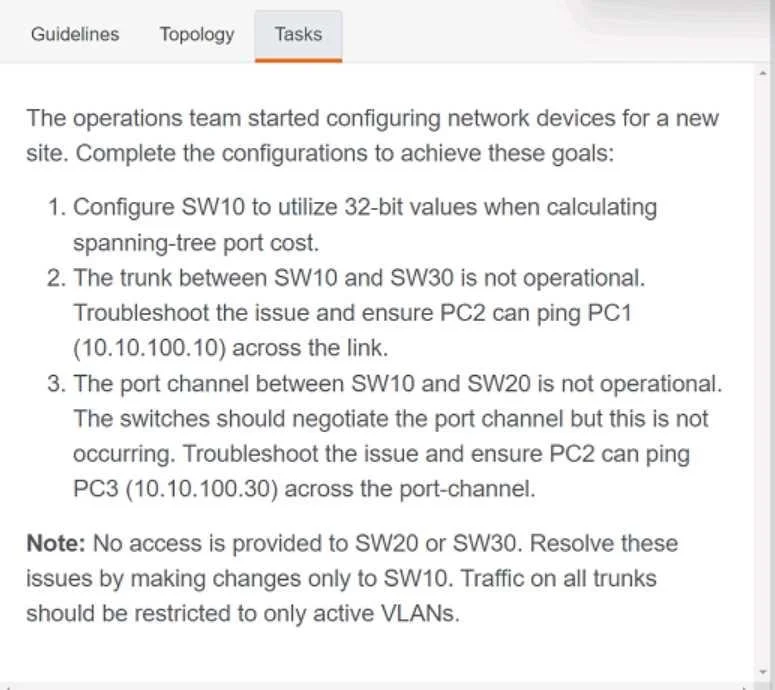
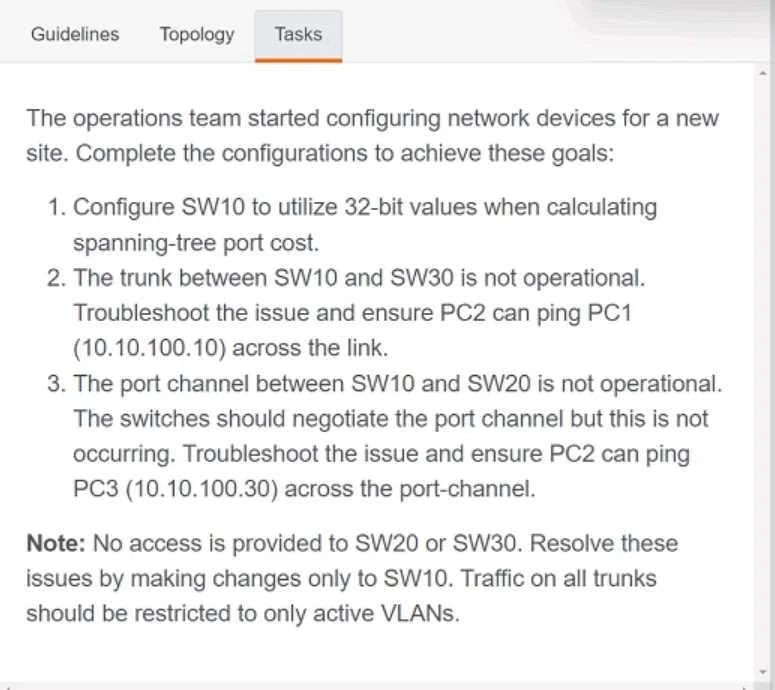
Explanation
Lab Simulation 32 - Expert Walkthrough
Overall Goal
SW10 has three broken or misconfigured elements that need fixing:
- Spanning-tree cost method - must use 32-bit (long) values instead of the default 16-bit short values
- Trunk to SW30 - the link carrying traffic to PC1 is broken or misconfigured; needs to be reset and properly configured for VLAN 400
- Port-channel to SW20 - the EtherChannel carrying traffic to PC3 is broken; needs to be rebuilt using LACP
The constraint is SW10 only - you cannot touch SW20, SW30, or any end device. You fix the upstream device to match what the downstream devices already expect.
Task 1: Configure 32-bit Spanning-Tree Port Cost
Command (missing from the listed procedure but required by Goal 1):
spanning-tree pathcost method long
Why: Cisco switches default to short (16-bit) path cost, which tops out at 65535. With modern high-speed links, many ports get the same cost value, making STP decisions ambiguous. The long (32-bit) method provides finer granularity (values up to ~200,000,000), giving STP better data to elect the correct root port and avoid topology loops.
If skipped: Goal 1 is unmet. On high-bandwidth links, STP may make suboptimal or inconsistent port role decisions across switches that use different cost methods, potentially causing loops or unexpected blocking.
Task 2: Fix the Trunk to SW30 (Steps 2-9)
Step 2 - conf t
Enters global configuration mode. Required before any interface or global commands.
Step 3 - default int e0/0
Resets interface e0/0 to factory defaults, wiping all prior configuration (wrong VLAN lists, wrong mode, wrong encapsulation).
Why this first: If you try to reconfigure a corrupted or conflicting interface piecemeal, leftover settings can silently conflict with new ones (e.g., a native VLAN mismatch). Starting from a clean slate is the safest approach.
If skipped: You risk layering new config on top of conflicting old config. For example, an existing switchport mode access command would prevent trunk mode from applying cleanly on some platforms.
Step 4 - int e0/0
Enters interface configuration mode for e0/0. Necessary to apply interface-specific commands.
Step 5 - no sh (no shutdown)
Administratively brings the interface up. After default int, the interface may be left in a shutdown state (depending on the platform/IOS version).
If skipped: The interface stays down, and no traffic flows regardless of other correct configuration.
Step 6 - switchport trunk allowed vlan 400
Restricts the trunk to only VLAN 400 (the active VLAN for this segment).
Why: The goal states "traffic on all trunks should be restricted to only active VLANs." By default, a trunk allows all VLANs (1-4094), which is a security and efficiency problem. Restricting to VLAN 400 ensures only relevant traffic crosses this link. PC1 is on VLAN 400 (at 10.10.10.10).
If skipped: The trunk either allows all VLANs (violates the restriction requirement) or - if a prior misconfiguration had the wrong VLAN allowed - PC2's traffic never reaches PC1.
Step 7 - switchport trunk encapsulation dot1q
Sets the trunk encapsulation protocol to 802.1Q (dot1q).
Why: On some Cisco platforms (especially older catalyst switches with ISL support), you must explicitly set encapsulation before you can enable trunk mode. ISL is Cisco-proprietary and not interoperable with modern switches; 802.1Q is the universal standard. SW30 almost certainly expects dot1q.
If skipped or wrong: switchport mode trunk may fail with an error, or the trunk comes up with ISL encapsulation while SW30 uses dot1q - the trunks negotiate but frames are malformed, and no VLAN traffic passes.
Step 8 - switchport mode trunk
Forces the port into unconditional trunk mode.
Why: Without this, the port uses DTP (Dynamic Trunking Protocol) and may stay as an access port or fail to negotiate trunk mode depending on SW30's DTP settings. Explicit configuration is more reliable and predictable.
If skipped: The port may remain in access mode, carrying only one VLAN with no tagging, and the trunk never forms.
Step 9 - end
Returns to privileged EXEC mode. Required before the next conf t block.
Task 3: Fix the EtherChannel to SW20 (Steps 10-14)
Step 10 - conf t
Re-enters global config mode for EtherChannel changes.
Step 11 - no int port 10 (no interface port-channel 10)
Deletes the existing Port-channel 10 logical interface and removes all associated configuration.
Why: The existing port-channel is broken. Rather than trying to patch it, you tear it down completely. A corrupted or misconfigured port-channel can hold member interfaces in an inconsistent state. Removing it ensures a clean rebuild.
If skipped: The channel-group 10 mode active command in the next step may conflict with existing port-channel configuration (wrong mode, wrong protocol), and the EtherChannel may not form or may form incorrectly.
Step 12 - int range ethernet 0/2 - 3
Selects both physical interfaces (e0/2 and e0/3) simultaneously for bulk configuration. These are the two links that will bundle into the EtherChannel.
Step 13 - channel-group 10 mode active
Assigns both interfaces to Port-channel 10 using LACP in active mode.
Why LACP active: SW20 is already configured (and you can't touch it). LACP (IEEE 802.3ad) is the standard, interoperable protocol. If SW20 is set to active or passive, SW10 being active will negotiate successfully (active+passive or active+active both work). Cisco's proprietary PAgP would not negotiate with LACP. If you used mode on (static), it only works if SW20 is also mode on.
If skipped or wrong mode: The EtherChannel never bundles. The physical links either stay individual (no redundancy, no bandwidth aggregation) or flap due to STP detecting a loop across the unbundled parallel links.
Step 14 - no shut
Brings up e0/2 and e0/3 in case they were administratively down.
If skipped: The physical members of the port-channel are down, the logical port-channel stays down, and PC2 cannot reach PC3.
Save and Verify
end
copy run start        ! Saves to NVRAM - required by lab instructions
show etherchannel summary   ! Verify port-channel is up (look for "SU" flags)
show etherchannel summary flags to know:
| Flag | Meaning |
|---|---|
S | Port-channel is Layer 2 |
U | Port-channel is in use |
P | Member port is bundled (good) |
I | Member port is individual (not bundled - problem) |
D | Down |
You want Po10(SU) with both e0/2 and e0/3 showing P.
Memory Tips
Trunk fix order: "Default, Up, Restrict, Encode, Trunk"
Default the port -> bring it Up (no shut) -> Restrict VLANs -> set Encapsulation -> set Trunk mode
EtherChannel fix order: "Nuke, Range, Group"
Nuke the old port-channel -> Range select the physical ports -> assign channel-Group with correct protocol
LACP mode rule: At least one side must be active. Both passive = no negotiation. One active + one passive (or both active) = forms successfully.
Topics
Community Discussion
No community discussion yet for this question.