
350-401 · Question #1249
Lab Simulation 31 Guidelines This is a lab item in which tasks will be performed on virtual devices. - Refer to the Tasks tab to view the tasks for this lab item. - Refer to the Topology tab to…
Lab Simulation 31 - Explanation Overall Goal This lab tests your ability to fix three interconnected switching issues all from SW20 - a constraint that mirrors real-world scenarios where you only have access to one device. The three problems are: 1. STP port cost method is…
Question
Exhibits
Explanation
Lab Simulation 31 - Explanation
Overall Goal
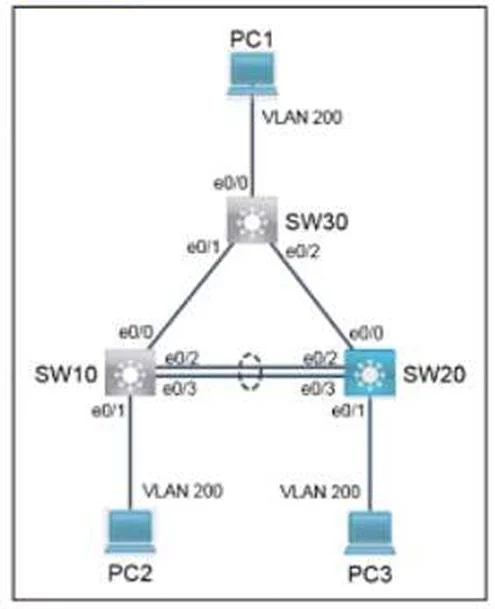
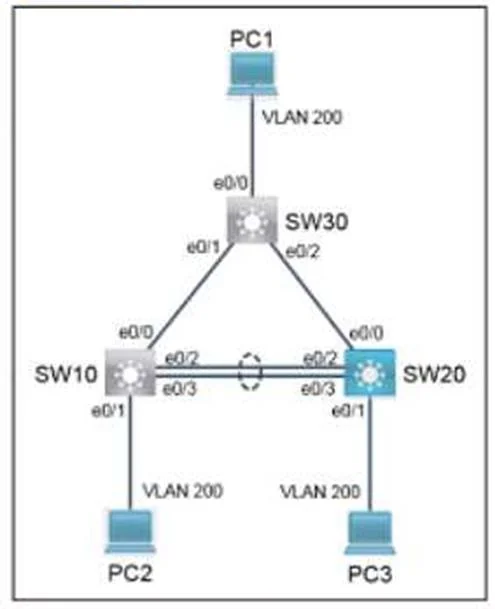
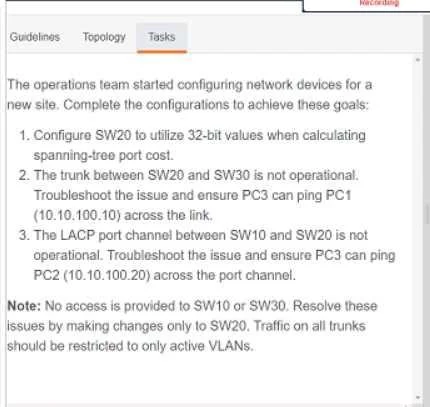
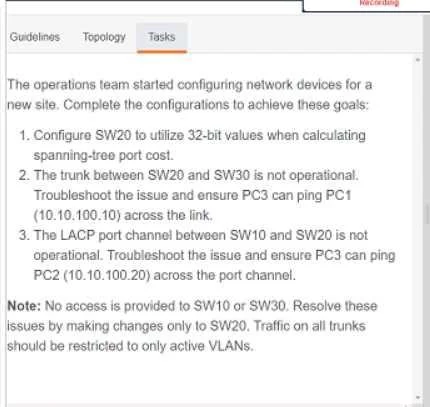
This lab tests your ability to fix three interconnected switching issues all from SW20 - a constraint that mirrors real-world scenarios where you only have access to one device. The three problems are:
- STP port cost method is using the outdated 16-bit default
- The trunk to SW30 is broken (blocking PC3 -> PC1 traffic)
- The LACP port channel to SW10 is broken (blocking PC3 -> PC2 traffic)
Step 1: spanning-tree pathcost method long
What it does
Switches STP port cost calculation from the 16-bit (short) method to the 32-bit (long) method.
| Method | Max bandwidth supported | Cost formula |
|---|---|---|
| Short (default) | 1 Gbps | Fixed cost table |
| Long (32-bit) | Up to 10+ Tbps | 20,000,000 / bandwidth in kbps |
Why it's necessary
Modern networks commonly use 10 Gbps, 40 Gbps, or 100 Gbps links. The 16-bit method assigns identical costs to anything above 1 Gbps (cost = 1 for anything ≥ 1G), making STP unable to distinguish between faster paths. The 32-bit method provides granular cost differentiation across high-speed links.
This command is global - it affects all ports on the switch simultaneously.
What breaks if skipped
STP path selection becomes unreliable on fast links. Two 10G links would have the same cost as a 1G link, potentially causing suboptimal or flapping topologies. In a lab context, the grader likely checks for this command explicitly in the running config.
The Remaining Tasks (Trunk & LACP)
The procedure only documents step 1, but the task description reveals two more areas to fix. Here's what you'd typically do:
Trunk Restoration (SW20 <-> SW30, for PC3 -> PC1)
Common issues to investigate and fix:
SW20# show interfaces trunk              ! check if trunk is up
SW20# show run interface <port>          ! check mode and allowed VLANs
Likely fixes:
SW20(config-if)# switchport mode trunk
SW20(config-if)# switchport trunk allowed vlan <active-vlan-list>   ! restrict to active VLANs only
The "restrict to active VLANs only" requirement is key - default trunks allow all VLANs, but best practice (and the task requirement) is to whitelist only what's needed.
LACP Port Channel Restoration (SW10 <-> SW20, for PC3 -> PC2)
Common issues: mode mismatch (passive/passive doesn't form - at least one side must be active), mismatched channel-group numbers, or mismatched port parameters (speed/duplex/VLAN config).
Likely fix on SW20:
SW20(config-if)# channel-group <number> mode active
Verify with:
SW20# show etherchannel summary           ! look for "P" (bundled) not "I" (individual/failed)
SW20# show lacp neighbor                  ! confirm SW10 is seen
What Breaks if Done Out of Order
- Fixing the trunk/LACP before
pathcost method longis fine for connectivity, but the STP configuration check will fail on grading. - Fixing LACP without matching the port configuration on both sides of the channel leaves the bundle in a suspended/individual state - pings still fail.
- Forgetting
switchport trunk allowed vlanmeans trunk carries all VLANs, which fails the "active VLANs only" requirement.
Memory Tip
"Long paths cost more to think about - just like long-distance calls"
spanning-tree pathcost method long = 32-bit = more bits = more precision = use it when links are faster than 1G.
For the trunk/LACP troubleshooting, remember the show-then-fix pattern:
show interfaces trunk-> is trunk up?show etherchannel summary-> is bundle up (P) or independent (I)?- Fix mode/config mismatch, then re-verify.
Final Step (Always)
SW20# copy running-config startup-config
The lab explicitly requires saving to NVRAM before clicking Next. Skipping this means your changes are lost and the grader sees the broken original config.
Topics
Community Discussion
No community discussion yet for this question.