
350-401 · Question #1248
Lab Simulation 30 Guidelines This is a lab item in which tasks will be performed on virtual devices. - Refer to the Tasks tab to view the tasks for this lab item. - Refer to the Topology tab to…
The correct answer addresses all three tasks systematically: defaulting E0/0 removes any misconfiguration, setting trunk encapsulation to dot1q and mode trunk fixes the SW10-SW30 trunk issue, enabling 'udld port aggressive' configures aggressive UDLD detection as required, and…
Question
Lab Simulation 30 Guidelines This is a lab item in which tasks will be performed on virtual devices.
- Refer to the Tasks tab to view the tasks for this lab item.
- Refer to the Topology tab to access the device console(s) and perform the tasks.
- Console access is available for all required devices by clicking the device icon or using the
tab(s) above the console window.
- All necessary preconfigurations have been applied.
- Do not change the enable password or hostname for any device.
- Save your configurations to NVRAM before moving to the next item.
- Click Next at the bottom of the screen to submit this lab and move to the next question.
- When Next is clicked, the lab closes and cannot be reopened.
Topology Tasks Answer:
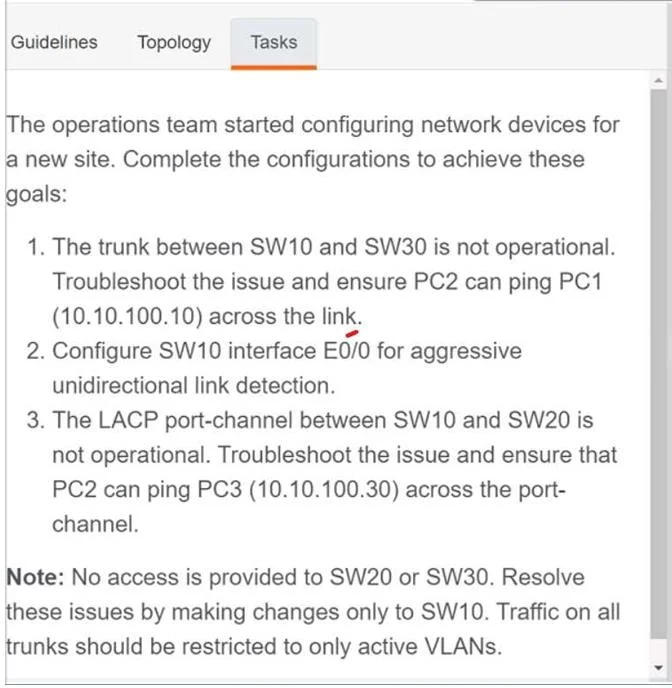
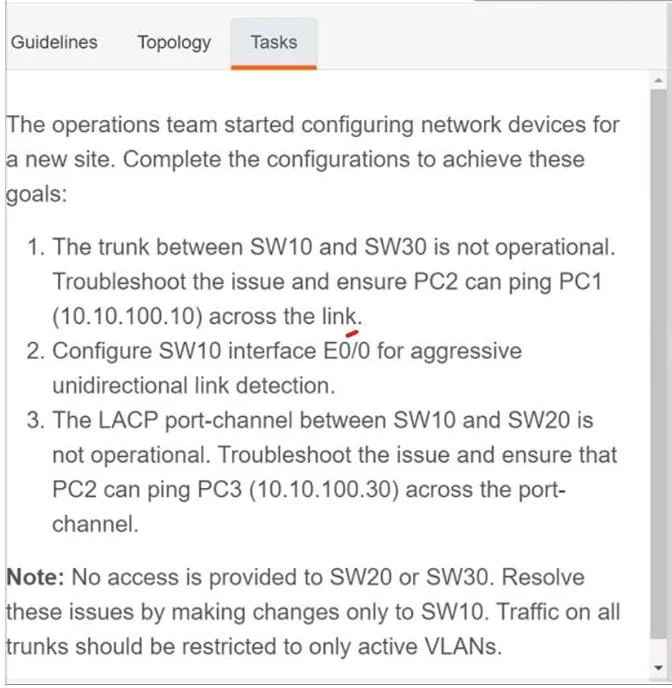
SW10 Conf t Default int e0/0 Int e0/0 No sh Switchport trunk encap dot1q Switchport mode trunk Udld port aggressive Switchport trunk allowed vlan add 300 No sh Ex
Exhibits
Explanation
The correct answer addresses all three tasks systematically: defaulting E0/0 removes any misconfiguration, setting trunk encapsulation to dot1q and mode trunk fixes the SW10-SW30 trunk issue, enabling 'udld port aggressive' configures aggressive UDLD detection as required, and adding VLAN 300 to the allowed list ensures PC2 can reach both PC1 and PC3. The 'no shutdown' commands ensure the interface is active after changes, and saving to NVRAM preserves the configuration. This sequence correctly troubleshoots both the trunk link and VLAN propagation issues while satisfying the UDLD requirement in a single cohesive configuration block.
Topics
Community Discussion
No community discussion yet for this question.