
350-401 · Question #1247
Lab Simulation 29 Guidelines This is a lab item in which tasks will be performed on virtual devices. - Refer to the Tasks tab to view the tasks for this lab item. - Refer to the Topology tab to…
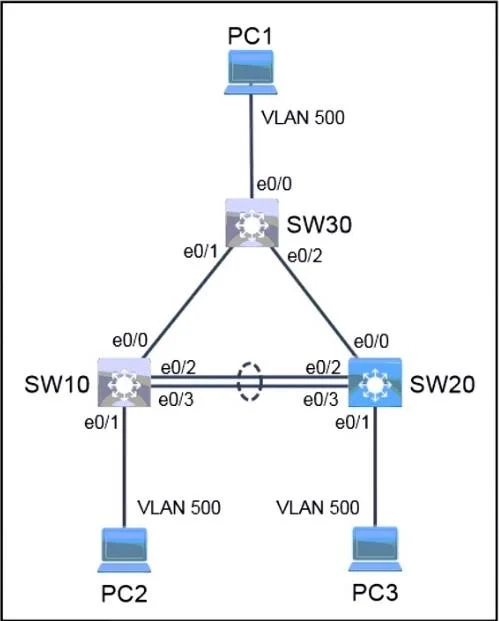
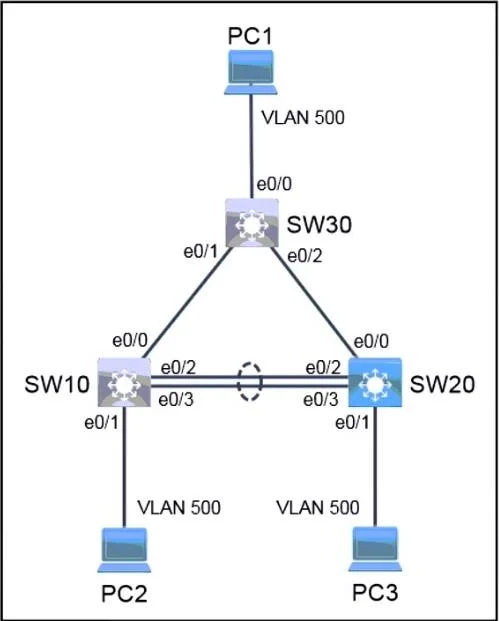
Lab Simulation 29 - Explanation Overall Goal You are completing a partially-configured Cisco switching environment at a new site. All three tasks converge on one goal: make SW20 a fully functional switch that bridges PC3 to both PC1 (via SW30) and PC2 (via SW10), using proper…
Question
Exhibits
Explanation
Lab Simulation 29 - Explanation
Overall Goal
You are completing a partially-configured Cisco switching environment at a new site. All three tasks converge on one goal: make SW20 a fully functional switch that bridges PC3 to both PC1 (via SW30) and PC2 (via SW10), using proper Layer 2 redundancy and link aggregation. Because you can only touch SW20, every problem and its fix lives there.
Task 1: Configure Rapid PVST+
What it does
Rapid PVST+ (802.1w per-VLAN) replaces the default PVST+ (802.1D) STP mode. It converges in ~1-2 seconds instead of 30-50 seconds, eliminating long waits when a link fails or a port comes up.
Commands on SW20
SW20# configure terminal
SW20(config)# spanning-tree mode rapid-pvst
Why it matters
Without this, STP convergence is slow. When troubleshooting the trunk or port-channel in tasks 2 and 3, ports would sit in the Listening/Learning states for ~30 seconds before forwarding - making ping tests appear to fail even after you fixed the underlying issue.
What goes wrong if skipped
Pings may time out or flap during convergence, giving you a false negative during verification. Also, the exam task explicitly requires it.
Task 2: Troubleshoot the Trunk to SW30
Background
A trunk link carries multiple VLANs between switches using 802.1Q encapsulation. Common reasons a trunk "is not operational":
- Encapsulation mismatch (dot1q vs. ISL)
- Native VLAN mismatch
- Mode mismatch (trunk vs. access or dynamic desirable vs. dynamic auto)
- Allowed VLAN list doesn't include the required VLANs
Diagnosis first
SW20# show interfaces trunk
SW20# show interfaces <int> switchport
Look at: Mode, Encapsulation, Native VLAN, and VLANs allowed and active in management domain.
Typical fix (mode mismatch)
SW20(config)# interface <interface-facing-SW30>
SW20(config-if)# switchport mode trunk
SW20(config-if)# switchport trunk encapsulation dot1q   ! if required by platform
SW20(config-if)# switchport trunk allowed vlan add <active-vlans-only>
Restricting to active VLANs
The task says "traffic on all trunks should be restricted to only active VLANs." First identify which VLANs exist:
SW20# show vlan brief
Then restrict:
SW20(config-if)# switchport trunk allowed vlan <vlan-list>
This prevents unnecessary broadcast flooding across trunks for VLANs that have no active ports.
What goes wrong if skipped
PC3 cannot reach PC1 (10.10.100.10) because VLAN traffic cannot cross SW20<->SW30. Even if both switches are powered, without a working trunk the VLANs are isolated.
Task 3: Troubleshoot the LACP Port Channel to SW10
Background
An EtherChannel (port channel) bundles multiple physical links into one logical link for bandwidth and redundancy. LACP (802.3ad) is the IEEE standard for negotiating the bundle. Common failure causes:
- One side is
active, the other ison(LACP vs. static mismatch - LACP won't negotiate withon) - Channel-group number mismatch (doesn't actually break LACP, but worth noting)
- Mismatched port parameters (speed, duplex, VLAN config, trunk mode)
Diagnosis first
SW20# show etherchannel summary
SW20# show interfaces port-channel <#>
SW20# show lacp neighbor
Look for flags: (D) = down, (P) = bundled in port-channel, (I) = stand-alone (not bundled).
Typical fix (mode mismatch - SW10 is active, SW20 is on)
Since SW10 uses LACP (active), SW20's ports must be active or passive - NOT on:
SW20(config)# interface range <ports-in-bundle>
SW20(config-if-range)# channel-group <#> mode active
Or passive (one side must be active):
SW20(config-if-range)# channel-group <#> mode passive
Also ensure the port-channel interface itself is trunking:
SW20(config)# interface port-channel <#>
SW20(config-if)# switchport mode trunk
SW20(config-if)# switchport trunk allowed vlan <active-vlan-list>
What goes wrong if skipped
- If SW20 ports are set to
on(static), they won't respond to LACP PDUs from SW10, and the bundle stays down. - PC3 cannot reach PC2 (10.10.100.20) because the only path between SW20 and SW10 is through this port channel.
Save Configuration
Always save before moving on - the lab explicitly requires it:
SW20# copy running-config startup-config
or
SW20# write memory
Failure to save means your changes are lost if the device reloads, and the grader may evaluate the startup config.
Verification Sequence
SW20# show spanning-tree          ! Confirm rapid-pvst mode
SW20# show interfaces trunk       ! Confirm both trunks are up, correct VLANs
SW20# show etherchannel summary   ! Confirm port-channel shows (P) flags, not (D)
Then confirm end-to-end:
- PC3 -> ping 10.10.100.10 (PC1 via SW30)
- PC3 -> ping 10.10.100.20 (PC2 via SW10/port-channel)
Memory Tips
| Task | Root cause pattern | Fix keyword |
|---|---|---|
| Rapid PVST+ | Missing config | spanning-tree mode rapid-pvst |
| Trunk down | Mode/encap mismatch | switchport mode trunk |
| LACP down | on vs. LACP mismatch | channel-group X mode active |
Mnemonic: "RTA" - Rapid STP, Trunk fix, Aggregation fix. Fix them in this order because Rapid PVST+ must be running before you verify that trunk/port-channel ports converge correctly.
Topics
Community Discussion
No community discussion yet for this question.