
350-401 · Question #1246
Lab Simulation 28 Guidelines This is a lab item in which tasks will be performed on virtual devices. - Refer to the Tasks tab to view the tasks for this lab item. - Refer to the Topology tab to…
Lab 28: SW10 Configuration Explanation Overall Goal This lab configures three distinct Layer 2 features on SW10, each solving a different network problem: eliminating STP delay on an access port, enabling inter-VLAN/trunk communication with SW30, and aggregating bandwidth via…
Question
Exhibits
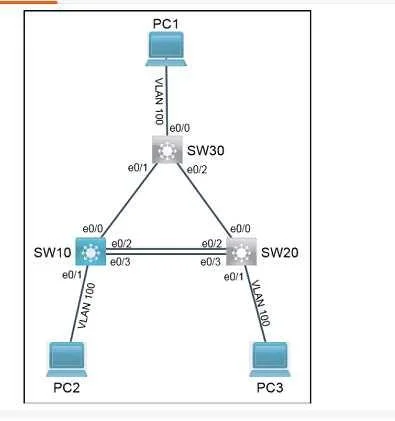
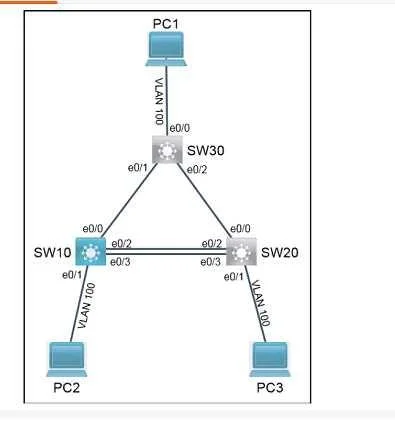
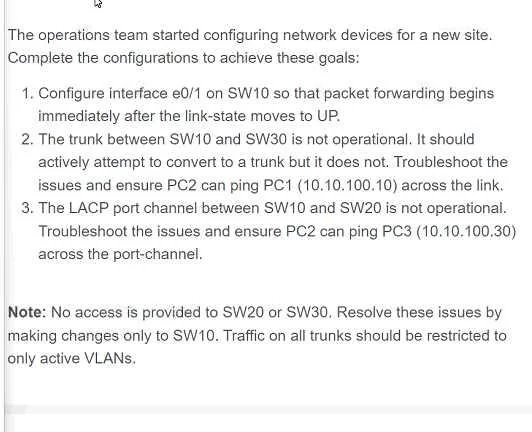
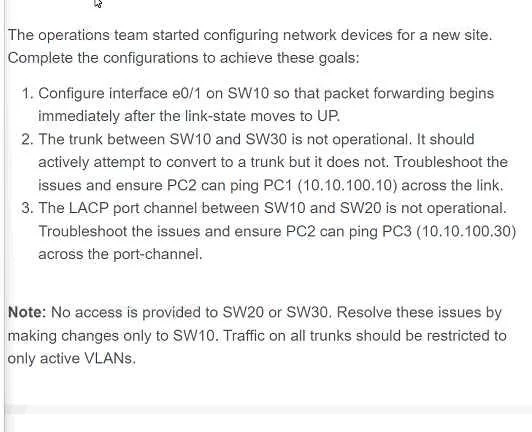
Explanation
Lab 28: SW10 Configuration Explanation
Overall Goal
This lab configures three distinct Layer 2 features on SW10, each solving a different network problem: eliminating STP delay on an access port, enabling inter-VLAN/trunk communication with SW30, and aggregating bandwidth via LACP with SW20.
Step-by-Step Reasoning
Step 1: spanning-tree portfast edge on e0/1
- What it does: Bypasses STP's Listening and Learning states (normally ~30 seconds) and puts the port directly into Forwarding.
- Why necessary: End devices (PCs, servers) don't create switching loops, so making them wait 30s for STP to converge is wasteful and causes problems like DHCP timeouts.
- If skipped: The port still works eventually, but there's a ~30-second delay after link-up before traffic flows - the task explicitly requires immediate forwarding.
- If misapplied: Never put PortFast on a port connected to another switch - it bypasses loop protection and can cause broadcast storms.
Step 2: switchport mode trunk on e0/0 (toward SW30)
- What it does: Configures the port to carry multiple VLANs using 802.1Q tagging, rather than being limited to a single access VLAN.
- Why necessary: PC2 and PC1 are likely in different VLANs or separated by this trunk link. Without trunk mode, only the native VLAN passes - tagged frames are dropped.
- If skipped: PC2 cannot ping PC1 because inter-switch VLAN traffic is blocked. The link may appear up but traffic from the wrong VLAN is silently discarded.
- Note: SW30 must also be configured as trunk on its side (preconfig handles this per the lab instructions).
Step 3: channel-group 10 mode active on e0/2-3 (toward SW20)
- What it does: Bundles both physical interfaces into EtherChannel (Port Channel 10) using LACP (
mode active= actively sends LACP negotiation packets). - Why necessary: Without EtherChannel, STP blocks one of the redundant links to prevent loops, cutting bandwidth in half. The channel-group aggregates them into a single logical link.
mode activespecifics: LACP has three modes -active(initiates negotiation),passive(responds but doesn't initiate),on(static, no LACP). Active works as long as the peer is active or passive. SW20 must be active or passive (preconfig handles this).- If skipped: STP blocks e0/2 or e0/3. PC2 can still reach PC3 via one path, but the port channel is not operational - the task requires a functional LACP bundle.
- If interfaces are added to different channel groups: The port channel won't form.
Step 4: Save to NVRAM (write memory or copy run start)
- Configurations live in RAM by default. A reload without saving loses everything. Always required before moving to the next lab item.
What Would Break If Steps Are Out of Order
- PortFast can be applied at any time - it's interface-local with no dependencies.
- Trunk must be configured before you test PC2->PC1 pings; the VLAN traffic is dropped until both sides are in trunk mode.
- LACP channel-group must be applied to both interfaces in the range simultaneously (using
interface range) - configuring them separately risks a brief STP topology change between commands, but functionally it still works.
Memory Tip
"PTA-S" - PortFast (end devices), Trunk (to other switches needing multi-VLAN), Active LACP (to aggregate redundant uplinks), Save.
Or remember the three problems being solved:
- Delay? -> PortFast
- VLANs not passing? -> Trunk
- Redundant links blocked? -> EtherChannel (LACP active)
Topics
Community Discussion
No community discussion yet for this question.