
350-401 · Question #1242
Lab Simulation 24 Guidelines This is a lab item in which tasks will be performed on virtual devices. - Refer to the Tasks tab to view the tasks for this lab item. - Refer to the Topology tab to…
The correct interaction involves identifying R3 as the Area Border Router (ABR) for Area 20 and applying an OSPF area filter-list with the 'out' keyword to prevent advertising R20's loopback route out of Area 20, while recognizing that R2's configuration for filtering R1's…
Question
Lab Simulation 24 Guidelines This is a lab item in which tasks will be performed on virtual devices.
- Refer to the Tasks tab to view the tasks for this lab item.
- Refer to the Topology tab to access the device console(s) and perform the tasks.
- Console access is available for all required devices by clicking the device icon or using the
tab(s) above the console window.
- All necessary preconfigurations have been applied.
- Do not change the enable password or hostname for any device.
- Save your configurations to NVRAM before moving to the next item.
- Click Next at the bottom of the screen to submit this lab and move to the next question.
- When Next is clicked, the lab closes and cannot be reopened.
Topology Tasks Answer:
R2 R3
Exhibits
Explanation
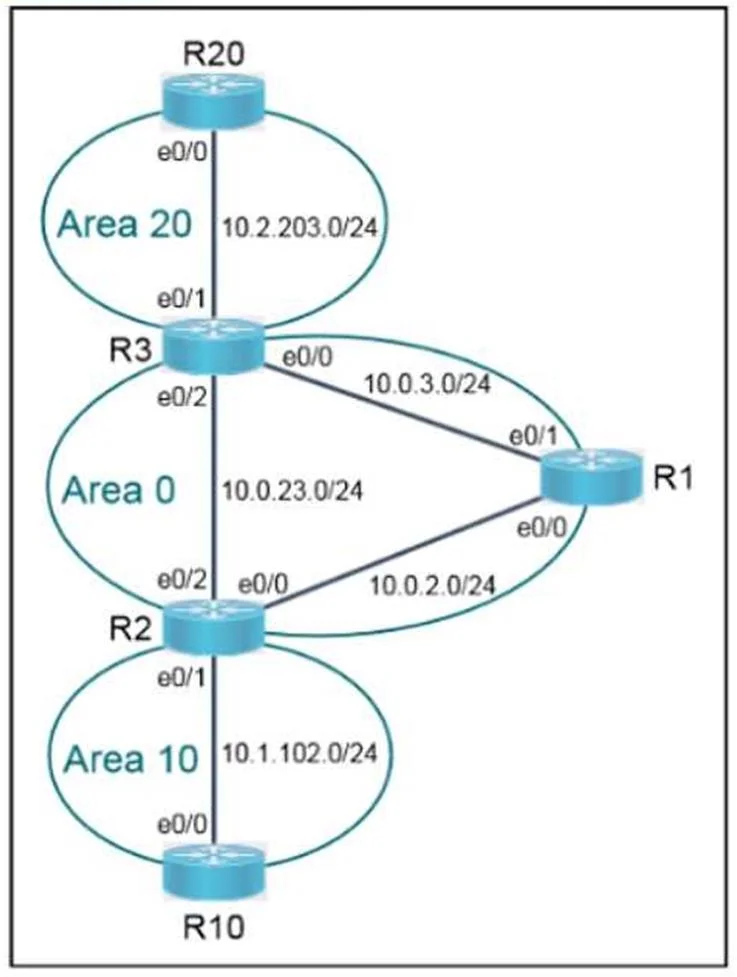
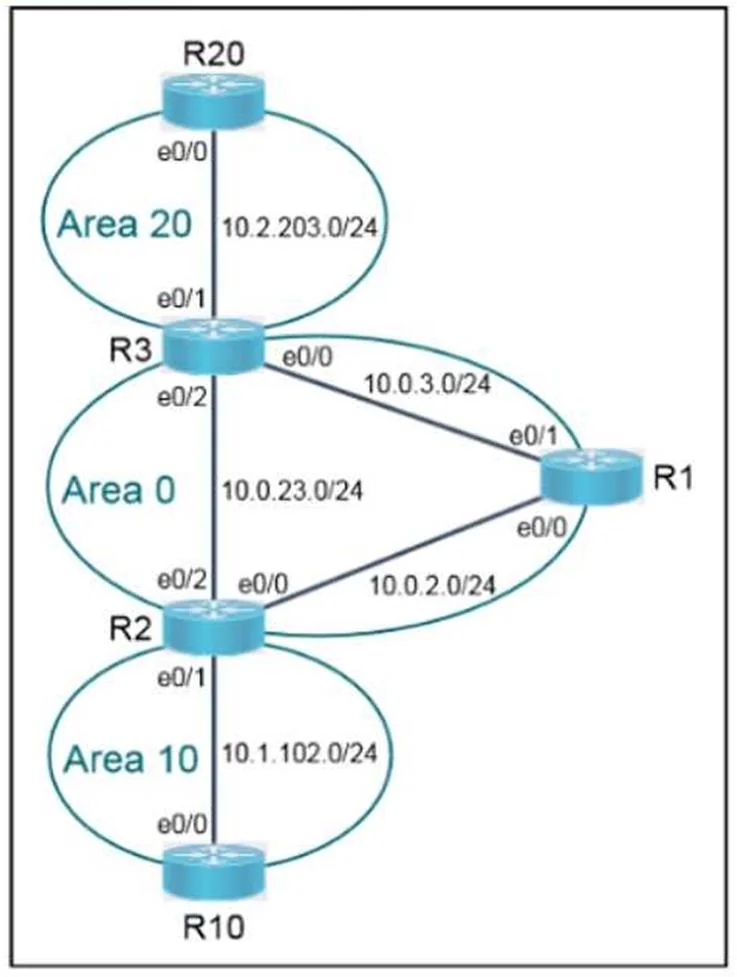
The correct interaction involves identifying R3 as the Area Border Router (ABR) for Area 20 and applying an OSPF area filter-list with the 'out' keyword to prevent advertising R20's loopback route out of Area 20, while recognizing that R2's configuration for filtering R1's loopback route into Area 10 is already complete.
Approach. The core of this question lies in correctly identifying the Area Border Routers (ABRs) responsible for inter-area route filtering and applying OSPF area filter-lists in the correct direction. The phrase 'Answer: R2 R3' indicates these are the routers where configuration might be needed or verified.
-
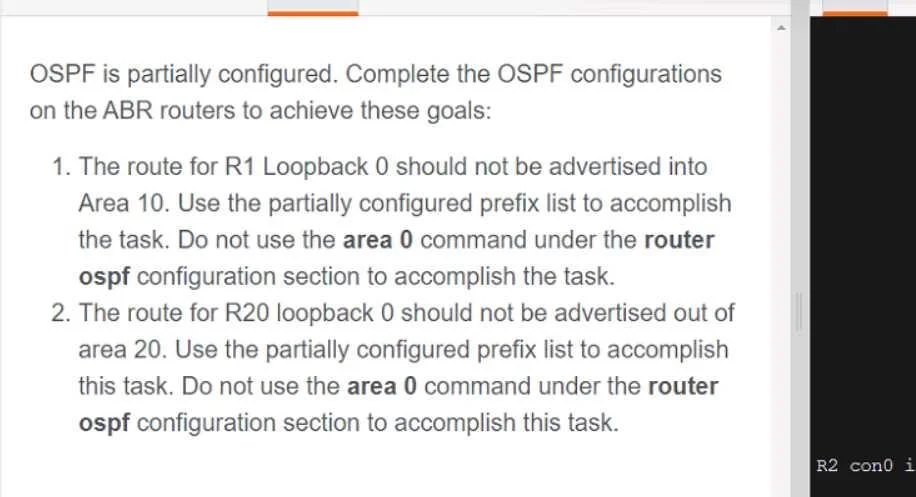
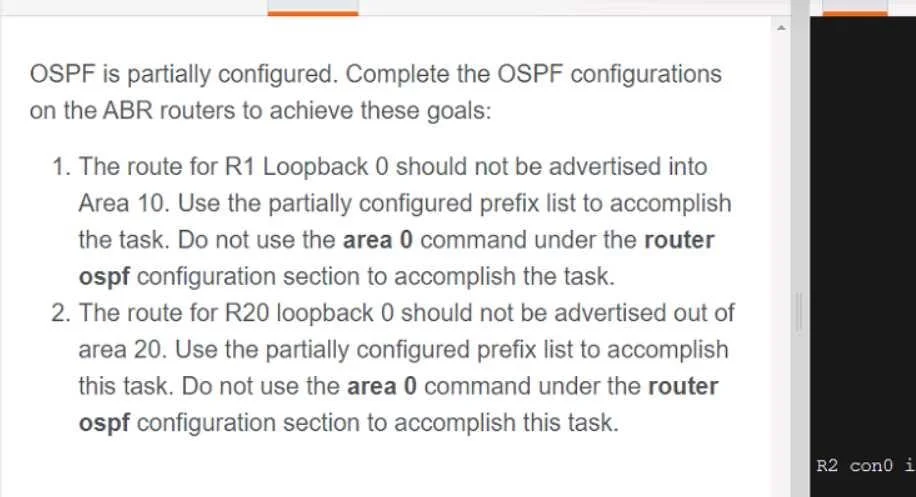
Analyze Task 1: 'The route for R1 Loopback 0 should not be advertised into Area 10.'
- ABR Identification: R2 is the ABR connecting Area 0 (where R1 resides) and Area 10. Filtering needs to occur on R2.
- Direction: The route is coming from Area 0 into Area 10. Therefore, on R2, the filter-list needs to be applied to
area 10with theinkeyword. - Verification from Exhibit: The R2 console output clearly shows
area 10 filter-list prefix deny_R1_Lo0 inand the correspondingip prefix-list deny_R1_Lo0which denies10.0.1.1/32(presumably R1's loopback). This confirms that Task 1 is already completed on R2.
-
Analyze Task 2: 'The route for R20 Loopback 0 should not be advertised out of area 20.'
- ABR Identification: R3 is the ABR connecting Area 20 (where R20 resides) and Area 0. Filtering needs to occur on R3.
- Direction: The route is originating in Area 20 and should be prevented from being advertised out of Area 20 (i.e., into Area 0). Therefore, on R3, the filter-list needs to be applied to
area 20with theoutkeyword. - Missing Configuration: Based on the completion of Task 1 and the general nature of these lab questions, Task 2 is the one requiring user interaction. The problem states 'use the partially configured prefix list'. While the exact name for R20's prefix list isn't shown, it can be inferred to be similar to
deny_R1_Lo0, perhapsdeny_R20_Lo0. The OSPF process ID can be assumed to be 10, consistent with R2.
The correct interaction is to access the console of R3 and apply the following commands:
Router>enable
Router#configure terminal
Router(config)#router ospf 10
Router(config-router)#area 20 filter-list prefix deny_R20_Lo0 out
Router(config-router)#end
Router#write memory
(Note:
deny_R20_Lo0is an assumed name based on typical lab conventions and the problem stating 'partially configured prefix list'. The actual name might be specified elsewhere in a real lab environment or implicitly defined in the background.)
Common mistakes.
- common_mistake. 1. Incorrect ABR Selection: Attempting to configure R1, R10, or R20 for inter-area filtering. These are internal routers, not ABRs, and cannot perform inter-area filtering.
- Incorrect Filter Direction: Applying the filter with the
inkeyword on R3 for Area 20 (e.g.,area 20 filter-list prefix deny_R20_Lo0 in). This would filter routes into Area 20 from Area 0, which is not the requirement. Task 2 requires filtering routes out of Area 20. - Attempting to Configure Task 1 on R2: Since the
show runon R2 clearly indicates Task 1 is already configured, attempting to reconfigure it or apply a different filter would be redundant or incorrect. - Using
area 0command: The task explicitly forbids using thearea 0 filter-listcommand. Usingarea 0 filter-list prefix <name> outon R3 would filter routes leaving Area 0 into Area 20, which is the opposite of the requirement for Task 2. Usingarea 0 filter-list prefix <name> inon R2 would filter routes into Area 0 from Area 10, which is also not the requirement for Task 1. - Not using a Prefix List: The task explicitly states to use a 'partially configured prefix list'. Using other filtering mechanisms like access-lists would be incorrect.
- Incorrect Prefix List Name: If the specific prefix list name for R20's loopback route (e.g.,
deny_R20_Lo0) is not correctly identified and used, the filter will not apply.
Concept tested. The core technical concepts being tested are:
- OSPF Area Border Router (ABR) Functionality: Understanding that ABRs are responsible for inter-area routing and filtering. R2 is an ABR between Area 0 and Area 10, and R3 is an ABR between Area 0 and Area 20.
- OSPF Area Filtering (
filter-listcommand): The ability to use thearea <area-id> filter-list prefix <prefix-list-name> {in | out}command to control the advertisement of Type 3 LSAs (summary LSAs) between OSPF areas. - Prefix-list Configuration and Application: Understanding how to define a prefix-list to match specific network prefixes and apply it within OSPF filtering.
- Directional Filtering (
invsout): Correctly determining whether a filter needs to be applied for routes cominginto an area or goingoutof an area from the perspective of the ABR and the specific area being configured. - Interpreting Network Topology and Configuration Output: Analyzing a network diagram to identify router roles and understanding existing router configurations to determine what tasks are already complete and what needs to be done.
Topics
Community Discussion
No community discussion yet for this question.