
300-920 · Question #60
Drag and Drop Question Drag and drop the code segments from the right of the screen into the targets on the left to create a script that retrieves a list of rooms using the Webex JavaScript API and…
The correct answer is var Webex = require('webex'); var webex = Webex.init({ credentials: { access_token: 'jhgdhdjuytut-hgjhgf' } }); webex.rooms; list({ max:500 }); then(function(rooms){; var room = rooms.items.filter(function(room){ return room.title == "MyWebex Discussion" })[0]; console.log(room.title, room.id); }); catch(function(reason){ console.error(reason); process.exit(1); }); }). Webex JavaScript API - Drag & Drop Explained The Complete Assembled Script ``javascript var Webex = require('webex') // 1 var webex = Webex.init({ // 2 credentials: { access_token: 'jhgdhdjuytut-hgjhgf' } }) webex.rooms // 3 .list({ max: 500 }) // 4 .then(function(rooms) { // 5…
Question
Exhibit
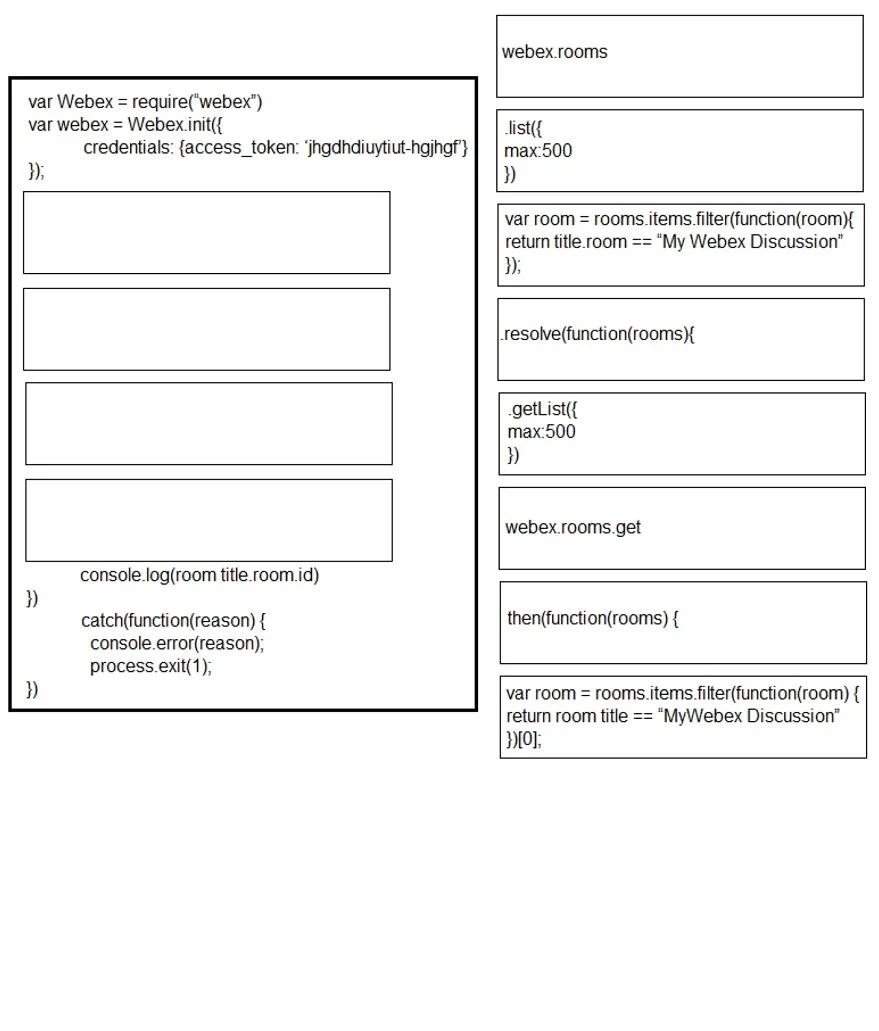
Answer Area
Drag items
Correct arrangement
- var Webex = require('webex')
- var webex = Webex.init({ credentials: { access_token: 'jhgdhdjuytut-hgjhgf' } })
- webex.rooms
- list({ max:500 })
- then(function(rooms){
- var room = rooms.items.filter(function(room){ return room.title == "MyWebex Discussion" })[0]
- console.log(room.title, room.id)
- })
- catch(function(reason){ console.error(reason); process.exit(1); })
- })
Explanation
Webex JavaScript API - Drag & Drop Explained
The Complete Assembled Script
var Webex = require('webex')                          // 1
var webex = Webex.init({                              // 2
  credentials: { access_token: 'jhgdhdjuytut-hgjhgf' }
})
webex.rooms                                           // 3
  .list({ max: 500 })                                 // 4
  .then(function(rooms) {                             // 5
    var room = rooms.items.filter(function(room) {    // 6
      return room.title == "MyWebex Discussion"
    })[0]
    console.log(room.title, room.id)                  // 7
  })                                                  // 8
  .catch(function(reason) {                           // 9
    console.error(reason);
    process.exit(1);
  })
})                                                    // 10
Item-by-Item Explanation
1. var Webex = require('webex')
Must come first. This imports the Webex Node.js SDK module. Nothing else can run until the library is loaded. This is standard CommonJS module loading - the capital Webex is intentional (it's a constructor/factory).
2. var webex = Webex.init({credentials: {access_token: ...}})
Must come second, after the import. Webex.init() creates an authenticated client instance. The lowercase webex variable is the live client object used for all subsequent API calls. You cannot call webex.rooms before this exists.
3. webex.rooms
Accesses the rooms resource on the authenticated client. This is a namespace/resource object - it does not make a request by itself. It chains into .list() on the next line. The distractor webex.rooms.get is wrong because .get is for fetching a single room by ID, not listing all rooms.
4. list({ max: 500 })
Calls the list method on the rooms resource, requesting up to 500 rooms. The distractor getList({max:500}) does not exist in the Webex SDK - the correct method name is list. This call returns a Promise, which is why .then() follows.
5. then(function(rooms){
Opens the Promise success callback. When the list() API call resolves, rooms is the response object containing a rooms.items array. The distractor resolve(function(rooms){ is wrong - .resolve() is not a Promise consumption method; .then() is.
6. var room = rooms.items.filter(...)[0]
Filters the array for the matching room and extracts the first result with [0]. The critical technical detail: .filter() always returns an array, not a single object. Without [0], room.title and room.id on the next line would both be undefined. The distractor (without [0]) would cause the console.log to silently fail.
7. console.log(room.title, room.id)
Outputs the title and ID of the matched room. This must come after room is defined and inside the .then() callback - it has access to the resolved data here. If placed outside the callback, room would not be in scope.
8. })
Closes the .then(function(rooms){ ... }) block. This is structurally required before chaining .catch().
9. catch(function(reason){ console.error(reason); process.exit(1); })
Handles any rejected Promise (network error, auth failure, etc.). Must come after .then() - this is standard Promise chain order. process.exit(1) signals a non-zero error exit code to the OS.
10. })
Closes an outer wrapping context implied by the exam (likely a function or module wrapper). While it looks redundant here, it balances a brace from context outside the visible snippet.
Common Mistakes to Watch For
| Mistake | Why It's Wrong |
|---|---|
Using getList() | Method doesn't exist; correct is list() |
Using resolve() instead of then() | .resolve() doesn't consume a Promise |
Using webex.rooms.get | .get() fetches one room by ID, not a list |
Omitting [0] on the filter | Returns an array; .title and .id would be undefined |
Putting console.log outside .then() | room is undefined in outer scope at call time |
Reversing .then() and .catch() | .catch() must follow .then() in the chain |
Topics
Community Discussion
No community discussion yet for this question.