
300-920 · Question #59
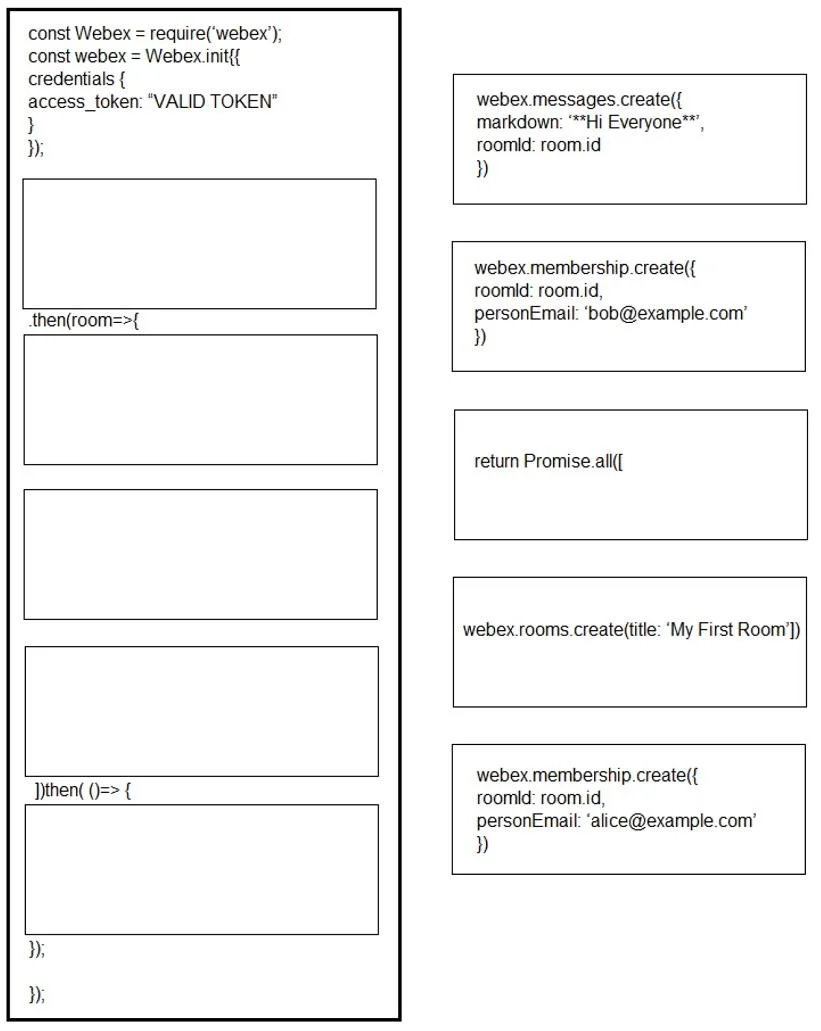
Drag and Drop Question Drag and drop the code segments to construct a script that carries out these functions: - adds a new room - adds two users, Bob, and Alice, to the room - when both the users…
The correct answer is webex.rooms.create(title: 'My First Room')); return Promise.all[[; webex.membership.create({ roomId: room.id, personEmail: '[email protected]' }); webex.membership.create({ roomId: room.id, personEmail: '[email protected]' }); webex messages.create({ markdown: "**Hi Everyone**", roomId: room.id }). The question requires correctly ordering Webex SDK API calls using JavaScript Promises to create a room, add two users concurrently, and then send a welcome message to the room once both users are added.
Question
Exhibit
Answer Area
Drag items
Correct arrangement
- webex.rooms.create(title: 'My First Room'))
- return Promise.all[[
- webex.membership.create({ roomId: room.id, personEmail: '[email protected]' })
- webex.membership.create({ roomId: room.id, personEmail: '[email protected]' })
- webex messages.create({ markdown: "Hi Everyone", roomId: room.id })
Explanation
The question requires correctly ordering Webex SDK API calls using JavaScript Promises to create a room, add two users concurrently, and then send a welcome message to the room once both users are added.
Approach. The correct approach involves sequentially structuring the asynchronous operations using JavaScript Promises.
- Slot 1: The first action must be to create the room.
webex.rooms.create({title: 'My First Room'})goes here. This promise resolves with a 'room' object, which is then passed to the subsequent.then(room=>{...})block. - Slot 2: Inside the
then(room=>{...})block, the requirement is to add two users and wait for both to complete before sending a message. This is achieved usingPromise.all. Therefore,return Promise.all([is placed here to initiate the concurrent execution and ensure the subsequent.then()waits for all promises withinPromise.allto resolve. - Slot 3 & 4: The two user membership creations are placed next, inside the conceptual
Promise.allarray.webex.membership.create({ roomId: room.id, personEmail: '[email protected]' })andwebex.membership.create({ roomId: room.id, personEmail: '[email protected]' })are dragged into these slots. Theroom.idis available from the parent.then(room=>scope. - Slot 5: The final
.then(()=>{...})block executes only after thePromise.all(and thus both user additions) has resolved. Here, the welcome message is sent:webex.messages.create({ markdown: '**Hi Everyone**', roomId: room.id }). Theroom.idis still accessible through closure or implicit context from the earlierroomobject.
Common mistakes.
- common_mistake. Common mistakes include:
- Incorrect order of operations: Placing membership creation or message sending before room creation, as
roomIdwould not be available or valid. - Not using
Promise.all: If the twowebex.membership.createcalls were placed sequentially withoutPromise.alland without explicitly waiting, the message might be sent before both users have actually been added. The prompt explicitly states 'when both the users have been added'. - Misplacing
return Promise.all([: IfPromise.allis not returned from the first.then()block, the subsequent.then()block would execute immediately without waiting for the memberships to be created, leading to the message being sent prematurely. - Sending message too early: Placing
webex.messages.createoutside the final.then()block or before thePromise.allensures all users are added would cause the message to be sent before the condition is met.
Concept tested. Asynchronous JavaScript programming, specifically using Promises (.then()) for sequential execution and Promise.all() for concurrent execution and waiting for multiple asynchronous operations to complete. It also tests familiarity with the Webex SDK for room creation, membership management, and message sending.
Topics
Community Discussion
No community discussion yet for this question.