
300-920 · Question #52
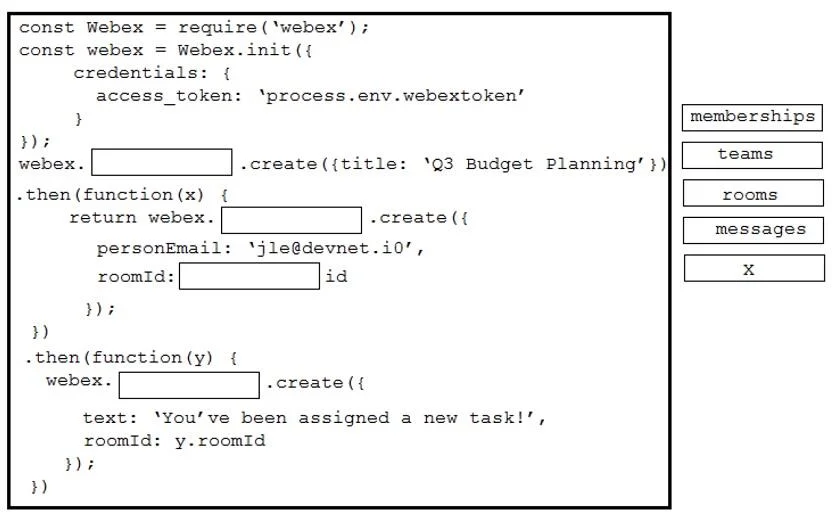
Drag and Drop Question Drag and drop the expressions from the right onto the Webex JavaScript SDK code on the left to create a Webex Teams space, add a person to the space, and send a welcome…
The correct answer is teams; memberships; rooms; messages. This question tests the ability to correctly identify and use Webex JavaScript SDK API modules for creating a team, adding a member to a space, and sending a message by dragging appropriate expressions into a code snippet.
Question
Exhibit
Answer Area
Drag items
Correct arrangement
- teams
- memberships
- rooms
- messages
Explanation
This question tests the ability to correctly identify and use Webex JavaScript SDK API modules for creating a team, adding a member to a space, and sending a message by dragging appropriate expressions into a code snippet.
Approach. The correct interaction involves dragging the appropriate Webex SDK API module names into the blanks as follows:
- First blank:
webex.________.create({title: 'Q3 Budget Planning'}). The solution showsteamsdragged here. This makes the callwebex.teams.create(), which creates a new Webex Team. The phrase "create a Webex Teams space" can, in this context, refer to creating a new Team itself. - Second blank:
return webex.________.create({personEmail: '[email protected]', roomID:________id}). This operation is about adding a person to a space (or a team's room). In the Webex SDK, managing user/bot participation is done via themembershipsAPI. So,membershipsis dragged here, resulting inwebex.memberships.create(). - Third blank:
roomID:________id. This blank needs to specify the ID of the room for the membership. The solution showsroomsdragged into this blank, resulting inroomID: rooms id. While this specific syntax ('rooms id') is unusual for an actualroomIDparameter in functional code (it typically expects a variable likex.id), given 'rooms' is an option and it's placed here in the provided solution, it indicates 'rooms' is the intended drag item for this position. - Fourth blank:
webex.________.create({text: 'You've been assigned a new task!', roomID: y.roomId}). This operation is for sending a message to a room. The Webex SDK uses themessagesAPI for this purpose. Thus,messagesis dragged here, making the callwebex.messages.create().
The 'X' option remains unused, as expected for distractor options.
Common mistakes.
- common_mistake. Common mistakes include confusing the purpose of different Webex SDK APIs. For example, dragging 'rooms' for creating a Team when the solution expects 'teams', or dragging 'teams' or 'messages' instead of 'memberships' when adding a person to a space. Another mistake would be incorrectly attempting to use 'memberships' or 'teams' for sending a message, which is handled by 'messages'. Misinterpreting the
roomID:________idblank is also a pitfall; while standard coding practice would suggest a variable (e.g.,x.id), the provided solution explicitly places 'rooms' in that position, so any other option (e.g., leaving it blank, or trying to drag a non-existent variable option) would be incorrect based on the provided solution. The 'X' option is a common distractor and should not be used in this scenario.
Concept tested. The core concept tested is the test-taker's familiarity with the Cisco Webex JavaScript SDK, specifically the proper use of its main API modules: webex.teams for team management, webex.rooms for space (room) management, webex.memberships for managing participants in spaces, and webex.messages for sending communications. It also implicitly assesses the understanding of asynchronous programming patterns using JavaScript Promises (chained .then() methods).
Topics
Community Discussion
No community discussion yet for this question.