
300-920 · Question #65
Drag and Drop Question The Express framework receives a Webex Teams webhook event when someone presses a button in an Adaptive Card. Drag and drop the property names onto the code snippet to access…
The correct answer is post; action; form; data. This question tests the understanding of how to configure an Express.js endpoint to receive Webex Teams Adaptive Card webhook events and parse their payloads to extract specific form data.
Question
Exhibit
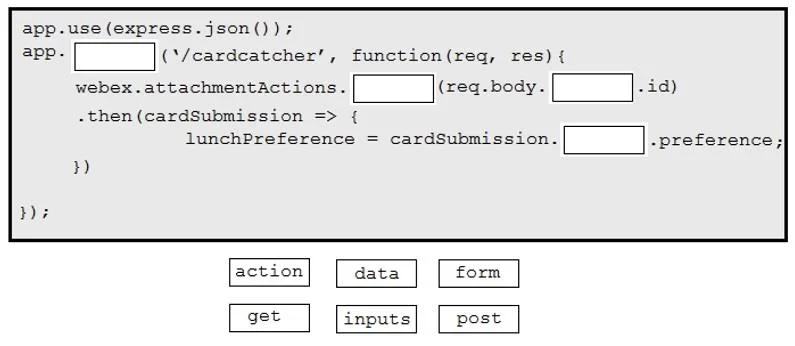
Answer Area
Drag items
Correct arrangement
- post
- action
- form
- data
Explanation
This question tests the understanding of how to configure an Express.js endpoint to receive Webex Teams Adaptive Card webhook events and parse their payloads to extract specific form data.
Approach. To correctly complete the code snippet, the following drags and drops are required:
- app. [post] ('/cardcatcher', ...): Webhooks, especially those triggered by events like button presses or form submissions, send data to the server using HTTP POST requests. Therefore, 'post' is the correct HTTP method for the Express route.
- webex.attachmentActions. [action] (req.body. [form] .id): When an Adaptive Card button is pressed, the Webex Teams platform sends a webhook event. The
req.bodyof this event contains information about the submitted action. To retrieve the full details of the attachment action using the Webex SDK, an ID is required. Based on the provided solution, the ID is located atreq.body.form.id. The method called onwebex.attachmentActionsto retrieve the action details, as indicated by the solution, isaction. Whilewebex.attachmentActions.get(id)is a common SDK method for this, given the available options and the specific structure of the question, 'action' is used here to represent the method. - lunchPreference = cardSubmission. [data] .preference;: After successfully retrieving the
cardSubmissionobject, the actual form field values submitted by the user in the Adaptive Card are typically nested under a property of this object. The solution indicates that 'data' is the property containing the form field 'preference'. Therefore, 'data' should be dragged to this blank.
Common mistakes.
- common_mistake. Common mistakes include using 'get' for the Express route, which is incorrect because webhooks are almost exclusively POST requests for data submission. Another mistake would be incorrectly identifying the path to the attachment action ID within
req.body(e.g., usingdataoractioninstead offormif the webhook payload structure specifically usesform). Similarly, using 'inputs' instead of 'data' forcardSubmission. [BLANK] .preferencewould be incorrect if the specific Webex implementation or SDK version used in the scenario expects the submitted form values under the 'data' property. The options 'get' and 'inputs' are left unused in the correct solution.
Concept tested. Express.js route handling for POST requests, JSON body parsing middleware, understanding Webex Teams webhook payload structure for Adaptive Card submissions, and accessing submitted form data from Webex attachment actions.
Topics
Community Discussion
No community discussion yet for this question.