
300-920 · Question #64
Drag and Drop Question Drag and drop the expressions to create a Webex Teams widget that uses Guest Issuer to enable customers to chat and meet with agents. Not all options are used. Answer:
The correct answer is guest; userId; session.token; session.agent. Webex Teams Guest Issuer Widget - Drag-and-Drop Explanation This question tests your knowledge of how to configure a Webex Teams widget for Guest Issuer authentication, which allows unauthenticated external users (customers) to connect with internal agents without a full Webex…
Question
Exhibit
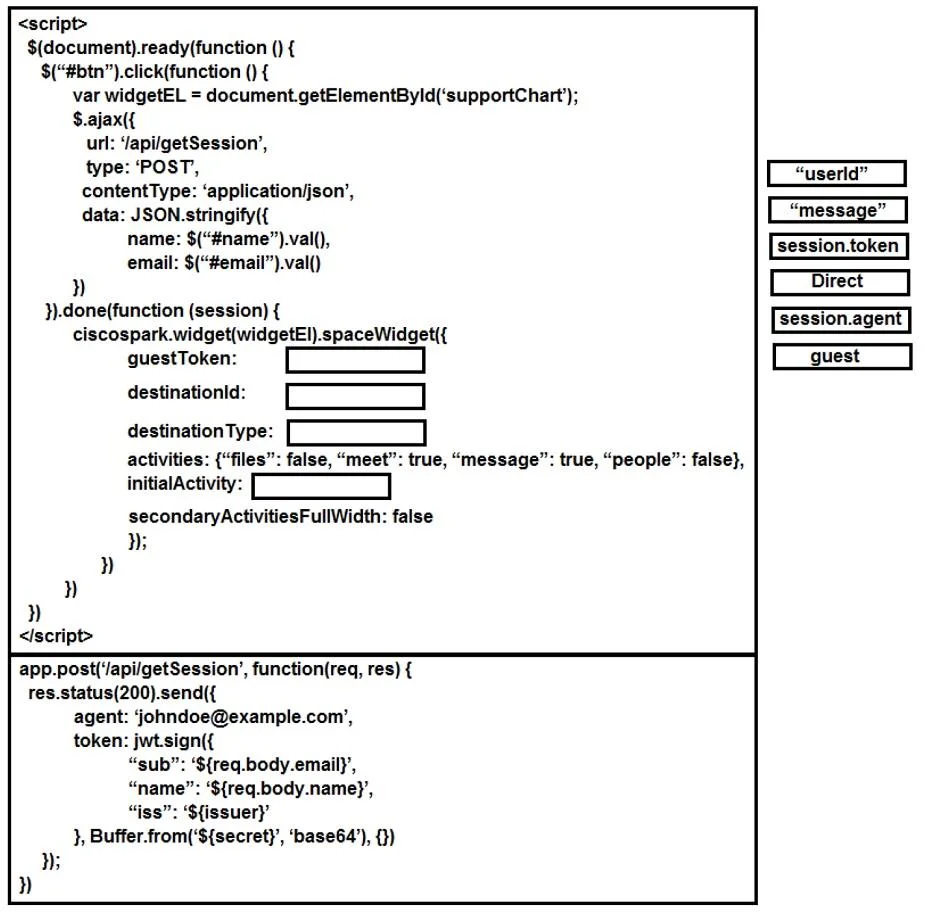
Answer Area
Drag items
Correct arrangement
- guest
- userId
- session.token
- session.agent
Explanation
Webex Teams Guest Issuer Widget - Drag-and-Drop Explanation
This question tests your knowledge of how to configure a Webex Teams widget for Guest Issuer authentication, which allows unauthenticated external users (customers) to connect with internal agents without a full Webex account.
The four blanks correspond to a widget configuration object like this:
webex.widget(el).spaceWidget({
  type:            "[1]",   // → guest
  destinationType: "[2]",   // → userId
  accessToken:     "[3]",   // → session.token
  destinationId:   "[4]",   // → session.agent
});
Position 1 - guest
What it fills: The type field - declares the authentication mode.
Why: Guest Issuer generates a short-lived JWT for anonymous/external users. Setting type: "guest" tells the widget to authenticate via that JWT rather than a standard Webex account. This is the foundation of the entire flow; without it, the widget assumes a registered user.
Position 2 - userId
What it fills: The destinationType field - how the destination is identified.
Why: You are routing the customer to a specific agent, identified by that agent's Webex userId. userId is the correct destination type for person-to-person (1:1) contact.
Common mistake: Choosing Direct here. While "Direct" sounds right for a 1:1 conversation, userId is the actual API parameter name that tells the widget how to interpret the destination ID. Direct is a distractor - it is not a valid destinationType value in the Webex Teams widget API.
Position 3 - session.token
What it fills: The accessToken field - the bearer token for the guest session.
Why: The Guest Issuer backend generates a JWT for the customer session. This token (stored as session.token) is passed to the widget so it can authenticate API calls on behalf of the guest user. Without a valid token, the widget cannot establish a Webex session.
Common mistake: Thinking a static developer token goes here. For guest flows, the token must be dynamically generated per session - session.token represents that runtime value.
Position 4 - session.agent
What it fills: The destinationId field - the actual target of the conversation.
Why: session.agent holds the specific agent's Webex userId (resolved at runtime, e.g., from a queue or routing logic). Pairing it with destinationType: userId tells the widget "connect this guest to the person identified by this userId."
Why the Unused Items Are Wrong
| Item | Why not used |
|---|---|
message | A destination type for spaces/rooms, not for direct agent contact |
Direct | Not a valid destinationType API value; userId is the correct term |
Key Takeaway
The correct order follows the logical flow: who the user is (guest) → how to find the agent (userId) → the guest's credentials (session.token) → which agent to reach (session.agent).
Topics
Community Discussion
No community discussion yet for this question.