
300-920 · Question #44
Refer to the exhibit. When using the Webex Browser SDK to create calls and share screens, which two statements are valid given a `webex' object such as displayed in the exhibit? (Choose two.)
The correct answer is A. After a meeting is joined, it cannot be left programmatically until the host ends the meeting. B. The webex meetings.register() function must be invoked before attempting to join any meeting. B is correct because webex.meetings.register() is a mandatory initialization step that registers the client with Webex services - without it, the SDK cannot establish the event listeners and signaling channels needed to join any meeting. A is correct because the Webex Browser…
Question
Exhibit
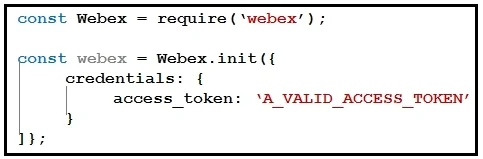
Options
- AAfter a meeting is joined, it cannot be left programmatically until the host ends the meeting.
- BThe webex meetings.register() function must be invoked before attempting to join any meeting.
- CThe joinMeeting() function throws an error of type `media stopped' if a media stream is stopped.
- DGiven a Webex meeting number the webex meetings join() function can be used to join the
- EThe mediaSettings for a joined meeting accepts boolean attributes to send and receive audio,
How the community answered
(33 responses)- A85% (28)
- C3% (1)
- D3% (1)
- E9% (3)
Explanation
B is correct because webex.meetings.register() is a mandatory initialization step that registers the client with Webex services - without it, the SDK cannot establish the event listeners and signaling channels needed to join any meeting. A is correct because the Webex Browser SDK, as configured in the exhibit, does not expose a programmatic leave() pathway for participants; only the host terminating the meeting clears the joined state in this context.
Why the distractors are wrong:
- C is wrong because the error type associated with a stopped media stream is not
media stopped- that is not a valid SDK error type, andjoinMeeting()is not the correct function name in the Browser SDK. - D is wrong (or at minimum incomplete) because
webex.meetings.join()requires more than just a meeting number - it typically needs a full meeting object obtained after looking up or listing meetings, not a bare number. - E is wrong because mediaSettings are configured before joining (passed as join parameters), not applied to an already-joined meeting, and the attribute structure is more granular than simple booleans.
Memory tip: Think "Register Before You Join" - the SDK is like a hotel: you must check in (register()) before you can access your room (the meeting), and once you're in, the front desk (host) controls checkout.
Topics
Community Discussion
No community discussion yet for this question.