
300-920 · Question #43
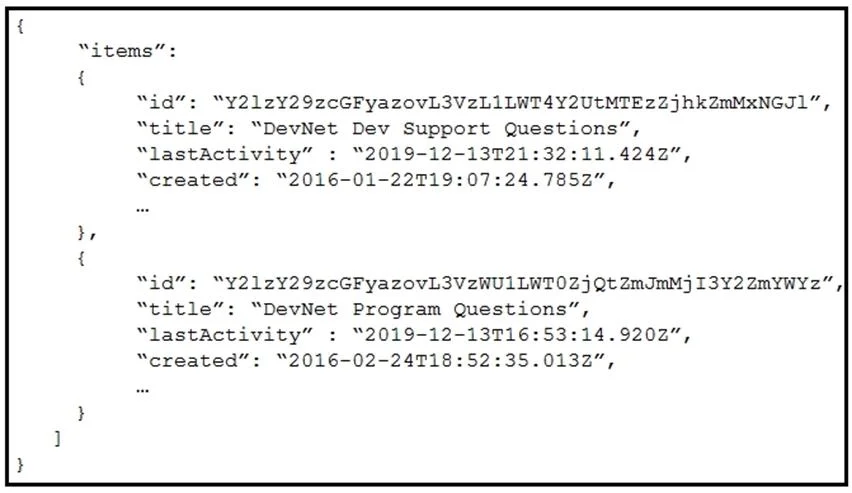
Refer to the exhibit. Which Webex Teams REST API request has generated the response body in the exhibit?
The correct answer is C. GET/v1/rooms?max=1. Option C is correct because the max parameter in the Webex Teams API controls the number of items returned - max=1 limits the response to a single room object, which matches what the exhibit displays. The sortBy parameter in options A and B affects the ordering of results, not…
Question
Exhibit
Options
- AGET/v1/rooms?sortBy=lastactivity
- BGET/v1/rooms?sortBy=created
- CGET/v1/rooms?max=1
- DGET/v1/spaces?orderBy=lastActivity
How the community answered
(42 responses)- A7% (3)
- B14% (6)
- C57% (24)
- D21% (9)
Explanation
Option C is correct because the max parameter in the Webex Teams API controls the number of items returned - max=1 limits the response to a single room object, which matches what the exhibit displays. The sortBy parameter in options A and B affects the ordering of results, not the count, so those requests would return multiple rooms rather than just one. Option D is doubly wrong: Webex Teams uses /v1/rooms as the endpoint (not /v1/spaces), and the correct query parameter for sorting is sortBy, not orderBy.
Memory tip: Think of max as a cap on quantity - whenever you see only one item in a Webex API response body, that's your signal that max=1 was used. If the question is about order, look for sortBy; if it's about count, look for max.
Topics
Community Discussion
No community discussion yet for this question.