
300-920 · Question #57
Drag and Drop Question Drag and drop the methods from the left into the correct order of execution on the right to use webex-js-sdk in a browser to call and share the screen with another Webex user…
The correct answer is webex.meetings.create(); webex.call(); meeting.getMediaStreams(); meeting.addMedia(). This question tests the correct sequence of webex-js-sdk methods to initiate a direct call and then share a screen with another Webex user.
Question
Exhibit
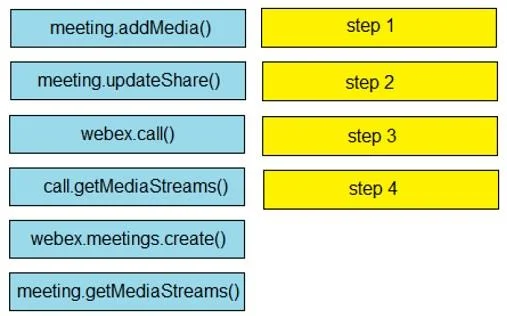
Answer Area
Drag items
Correct arrangement
- webex.meetings.create()
- webex.call()
- meeting.getMediaStreams()
- meeting.addMedia()
Explanation
This question tests the correct sequence of webex-js-sdk methods to initiate a direct call and then share a screen with another Webex user.
Approach. The correct interaction involves dragging the methods into the following sequence based on the webex-js-sdk API for direct calling and screen sharing:
- step 1:
webex.call()- This method is used to initiate a direct peer-to-peer call with another Webex user, which is the foundational step for the scenario. - step 2:
call.getMediaStreams()- After a call is initiated,call.getMediaStreams()is typically used to retrieve the local and remote media streams associated with the active call. While not strictly mandatory before adding a share stream, it's a common step to manage call media and is appropriate in this sequence, especially if the call object iscall. - step 3:
meeting.addMedia()- To add a new media stream, such as a screen sharing stream, to an existing call or meeting context,meeting.addMedia()is the correct method. In thewebex-js-sdk, even direct calls can be managed with 'meeting' related methods for media operations. - step 4:
meeting.updateShare()- Once the screen share media stream has been added usingmeeting.addMedia(),meeting.updateShare()is invoked to actively start or stop sharing that stream with the other participant(s) in the call.
The methods webex.meetings.create() and meeting.getMediaStreams() are not used in this specific scenario for initiating a direct call and screen share.
Common mistakes.
- common_mistake. 1. Using
webex.meetings.create()first: This method is used to create a formal meeting room, either scheduled or ad-hoc. The scenario describes making a direct call to 'another Webex user' and sharing the screen, which aligns better with a direct peer-to-peer call initiated bywebex.call(), not necessarily creating a meeting room.
- Incorrect order of
addMedia()andupdateShare():meeting.updateShare()must occur aftermeeting.addMedia(). You first add the specific media stream (e.g., screen share) to the call's context, and then you useupdateShare()to signal the SDK to begin sharing that previously added stream. - Using
meeting.getMediaStreams()instead ofcall.getMediaStreams(): While both methods relate to getting media streams,call.getMediaStreams()is specific to thecallobject returned bywebex.call().meeting.getMediaStreams()would be used with ameetingobject obtained fromwebex.meetings.create()orwebex.meetings.get(), which is not the initial step in this direct call scenario. - Not using
call.getMediaStreams(): Skipping this step might lead to issues if the application needs to explicitly manage the media streams generated by the call before adding new ones, although the SDK might handle some aspects implicitly.
Concept tested. The core concept being tested is the understanding of the webex-js-sdk API for implementing real-time communication features, specifically initiating peer-to-peer calls, managing media streams, and performing screen sharing in a browser environment. It assesses knowledge of the correct sequence of method calls for these operations.
Topics
Community Discussion
No community discussion yet for this question.