
300-920 · Question #58
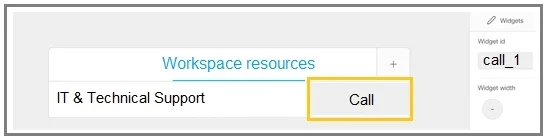
Drag and Drop Question Refer to the exhibit. A Webex device In-Room Control editor screenshot and associated Macro code is shown. Drag and drop the code snippets to complete the JavaScript Macro…
The correct answer is UserInterface InRoomControl Button Event; call_1; command; execute; UserInterface Extensions Widget Action; Widget:Call. Webex In-Room Control Macro - Drag & Drop Explanation This macro registers two event listeners on the Webex xAPI to handle a custom "Call" button press - one using the legacy API, one using the modern API. --- The Completed Code Structure ``javascript const xapi =…
Question
Exhibit
Answer Area
Drag items
Correct arrangement
- UserInterface InRoomControl Button Event
- call_1
- command
- execute
- UserInterface Extensions Widget Action
- Widget:Call
Explanation
Webex In-Room Control Macro - Drag & Drop Explanation
This macro registers two event listeners on the Webex xAPI to handle a custom "Call" button press - one using the legacy API, one using the modern API.
The Completed Code Structure
const xapi = require('xapi');

// --- LISTENER 1: Legacy API ---
xapi.event.on('UserInterface InRoomControl Button Event', (event) => {
//             ^^^^^^^^^^^^^^^^^^^^^^^^^^^^^^^^^^^^^^^^
//             BLANK 1
  if (event.Signal.match('call_1')) {
//                        ^^^^^^
//                        BLANK 2
    xapi.command('Dial', { Number: videoAddress })
//       ^^^^^^^
//       BLANK 3
    .execute();
//   ^^^^^^^
//   BLANK 4
  }
});

// --- LISTENER 2: Modern API ---
xapi.event.on('UserInterface Extensions Widget Action', (event) => {
//             ^^^^^^^^^^^^^^^^^^^^^^^^^^^^^^^^^^^^^^
//             BLANK 5
  if (event.WidgetId === 'Widget:Call') {
//                         ^^^^^^^^^^^
//                         BLANK 6
    xapi.command('Dial', { Number: videoAddress }).execute();
  }
});
Item-by-Item Explanation
1. UserInterface InRoomControl Button Event
This is the xAPI event path string for the legacy In-Room Control framework (CE firmware). It goes into xapi.event.on() as the first argument, telling the macro to listen for button presses on a custom control panel. Without this exact path string, the listener registers for the wrong events or nothing at all.
2. call_1
This is the ButtonId/Signal identifier assigned to your custom button in the In-Room Control Editor. When the button is pressed, the codec fires an event with event.Signal containing call_1 (typically as call_1/Clicked). This is the conditional check that ensures the macro only reacts to this specific button, not any other widget.
3. command
xapi.command() is the method that sends instructions to the codec - specifically here to initiate a dial. This is distinct from xapi.event (which listens). The method takes a command name like 'Dial' and a parameters object. Placing event here instead would be a critical mistake - you'd be listening for a second event instead of sending a command.
4. execute
In older xAPI macro patterns, xapi.command() returns a command object that must be explicitly executed by chaining .execute(). Without .execute(), the command is constructed but never sent to the codec - the call never launches. This is a common gotcha for developers new to the Webex macro framework.
5. UserInterface Extensions Widget Action
This is the modern xAPI event path (RoomOS / newer firmware). Cisco rebranded and restructured the UI extension system; Extensions Widget Action covers interactions with any widget (buttons, toggles, sliders) in the newer Extensions Panel framework. This second listener ensures compatibility with modern firmware while the first handles legacy devices.
6. Widget:Call
This is the WidgetId assigned to the Call button in the Extensions Panel Editor (the modern equivalent of the In-Room Control Editor). The macro checks event.WidgetId === 'Widget:Call' to confirm the specific widget that was interacted with. Widget IDs are user-defined in the editor, so Widget:Call is whatever name was given to that button.
Why Two Listeners?
Cisco evolved from InRoomControl (CE 9.x firmware) to Extensions (RoomOS). The macro registers both to:
- Support older room devices still on CE firmware
- Support newer devices running RoomOS
- Act as a compatibility bridge during fleet migrations
Common Mistakes
| Mistake | Why It's Wrong |
|---|---|
Swapping command and event | event listens; command sends - opposite purposes |
Omitting .execute() | The dial command is built but never fired |
Putting Widget:Call in Listener 1 | The InRoomControl API uses Signal/ButtonId, not WidgetId |
| Swapping listeners 1 and 5 | Each path string must match its corresponding API framework |
Using call_1 as the WidgetId | call_1 is the legacy button signal; Widget:Call is the modern widget ID |
Topics
Community Discussion
No community discussion yet for this question.