
300-920 · Question #38
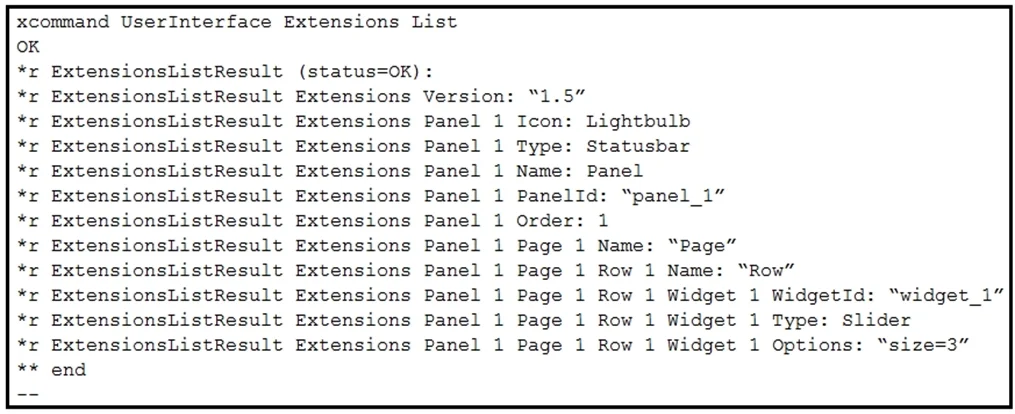
Refer to the exhibit. With this in-room configuration, which command successfully sets the slider to 50?
The correct answer is A. xcommand UserInterface Extensions Widget SetSlider Value: 50. Option A uses the correct Cisco xAPI command structure: xcommand is the proper command type for triggering runtime UI actions, and SetSlider is the specific sub-command for slider widgets - no Widget ID is needed in this context because the exhibit shows a single-widget…
Question
Exhibit
Options
- Axcommand UserInterface Extensions Widget SetSlider Value: 50
- Bxcommand UserInterface Extensions Widget Slider: 50 Widget: "widget_1"
- Cxconfiguration UserInterface Extensions widget_1 50
- Dxcommand UserInterface Extensions Widget SetValue WidgetId: "widget_1" Value: 50
How the community answered
(53 responses)- A81% (43)
- B2% (1)
- C8% (4)
- D9% (5)
Explanation
Option A uses the correct Cisco xAPI command structure: xcommand is the proper command type for triggering runtime UI actions, and SetSlider is the specific sub-command for slider widgets - no Widget ID is needed in this context because the exhibit shows a single-widget configuration where the slider is the active target.
Option B fails because the parameter syntax is invalid - Slider: 50 is not a recognized parameter, and the Widget ID should use WidgetId: not Widget:. Option C is wrong because xconfiguration is used for persistent device settings, not for dynamically controlling UI widget states at runtime. Option D looks plausible but uses SetValue, which is a generic widget command for text and toggle widgets - not the slider-specific SetSlider command tested here.
Memory tip: Think "match the widget, match the command" - sliders use SetSlider, and whenever you're doing something to a UI widget at runtime, it's always xcommand, never xconfiguration.
Topics
Community Discussion
No community discussion yet for this question.