
300-920 · Question #63
Drag and Drop Question Drag and drop the code to complete the snippet that sends a message to the room "My First Room" using the Browser SDK. Not all options are used. Answer:
The correct answer is messages; create; text:; roomID. Explanation: Webex Browser SDK - Sending a Message This question tests knowledge of the Cisco Webex (formerly Spark) Browser SDK method chain for posting a message to a room. The completed snippet looks like this: ``javascript webex.messages.create({ text: "Hello, My First…
Question
Exhibit
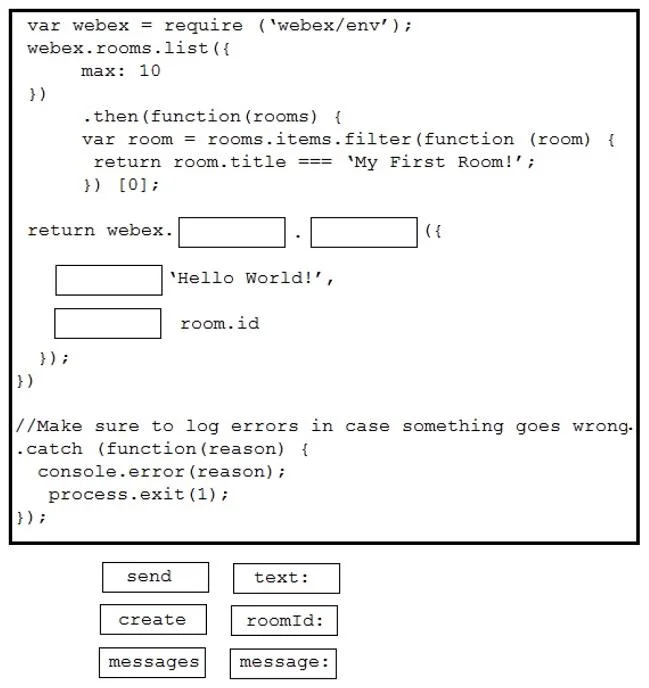
Answer Area
Drag items
Correct arrangement
- messages
- create
- text:
- roomID:
Explanation
Explanation: Webex Browser SDK - Sending a Message
This question tests knowledge of the Cisco Webex (formerly Spark) Browser SDK method chain for posting a message to a room.
The completed snippet looks like this:
webex.messages.create({
  text: "Hello, My First Room!",
  roomID: "<room-id>"
})
Why This Arrangement
1. messages
This is the namespace on the Webex SDK object that groups all message-related operations. You access it as a property (e.g., webex.messages). It must come first because it scopes the action - you're working with messages, not rooms or memberships.
2. create
This is the method called on the messages namespace. The SDK uses create (REST-style verb) to send a new message. It comes second because methods are called on their parent namespace. This is the most common mistake - candidates often assume the method is send, which does not exist in this SDK.
3. text:
This is the body property inside the options object passed to create(). It defines the message content. It goes first inside the object by convention (content before metadata), though technically order within an object literal doesn't affect functionality.
4. roomID:
This is the destination property - it tells the SDK which room to post to. It must be inside the same options object as text:, specifying the target room by its ID.
Why the Unused Items Are Wrong
| Item | Why not used |
|---|---|
send | Not a method in this SDK; create is the correct verb |
message: | Not a valid property; text: is the correct key for message body |
Key Takeaway
The pattern is always: namespace → method → options object (messages.create({ text, roomID })). The SDK follows a resource-oriented design where create maps to an HTTP POST, not an imperative send.
Topics
Community Discussion
No community discussion yet for this question.