
300-920 · Question #53
Drag and Drop Question Drag and drop the code to complete the JavaScript to display the first URL from a user's list of Webex Meetings recordings. Not all options are used. Answer:
The correct answer is teams; memberships; rooms; messages. Important Caveat The question as provided is incomplete - the actual JavaScript code template with drop zones is missing. Without seeing the code blanks, I can only explain based on the Webex API resource hierarchy that the arrangement implies. --- Webex API Hierarchy…
Question
Exhibit
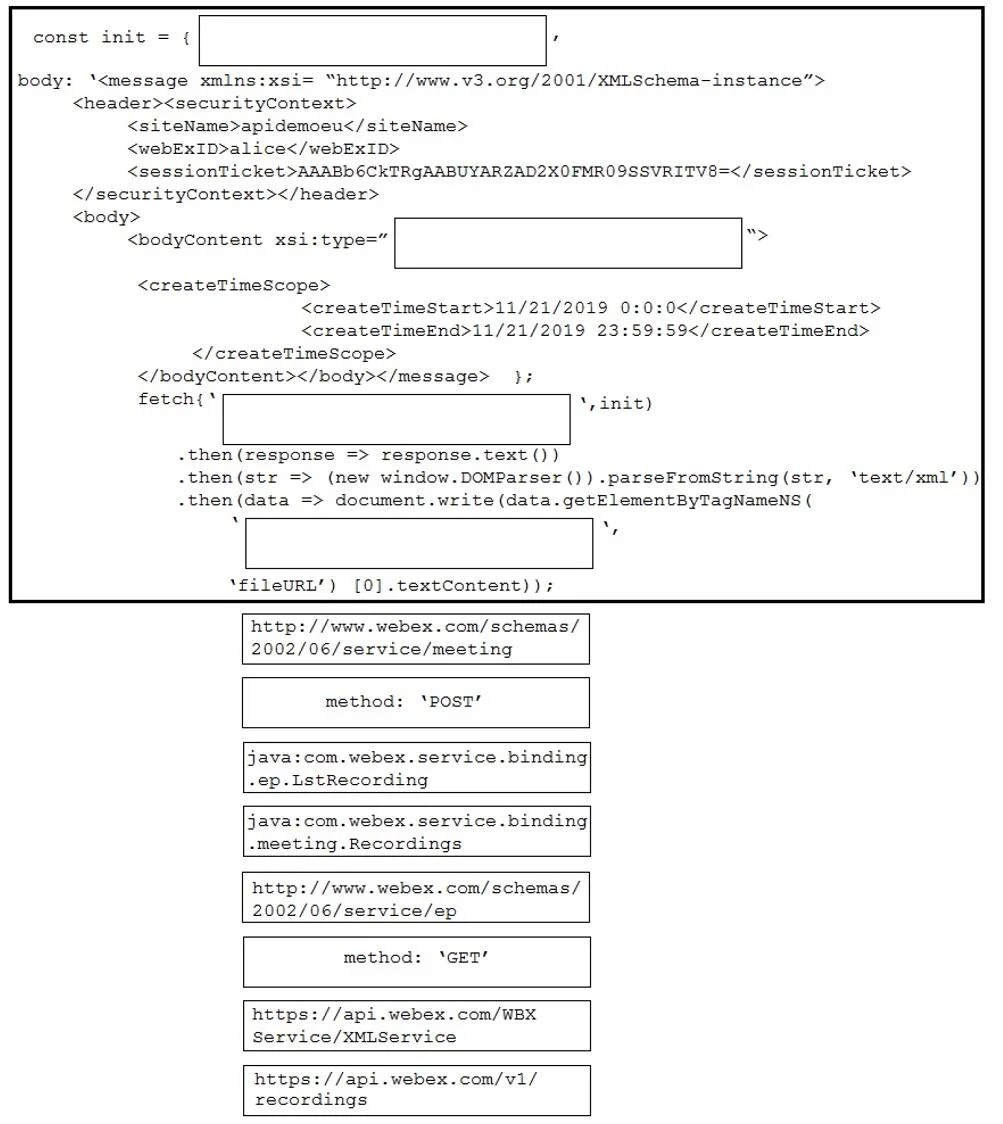
Answer Area
Drag items
Correct arrangement
- teams
- memberships
- rooms
- messages
Explanation
Important Caveat
The question as provided is incomplete - the actual JavaScript code template with drop zones is missing. Without seeing the code blanks, I can only explain based on the Webex API resource hierarchy that the arrangement implies.
Webex API Hierarchy Explanation
The correct arrangement - teams → memberships → rooms → messages - reflects a nested API traversal pattern common in Cisco DevNet exam questions:
1. teams (Position 1)
The entry point. You start by listing the user's Teams to scope subsequent queries. Without a team context, you can't filter memberships or rooms meaningfully.
2. memberships (Position 2)
After getting a team, you query its Memberships to identify which spaces/rooms the user belongs to within that team. This bridges the team-to-room relationship.
3. rooms (Position 3)
Using the membership data, you retrieve the actual Rooms (spaces). This gives you room IDs needed for the next query.
4. messages (Position 4)
Finally, you query Messages within a specific room. In some Webex API patterns, recording URLs are embedded within message objects (e.g., html or files fields).
Common Mistakes
- Skipping memberships - jumping directly from teams → rooms misses the scoping step the API requires.
- Reversing rooms/memberships - you need membership context before filtering rooms.
- Using
X- it's a distractor; ignore it.
Bottom line: This question likely has a missing code block. Ask your instructor or find the original source to see the actual JavaScript with blanks, since the arrangement only makes sense in that context.
Topics
Community Discussion
No community discussion yet for this question.