
300-920 · Question #54
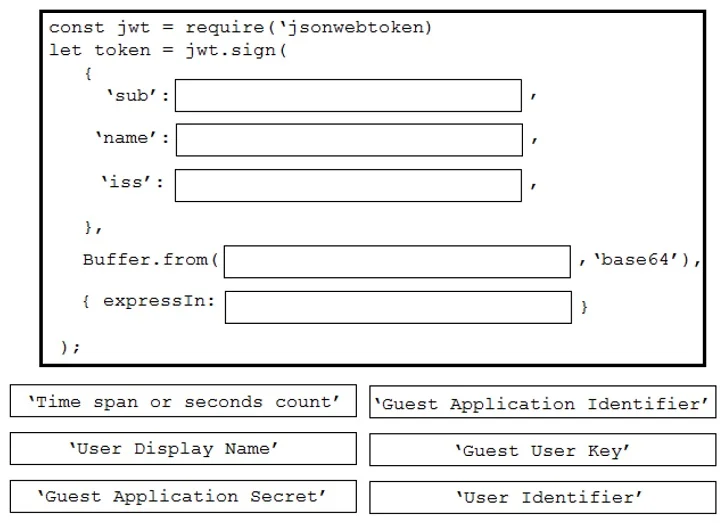
Drag and Drop Question Drag and drop the code to create a valid Guest Issuer JWT token to use with the Webex Teams Browser SDK. Not all options are used. Answer:
The correct answer is User Identifier; User Display Name; Guest Application Identifier; Guest Application Secret; Time span or seconds count. Webex Guest Issuer JWT Token - Drag & Drop Explained A Webex Guest Issuer JWT is built by constructing a payload with specific claims, then signing it with a secret and setting an expiration. The ordering maps directly to how JWT libraries (e.g., jsonwebtoken) expect the…
Question
Exhibit
Answer Area
Drag items
Correct arrangement
- User Identifier
- User Display Name
- Guest Application Identifier
- Guest Application Secret
- Time span or seconds count
Explanation
Webex Guest Issuer JWT Token - Drag & Drop Explained
A Webex Guest Issuer JWT is built by constructing a payload with specific claims, then signing it with a secret and setting an expiration. The ordering maps directly to how JWT libraries (e.g., jsonwebtoken) expect the arguments.
The Code Structure
const payload = {
  sub:  /* 1. User Identifier      */,
  name: /* 2. User Display Name    */,
  iss:  /* 3. Guest App Identifier */,
};

const token = jwt.sign(
  payload,
  /* 4. Guest Application Secret */,
  { expiresIn: /* 5. Time span or seconds count */ }
);
Item-by-Item Explanation
| # | Item | JWT Claim | Why Here |
|---|---|---|---|
| 1 | User Identifier | sub (subject) | Uniquely identifies who this token represents - the guest user's ID. Always the first payload claim in Webex's spec. |
| 2 | User Display Name | name | The display name shown in Webex meetings/spaces. Goes in the payload alongside sub. |
| 3 | Guest Application Identifier | iss (issuer) | Tells Webex which registered guest app issued this token. Webex uses this to look up the secret for verification. |
| 4 | Guest Application Secret | Signing key | Used to cryptographically sign the JWT. This is the jwt.sign() second argument - it comes after the payload is fully defined. |
| 5 | Time span or seconds count | exp / expiresIn | Sets how long the token is valid. Always the last piece - it's a signing option, not a payload field you set manually. |
The Unused Item: "Guest User Key"
Guest User Key is the trap answer. There is no such field in the Webex Guest Issuer JWT spec. Candidates confuse it with either:
- The User Identifier (
sub) - the user has an ID, not a "key" - The Guest Application Secret - that belongs to the app, not the user
Common Misconceptions
- Secret before identifier: Some swap items 3 and 4, but the secret is never in the payload - it's the signing key passed separately to
jwt.sign(). - Expiration in the payload: Some try to put
expas a manual payload field before signing. While technically valid in JWT, Webex's SDK implementation expectsexpiresInas a signing option. - Including Guest User Key: There is no guest-user-level key in this flow - the application secret authenticates the whole app, not individual users.
Topics
Community Discussion
No community discussion yet for this question.