
300-920 · Question #50
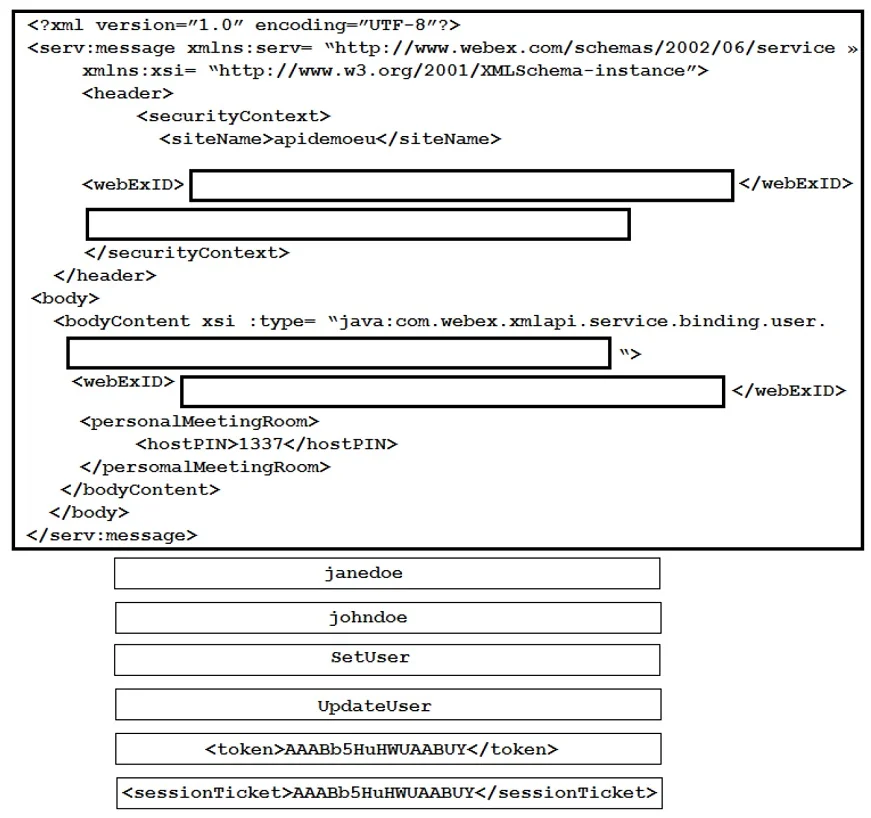
Drag and Drop Question Drag and drop the code snippets onto the exhibit to create a valid Webex Meetings API request allowing Jane (an admin) to reset John's PMR pin. Not all options are used. Answer:
The correct answer is johndoe; SetUser; <token>AAABb5RuiWUAABUY</token>; UpdateUser; janedoe; <sessionTicket>AAABb5RuiWUAABUY</sessionTicket>. The correct interaction involves dragging johndoe to the header's security context webExID, SetUser to the header's blank tag, the authentication token into the bodyContent's xsi:type attribute, and UpdateUser into the bodyContent's webExID tag, as depicted in the solution…
Question
Exhibit
Answer Area
Drag items
Correct arrangement
- johndoe
- SetUser
- <token>AAABb5RuiWUAABUY</token>
- UpdateUser
- janedoe
- <sessionTicket>AAABb5RuiWUAABUY</sessionTicket>
Explanation
The correct interaction involves dragging johndoe to the header's security context webExID, SetUser to the header's blank tag, the authentication token into the bodyContent's xsi:type attribute, and UpdateUser into the bodyContent's webExID tag, as depicted in the solution image to reset John's PMR pin.
Approach. Based on the provided solution image, the correct drag-and-drop interactions are as follows:
-
Drag
johndoeto the<webExID>tag within the<securityContext>in the<header>section.- Reasoning: In this specific API structure presented, the
webExIDwithin theheader'ssecurityContextis designated to identify the target user whose data is being accessed or modified (John). This establishes the subject of the administrative action.
- Reasoning: In this specific API structure presented, the
-
Drag
SetUserto the blank line immediately following the<webExID>block within the<securityContext>in the<header>section.- Reasoning: This placement indicates that
SetUseris the primary administrative method or action being declared within thesecurityContextitself, initiating a user-related operation such as a PIN reset. While unconventional in standard API design, this is the expected placement for this question.
- Reasoning: This placement indicates that
-
Drag
<token>AAABb5HuHWUAABUY</token>to the blank space located within thebodyContenttag'sxsi:typeattribute, specifically betweenuser.and the closing">"character.- Reasoning: According to this API's design, the authentication token for the administrator (Jane) is embedded directly into the
xsi:typeattribute declaration. This serves as the credential for authenticating the administrative request.
- Reasoning: According to this API's design, the authentication token for the administrator (Jane) is embedded directly into the
-
Drag
UpdateUserto the<webExID>tag located inside the<body>'s<bodyContent>section.- Reasoning: In this specific structure, the
<webExID>tag within thebodyContentis repurposed to specifyUpdateUseras a sub-action or a more granular method. This indicates that the operation is an update to the user's properties, specifically affecting thepersonalMeetingRoomconfiguration.
- Reasoning: In this specific structure, the
Common mistakes.
- common_mistake. A common mistake would be to apply standard XML API design principles, which differ significantly from the specific structure shown in the solution image. For instance:
- Placing
janedoein the headerwebExIDandjohndoein the bodywebExID: Standard API practice would have the caller (Jane) identified in thesecurityContextwebExID, and the target user (John) in thebodyContentwebExID. The provided solution reverses or reassigns these roles. - Placing
UpdateUseras the method inxsi:typeand the authentication token in thesecurityContext: Logically,UpdateUseris more suitable for resetting an existing pin, and authentication tokens belong in dedicated security elements or headers. The solution placesSetUserin the header's security context and the token embedded within thexsi:typeattribute, which is syntactically unconventional for XML attributes and API method declaration. - Leaving
janedoeor<sessionTicket>unused: These are distractors. Choosing<sessionTicket>over<token>(or vice-versa if the requirement was different) or misplacingjanedoewould lead to an incorrect answer. The solution specifically uses<token>and leavesjanedoeand<sessionTicket>out.
The core challenge of this question lies in understanding and adhering to the specific, potentially non-standard XML API structure presented in the question's solution, rather than relying on general, best-practice API design principles.
Concept tested. The underlying technical concepts being tested include understanding the logical components of an API request (caller, target, authentication, action/method), interpreting XML structure for Webex Meetings API calls, and identifying the appropriate elements for user management and configuration within that specific API framework, even if its structure is unconventional.
Topics
Community Discussion
No community discussion yet for this question.