
300-920 · Question #61
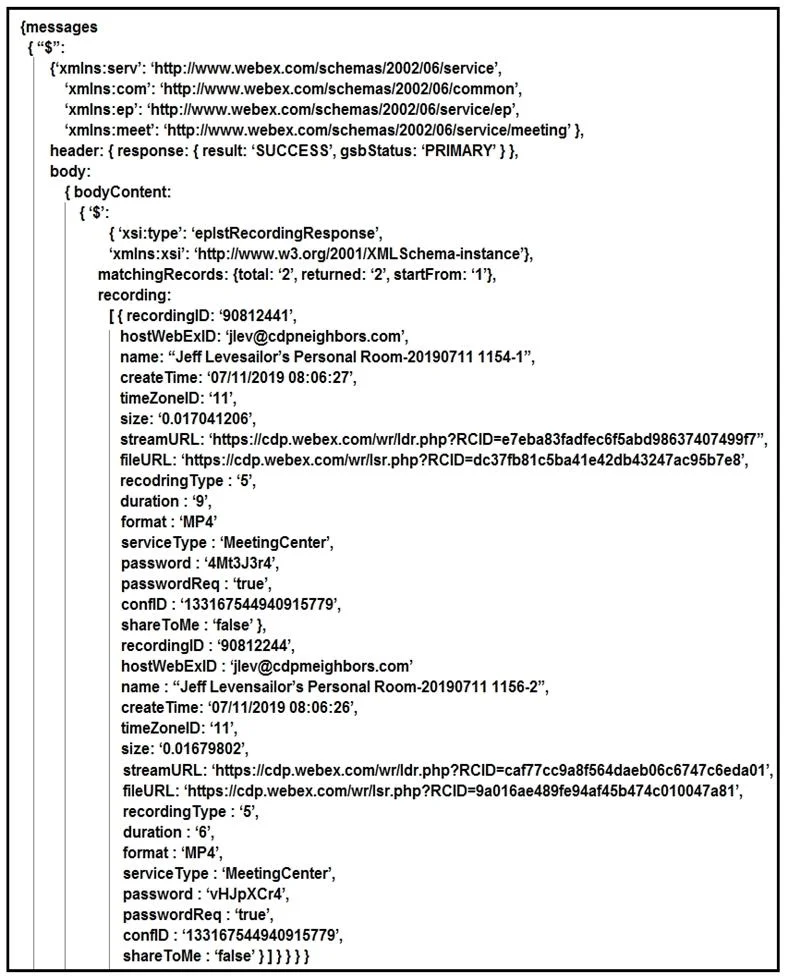
Drag and Drop Question Refer to the exhibit. A training coordinator must post links to Webex recordings on a company SharePoint site. This is usually a manual process, but a DevOps engineer wants to…
The correct answer is body; bodyContent; streamURL; message; recording. This question tests the ability to parse a JSON object, specifically extracting nested data using dot notation to access an array of objects and then iterating through it to retrieve a specific property.
Question
console dir(result)' output is shown in the exhibit. Using dot notation', drag and drop the code below onto the code snippet to output the streamURL for each recording. Answer:Exhibit
Answer Area
Drag items
Correct arrangement
- body
- bodyContent
- streamURL
- message
- recording
Explanation
This question tests the ability to parse a JSON object, specifically extracting nested data using dot notation to access an array of objects and then iterating through it to retrieve a specific property.
Approach. The goal is to extract the streamURL for each recording listed in the JSON output.
- First Line:
recordings = result {{ }}[{ }][{ }][{ }]. This line needs to definerecordingsas the array containing all individual recording objects. Following the JSON structure shown in the exhibit, the path to this array from theresultobject isresult.messages.body.bodyContent.recording. Therefore, the drag options for the four blanks in the first line, in order, should be:message,body,bodyContent,recording. This makes the linerecordings = result.message.body.bodyContent.recording. - Second Line:
for (i=0, i<recordings length, i++) Console.log(recordings[{{ }}]). Inside the loop,recordings[i]represents a single recording object. To output thestreamURLof that specific recording, we need to access itsstreamURLproperty using dot notation. Therefore, the drag option for the blank in the second line should bestreamURL. This makes the lineConsole.log(recordings[i].streamURL).
Common mistakes.
- common_mistake. Common mistakes include:
- Incorrect Path Order: Placing the drag targets in the wrong sequence for the JSON path (e.g.,
bodyContentbeforebody). The JSON path must be followed strictly from the root to the target array. - Missing Keys: Skipping intermediate keys in the path, which would result in an undefined property.
- Incorrect Final Accessor: Forgetting that
recordingsis an array of objects, andrecordings[i]is an object. Some might incorrectly try to accessrecordings[i].recordingor justrecordings[i](which would log the entire recording object, not just the streamURL). - Using
streamURLprematurely: Attempting to usestreamURLin the first line would lead to an error asstreamURLis a property of individual recording objects, not an intermediate object in the path to the array itself.
Concept tested. JSON parsing, object traversal using dot notation, array iteration, and extracting specific data properties from nested data structures, often encountered when working with REST APIs and their JSON responses.
Topics
Community Discussion
No community discussion yet for this question.