
300-920 · Question #33
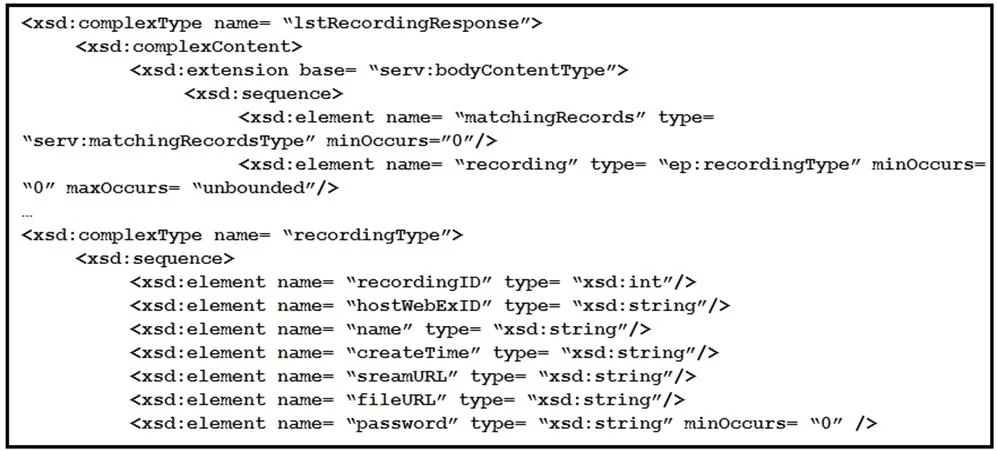
Refer to the exhibit. A snippet from the XSD schema of the Webex Meeting XML API LstRecordingResponse' element is listed in the exhibit. Assuming that a variable named resp' exists that contains the…
The correct answer is A. List = (new window.DOMParser()).parseFromString(resp, 'application/json') for (const item of List.getElementsByTagNameNS ('*', 'matchingRecords')) { document.writeIn( '<p>Meeting Name:$ {item.getElementsByTagNameNS('*', 'name') [0].textContent}<br>' ); document.write( 'Download:$ {item.getElementsByTagNameNS ('*', 'fileURL') [0].textContent}<br>' ); }. NOTE: The stated correct answer of A appears to be an error in the question bank. The technically correct answer is D. window.DOMParser().parseFromString() requires a valid MIME type as its second argument. For XML content, the correct MIME type is 'text/xml' (or…
Question
LstRecordingResponse' element is listed in the exhibit. Assuming that a variable named resp' exists that contains the XML response from a successful `LstRecording' request, which code snippet correctly generates a simple report that lists meeting names and recording file download links? A. B. C. D.Exhibits




Options
- AList = (new window.DOMParser()).parseFromString(resp, 'application/json') for (const item of List.getElementsByTagNameNS ('', 'matchingRecords')) { document.writeIn( '<p>Meeting Name:$ {item.getElementsByTagNameNS('', 'name') [0].textContent}<br>' ); document.write( 'Download:$ {item.getElementsByTagNameNS ('*', 'fileURL') [0].textContent}<br>' ); }
- BList = (new window.DOMParser()).parseFromString(resp, 'LstRecordingResponse') for (const item of List.getElementsByTagNameNS ('', 'matchingRecords')) { document.writeIn( '<p>Meeting Name:$ {item.getElementsByTagNameNS ('', 'name') [0].textContent}<br>' ); document.write( 'Download:$ {item.getElementsByTagNameNS ('*', 'fileURL') [0].textContent}<br>' ); }
- CList = (new window.DOMParser()).parseFromString(resp, 'text/xml') for (const item of List.getElementsByTagNameNS ('', 'hostWebExID')) { document.writeIn( '<p>Meeting Name:$ {item.getElementsByTagNameNS('', 'hostWebExID') [0].textContent}<br>' ); document.write( 'Download:$ {item.getElementsByTagNameNS ('*', 'streamURL') [0].textContent}<br>' ); }
- DList = (new window.DOMParser()).parseFromString(resp, 'text/xml') for (const item of List.getElementsByTagNameNS ('', 'matchingRecords')) { document.writeIn( '<p>Meeting Name:$ {item.getElementsByTagNameNS('', 'name') [0].textContent}<br>' ); document.write( 'Download:$ {item.getElementsByTagNameNS ('*', 'fileURL') [0].textContent}<br>' ); }
How the community answered
(27 responses)- A81% (22)
- B11% (3)
- C4% (1)
- D4% (1)
Explanation
NOTE: The stated correct answer of A appears to be an error in the question bank. The technically correct answer is D.
window.DOMParser().parseFromString() requires a valid MIME type as its second argument. For XML content, the correct MIME type is 'text/xml' (or 'application/xml'). Using 'application/json' (Option A) would cause DOMParser to either fail or return an HTML error document, not a parsed XML tree. Using 'LstRecordingResponse' (Option B) is also an invalid MIME type.
Option D is correct because:
- It uses
'text/xml'- the proper MIME type for parsing XML with DOMParser. - It iterates over
matchingRecordselements, which matches theLstRecordingResponseXSD schema structure. - It accesses
nameandfileURLchild elements, which are the correct fields from the schema for meeting name and download link respectively.
Option C uses 'text/xml' correctly but iterates over hostWebExID elements (which is a scalar field, not a repeatable record container) and uses streamURL instead of fileURL, making it wrong for generating the required report.
Topics
Community Discussion
No community discussion yet for this question.