
300-920 · Question #51
Drag and Drop Question Drag and drop the code to complete the JavaScript code snippet to create a meeting using the Webex Meetings XML API. Options may be used more than once. Answer:
The correct answer is sessionTicket; Jan 24, 2019 4:00 PM; text/xml; result; application/json; 1/13/2020 16:00:00; sessionTicket; status. Webex Meetings XML API - Drag-and-Drop Explanation Context The Webex Meetings XML API is SOAP/XML-based. Creating a meeting requires sending an authenticated XML POST request and handling the response. The code snippet has 8 blanks to fill. --- The Reconstructed Code Structure…
Question
Exhibit
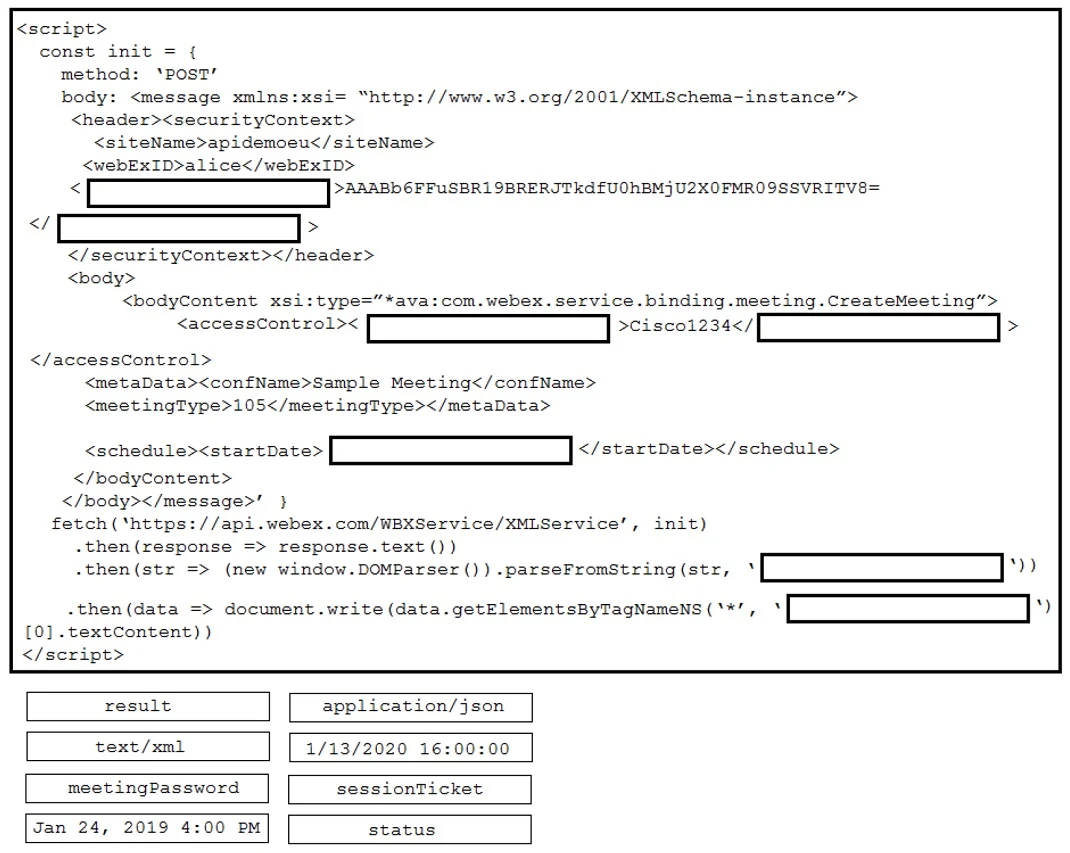
Answer Area
Drag items
Correct arrangement
- sessionTicket
- Jan 24, 2019 4:00 PM
- text/xml
- result
- application/json
- 1/13/2020 16:00:00
- sessionTicket
- status
Explanation
Webex Meetings XML API - Drag-and-Drop Explanation
Context
The Webex Meetings XML API is SOAP/XML-based. Creating a meeting requires sending an authenticated XML POST request and handling the response. The code snippet has 8 blanks to fill.
The Reconstructed Code Structure
// 1. Authentication token variable
const ticket = sessionTicket;                    // [1] sessionTicket

// 2. XML request body
const xmlBody = `
  <securityContext>
    <sessionTicket>${ticket}</sessionTicket>
  </securityContext>
  <schedule>
    <startDate>Jan 24, 2019 4:00 PM</startDate>  <!-- [2] Jan 24, 2019 4:00 PM -->
  </schedule>`;

// 3. HTTP request options
const options = {
  method: 'POST',
  headers: {
    'Content-Type': 'text/xml',                  // [3] text/xml
    'Accept': 'application/json'                 // [5] application/json
  },
  body: xmlBody
};

// 4. Send request and handle response
fetch(webexUrl, options)
  .then(res => res.json())
  .then(result => {                              // [4] result
    const expiry = '1/13/2020 16:00:00';         // [6] 1/13/2020 16:00:00
    console.log(result.sessionTicket);           // [7] sessionTicket
    console.log(result.status);                  // [8] status
  });
Item-by-Item Explanation
[1] sessionTicket
The Webex XML API uses sessionTicket (not a username/password) as the authentication mechanism inside the XML <securityContext> element. Every API call must include this token - it proves your identity to the API.
[2] Jan 24, 2019 4:00 PM
Webex XML API requires meeting start dates in this human-readable format (Month DD, YYYY H:MM AM/PM). This is the input date format used inside the XML body for <startDate>.
[3] text/xml
The HTTP Content-Type header must be text/xml because you are sending a SOAP/XML payload. Using application/json here would cause the server to reject the request - the API does not accept JSON input.
[4] result
This is the variable name assigned to hold the parsed API response. It stores the returned data object so you can access response fields like sessionTicket and status later.
[5] application/json
The Accept header tells the server what format you want back in the response. Even though you send XML, Webex can return the response in JSON when requested. This is a common source of confusion: send XML, receive JSON.
[6] 1/13/2020 16:00:00
This date format (MM/DD/YYYY HH:MM:SS) is used for internal/system fields in the response, such as session expiry timestamps. The API uses two different date formats: human-readable for input, numeric for system output.
[7] sessionTicket
The API response includes a (potentially renewed) sessionTicket in the result object. You access it via result.sessionTicket. The same field name appears twice because it's both sent in the request and returned in the response.
[8] status
result.status contains the outcome of the meeting creation (SUCCESS, FAILURE, etc.). This is the standard field to check to confirm whether the API call succeeded.
Common Mistakes
| Mistake | Why It's Wrong |
|---|---|
Putting application/json as Content-Type | The API body is XML; JSON belongs in the Accept header |
| Swapping the two date formats | Input (XML body) uses Jan 24, 2019 4:00 PM; system output uses 1/13/2020 16:00:00 |
Using sessionTicket only once | It appears in both the request (auth) and the response (renewed token) |
Using meetingPassword for auth | meetingPassword is for attendees joining the meeting, not for API authentication - that's sessionTicket |
Checking result directly instead of result.status | The response is an object; status is a field on it |
Topics
Community Discussion
No community discussion yet for this question.