
300-810 · Question #223
Drag and Drop Question An engineer must configure Microsoft Office 365 calendar integration with Cisco IM and Presence. The engineer has already configured the presence gateway. Drag and drop the…
The correct answer is Restart the Cisco Presence Engine.; Enable calendaring for users.; Configure Pull Interval for Office 365 Integration.; Configure Service Parameters for Exchange Integration. This question tests the understanding of the correct sequence of configuration steps required to integrate Microsoft Office 365 calendar with Cisco IM and Presence.
Question
Drag and Drop Question An engineer must configure Microsoft Office 365 calendar integration with Cisco IM and Presence. The engineer has already configured the presence gateway. Drag and drop the remaining configuration steps from the left into the correct order on the right to complete the configuration. Answer:
Exhibit
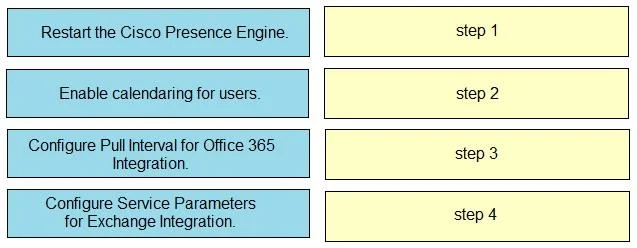
Answer Area
Drag items
Correct arrangement
- Restart the Cisco Presence Engine.
- Enable calendaring for users.
- Configure Pull Interval for Office 365 Integration.
- Configure Service Parameters for Exchange Integration.
Explanation
This question tests the understanding of the correct sequence of configuration steps required to integrate Microsoft Office 365 calendar with Cisco IM and Presence.
Approach. The correct interaction is to drag the configuration steps from the left to the right in the following order:
- Drag 'Configure Service Parameters for Exchange Integration.' to 'step 1'. - Before any specific integration details, the foundational parameters for connecting Cisco IM and Presence to Microsoft Exchange (which Office 365 uses for calendaring) must be set. This includes defining server addresses, authentication, and overall integration settings.
- Drag 'Configure Pull Interval for Office 365 Integration.' to 'step 2'. - Once the basic service parameters are established, specific integration behaviors like how frequently the Presence Engine should poll Office 365 for calendar updates can be configured. This refines the integration's operation.
- Drag 'Restart the Cisco Presence Engine.' to 'step 3'. - After making significant configuration changes to service parameters and integration settings, the relevant service (the Cisco Presence Engine) typically needs to be restarted for the new configurations to take effect and be loaded into memory.
- Drag 'Enable calendaring for users.' to 'step 4'. - Finally, once the backend integration is fully configured, activated, and verified through a service restart, the feature can be enabled for the end-users who will utilize the calendar integration for their presence status.
Common mistakes.
- common_mistake. A common mistake would be to enable calendaring for users (step 4) too early in the process. If users are enabled before the foundational service parameters are configured, the pull interval is set, and the Presence Engine is restarted, the feature will not function correctly for them, leading to a poor user experience. Another mistake is restarting the Cisco Presence Engine too early, before all necessary configuration changes (service parameters and pull interval) have been applied. This would mean that the engine would restart with incomplete settings, requiring further configuration and another restart. Configuring the pull interval before the general service parameters for Exchange integration is also incorrect, as specific settings typically follow general ones.
Concept tested. Cisco Unified Communications Manager IM and Presence Service (CUCM IM&P) integration with Microsoft Office 365/Exchange for calendar presence, specifically understanding the logical sequence of configuration steps and the dependency of service activation on underlying parameter settings and service restarts.
Topics
Community Discussion
No community discussion yet for this question.