
300-810 · Question #217
Drag and Drop Question An engineer must enable push notifications within Cisco UCM and the Cisco IM and Presence service cluster. The engineer has already signed into the Unified Communications…
The correct answer is Click Advanced Features and select Cisco Cloud Onboarding.; Cisco Generate Voucher and select Enable Push Notifications.; Click Save and select Restart Cisco Tomcat Service.; Restart the Cisco XCP Config Manager service and the Cisco XCP Router service. This question assesses the candidate's knowledge of the correct sequence of steps to enable push notifications within Cisco Unified Communications Manager and the Cisco IM and Presence service cluster.
Question
Drag and Drop Question An engineer must enable push notifications within Cisco UCM and the Cisco IM and Presence service cluster. The engineer has already signed into the Unified Communications Manager publisher node. Drag and drop the remaining configuration steps from the left into the correct order on the right to complete the configuration. Answer:
Exhibit
Answer Area
Drag items
Correct arrangement
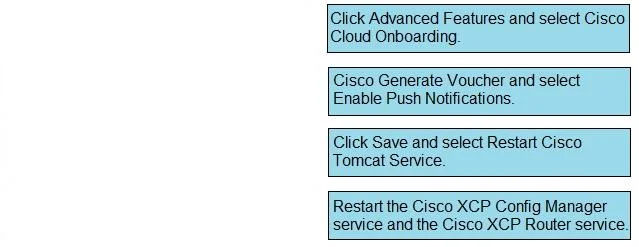
- Click Advanced Features and select Cisco Cloud Onboarding.
- Cisco Generate Voucher and select Enable Push Notifications.
- Click Save and select Restart Cisco Tomcat Service.
- Restart the Cisco XCP Config Manager service and the Cisco XCP Router service.
Explanation
This question assesses the candidate's knowledge of the correct sequence of steps to enable push notifications within Cisco Unified Communications Manager and the Cisco IM and Presence service cluster.
Approach. The correct interaction is to drag the configuration steps into the following order:
- Step 1: 'Click Advanced Features and select Cisco Cloud Onboarding.' - This is the initial navigation step in Cisco UCM Administration to access the cloud integration settings required for push notifications.
- Step 2: 'Cisco Generate Voucher and select Enable Push Notifications.' - Once on the Cloud Onboarding page, you would typically initiate the process to enable the specific cloud service, which in this case is push notifications, often involving a 'Generate Voucher' or 'Enable' action.
- Step 3: 'Click Save and select Restart Cisco Tomcat Service.' - After enabling the feature, changes must be saved. For many cloud-related and core configuration changes in UCM, a restart of the Cisco Tomcat service is required for the changes to take effect on the UCM publisher node.
- Step 4: 'Restart the Cisco XCP Config Manager service and the Cisco XCP Router service.' - Push notifications for IM and Presence (Jabber/Webex client mobile notifications) are handled by the IM&P cluster. Restarting the XCP Config Manager and XCP Router services on the IM&P nodes ensures that these services pick up the new configuration for cloud connectivity and notification proxying, making the feature fully operational.
Common mistakes.
- common_mistake. Common mistakes include misordering the steps, such as attempting to save or restart services before navigating to and enabling the feature. Forgetting to restart the Tomcat service after UCM configuration changes, or the XCP services after IM&P related changes, would prevent the feature from functioning correctly. For example, restarting XCP services before enabling the feature in UCM would be premature and ineffective. Similarly, restarting Tomcat before saving would lose changes. Placing 'Restart the Cisco Tomcat Service' after the XCP service restart would also be incorrect, as the UCM configuration needs to be applied first.
Concept tested. The core concept tested is the procedural knowledge of configuring cloud-connected services, specifically push notifications, within a Cisco Unified Communications Manager and Cisco IM and Presence environment. This includes understanding the administrative navigation, feature enablement, the necessity of saving changes, and the specific service restarts (Cisco Tomcat on UCM, and Cisco XCP services on IM&P) required for configuration changes to propagate and become active.
Topics
Community Discussion
No community discussion yet for this question.