
300-615 · Question #242
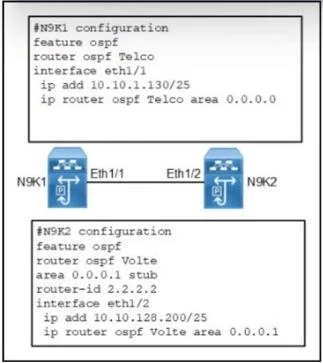
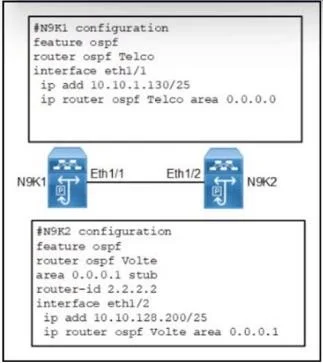
Refer to the exhibit. Two Cisco Nexus 9000 Series Switches fail to establish OSPF neighborship. Which action set resolves the issue?
The correct answer is A. Configure ospf area 1 as a standard area on N9K2. OSPF Area Configuration: The issue arises because N9K1 and N9K2 are in different OSPF areas. To establish an OSPF neighborship, they must be in the same area or have a common area (like Area 0). IP Address Configuration: For N9K2, configuring eth1/2 with the IP address…
Question
Refer to the exhibit. Two Cisco Nexus 9000 Series Switches fail to establish OSPF neighborship. Which action set resolves the issue?
Exhibits
Options
- AConfigure ospf area 1 as a standard area on N9K2.
- BConfigure ospf area 1 as a standard area on N9K2.
- CConfigure ospf area 0 as a stub area on N9K1.
- DConfigure ospf area 0 as a stub area on N9K1.
How the community answered
(63 responses)- A71% (45)
- B3% (2)
- C8% (5)
- D17% (11)
Explanation
OSPF Area Configuration: The issue arises because N9K1 and N9K2 are in different OSPF areas. To establish an OSPF neighborship, they must be in the same area or have a common area (like Area 0). IP Address Configuration: For N9K2, configuring eth1/2 with the IP address 10.10.128.130/25 ensures that it is in the correct subnet to communicate with N9K1. Assigning Areas: By assigning eth1/1 to OSPF area 0.0.0.1, it aligns with the intended OSPF
Topics
Community Discussion
No community discussion yet for this question.