
300-615 · Question #282
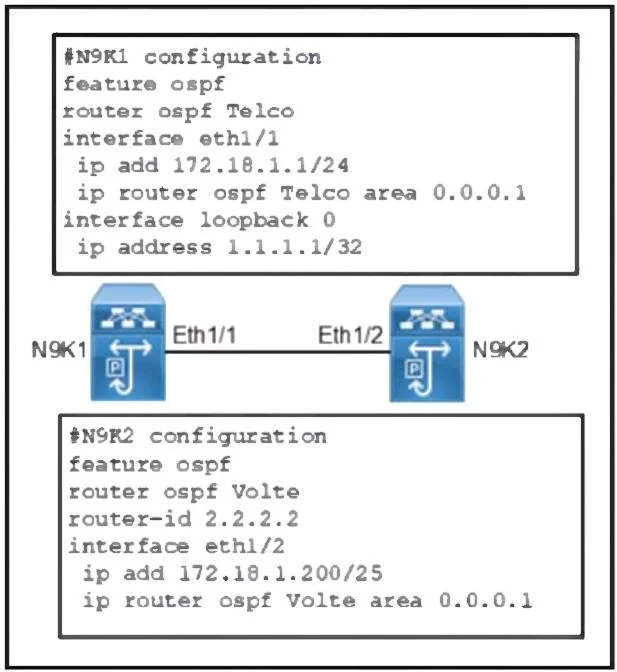
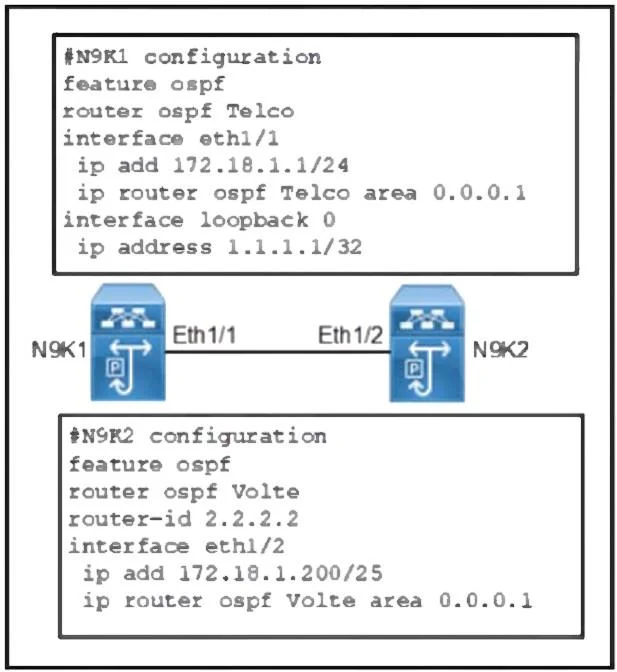
Refer to the exhibit. Two Cisco Nexus 9000 Series Switches fail to establish OSPF adjacency. Which configuration resolves the issue?
The correct answer is B. N9K2(config)# interface eth1/2. On N9K2 the IP on Eth1/2 was placed in a /25, which puts 172.18.1.200 in the 172.18.1.128/25 network, whereas N9K1's 172.18.1.1/24 lives in 172.18.1.0/24. Because they aren't in the same subnet they cannot form adjacency. Changing N9K2's mask to /24 (so both ends share…
Question
Refer to the exhibit. Two Cisco Nexus 9000 Series Switches fail to establish OSPF adjacency. Which configuration resolves the issue?
Exhibits
Options
- AN9K2(config)# interface loopback 0
- BN9K2(config)# interface eth1/2
- CN9K1(config)# router ospf Telco
- DN9K1(config)# interface loopback 0
How the community answered
(49 responses)- A4% (2)
- B76% (37)
- C6% (3)
- D14% (7)
Explanation
On N9K2 the IP on Eth1/2 was placed in a /25, which puts 172.18.1.200 in the 172.18.1.128/25 network, whereas N9K1's 172.18.1.1/24 lives in 172.18.1.0/24. Because they aren't in the same subnet they cannot form adjacency. Changing N9K2's mask to /24 (so both ends share 172.18.1.0/24) restores direct Layer 3 connectivity and allows OSPF to neighbor.
Topics
Community Discussion
No community discussion yet for this question.