
300-510 · Question #297
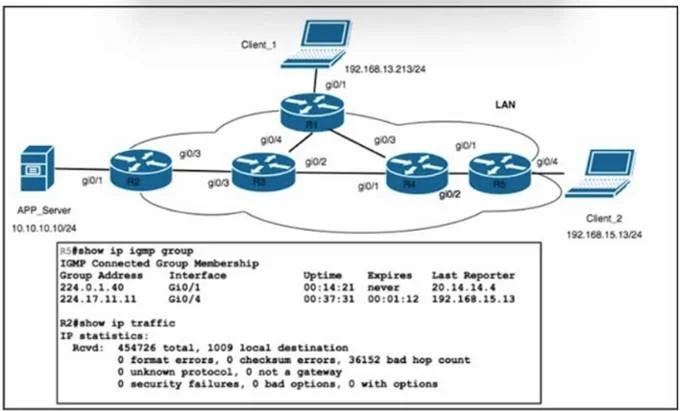
Refer to the exhibit. PIM-SM has been enabled in the network, and the RP is located on R1 with IP address 20.20.20.1/24. After the team upgraded the networking stack on APP_Server with IP address…
The correct answer is C. Change the TTL configuration on APP_Server to 6. The “bad hop count” statistics on R2 indicate that the multicast packets are expiring in flight because their TTL is too low to traverse your PIM-SM domain. By default, many OS multicast stacks send with TTL=1, which only survives a single router hop. Raising the source’s…
Question
Refer to the exhibit. PIM-SM has been enabled in the network, and the RP is located on R1 with IP address 20.20.20.1/24. After the team upgraded the networking stack on APP_Server with IP address 10.10.10.10/24, clients no longer receive the remote learning VoD resources. APP_Server is assigned group address 224.0.1.40. Which action must the networking team take to resolve the multicast issue?
Exhibit
Options
- ASet route ip mroute 192.168.15.13 255.255.255.255 20.14.14.4 on R2.
- BImplement ttl-threshold 6 on R2.
- CChange the TTL configuration on APP_Server to 6.
- DConfigure ip pim rp-address 20.13.13.1 override on all routers in the domain
How the community answered
(57 responses)- A16% (9)
- B4% (2)
- C74% (42)
- D7% (4)
Explanation
The “bad hop count” statistics on R2 indicate that the multicast packets are expiring in flight because their TTL is too low to traverse your PIM-SM domain. By default, many OS multicast stacks send with TTL=1, which only survives a single router hop. Raising the source’s multicast TTL (for example to 6) ensures the packets can reach clients several hops away without hitting
Topics
Community Discussion
No community discussion yet for this question.