
300-510 · Question #123
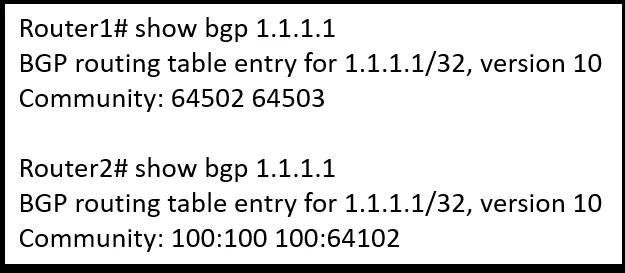
Refer to the exhibit. An engineer working on a client's network is trying to solve the BGP community issue on R1 and R2 routers. After displaying the BGP entries, the engineer notices that both…
The correct answer is A. Execute the lp bgp-community new-format command in Router1. Executing ip bgp-community new-format on Router1 changes how BGP community values are displayed - from a single 32-bit decimal integer (legacy format) to the human-readable AA:NN (AS:value) format. Since Router2 already uses the new format, applying this command to Router1…
Question
Refer to the exhibit. An engineer working on a client’s network is trying to solve the BGP community issue on R1 and R2 routers. After displaying the BGP entries, the engineer notices that both routers still have different outputs. Which action must the engineer perform to any of the routers to correct the problem and get the same output?
Exhibit
Options
- AExecute the lp bgp-community new-format command in Router1.
- BRemove the lp bgp-community new-format command in Router1.
- CAdvertise the route to Router2 as standard community.
- DAdvertise the route to Router2 as extended community.
How the community answered
(32 responses)- A72% (23)
- B16% (5)
- C9% (3)
- D3% (1)
Explanation
Executing ip bgp-community new-format on Router1 changes how BGP community values are displayed - from a single 32-bit decimal integer (legacy format) to the human-readable AA:NN (AS:value) format. Since Router2 already uses the new format, applying this command to Router1 aligns both outputs. Option B is wrong because removing the command would only help if Router1 already had it and Router2 didn't - here, Router1 lacks it and needs it added. Options C and D are wrong because they conflate the display format issue with the community type (standard vs. extended); changing what is advertised doesn't fix a local formatting inconsistency between two routers' show outputs.
Memory tip: Think of new-format as a "translator" - without it, the router shows a raw 32-bit number (e.g., 131084); with it, the same value appears as 2:12. If two routers "speak different dialects," give the old one the new-format command.
Topics
Community Discussion
No community discussion yet for this question.