
300-510 · Question #103
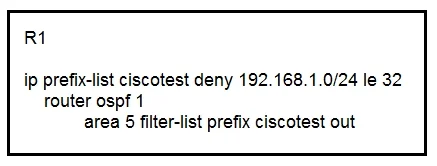
Refer to the exhibit. An engineer applied the configuration on R1 to prevent network 192.168.1.0/24 from being propagated outside of area 5. After the change, users have reported they are not able…
The correct answer is D. Add a permit statement for 0.0.0.0/0 le 32 to the end of the prefix-list 10 override the implicit deny. The engineer applied an OSPF filter-list using a prefix-list to block 192.168.1.0/24 from leaving Area 5. The prefix-list likely contains only a deny statement for 192.168.1.0/24. Like all access-lists and prefix-lists in Cisco IOS, there is an implicit deny all at the end…
Question
Refer to the exhibit. An engineer applied the configuration on R1 to prevent network 192.168.1.0/24 from being propagated outside of area 5. After the change, users have reported they are not able to access any of the application servers that were working before. While checking the routing table of the peer router. The engineer notices R1 stopped propagating any routes outside are 5. Which action must be taken to fix the problem?
Exhibit
Options
- AConfigure an additional filter-list on R1 for inbound traffic to allow external router into area 5.
- BReconfigure the filter-list statement to apply in the inbound direction
- CChange the prefix-list action to permit and add an explicit deny statement for network
- DAdd a permit statement for 0.0.0.0/0 le 32 to the end of the prefix-list 10 override the implicit deny.
How the community answered
(58 responses)- A9% (5)
- B5% (3)
- C16% (9)
- D71% (41)
Explanation
The engineer applied an OSPF filter-list using a prefix-list to block 192.168.1.0/24 from leaving Area 5. The prefix-list likely contains only a deny statement for 192.168.1.0/24. Like all access-lists and prefix-lists in Cisco IOS, there is an implicit deny all at the end, which means every other prefix is also being blocked-not just the target network. The fix is to add a 'permit 0.0.0.0/0 le 32' statement at the end of the prefix-list. This explicitly permits all other prefixes to pass through the filter, while the specific deny for 192.168.1.0/24 above it continues to block only that network from propagating outside Area 5.
Topics
Community Discussion
No community discussion yet for this question.