
2V0-51.23 · Question #85
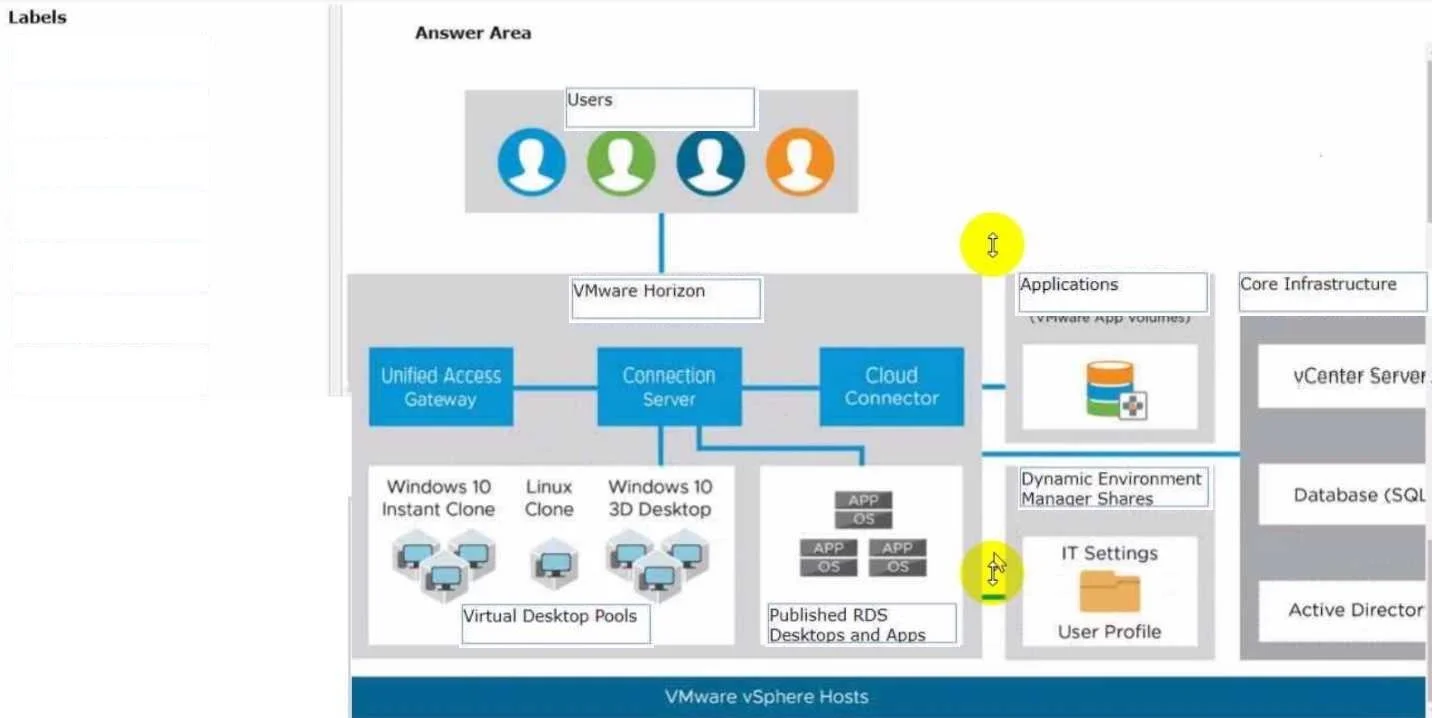
Drag and Drop Question Drag and drop the labels on the left into their correct location in the diagram of VMware Horizon Architecture on the right. Answer:
The correct answer is Users; VMware Horizon; Dynamic Environment Management; Core Infrastructure; Virtual Desktop Pools; Published RDS Desktops and Apps; Applications. VMware Horizon Architecture: Drag-and-Drop Explained The arrangement follows the logical flow of a layered architecture diagram, moving from end-user access at the top down through management and brokering layers to the underlying resources being delivered. --- Item-by-Item…
Question
Drag and Drop Question Drag and drop the labels on the left into their correct location in the diagram of VMware Horizon Architecture on the right. Answer:
Exhibit
Answer Area
Drag items
Correct arrangement
- Users
- VMware Horizon
- Dynamic Environment Management
- Core Infrastructure
- Virtual Desktop Pools
- Published RDS Desktops and Apps
- Applications
Explanation
VMware Horizon Architecture: Drag-and-Drop Explained
The arrangement follows the logical flow of a layered architecture diagram, moving from end-user access at the top down through management and brokering layers to the underlying resources being delivered.
Item-by-Item Breakdown
1. Users The topmost layer. Users are the consumers of the entire system - they initiate all connections. Every architectural diagram places end users at the entry point because the entire infrastructure exists to serve them.
2. VMware Horizon Directly below users because Horizon is the connection broker and access control layer. When a user connects, Horizon authenticates them, routes their session, and decides what resources they're entitled to. Nothing reaches the backend without passing through here.
3. Dynamic Environment Management (DEM) Sits after Horizon because it activates during session establishment, after authentication. DEM applies user profiles, Group Policy settings, and personalization before the desktop loads. It's management-layer logic that wraps around the user experience - not part of the initial access flow, but not infrastructure either.
4. Core Infrastructure The foundational platform: vSphere/ESXi, vCenter, Active Directory, networking, and storage. Everything above depends on this layer. It doesn't deliver desktops itself - it provides the compute and services that make delivery possible.
5. Virtual Desktop Pools Now we move into resource delivery. VDI pools (persistent or non-persistent virtual machines) are the primary desktop delivery mechanism. They come first because VDI is Horizon's flagship delivery method and the most commonly used.
6. Published RDS Desktops and Apps Sits alongside/below Virtual Desktop Pools because RDSH (Remote Desktop Session Host) is an alternative delivery mechanism - shared session hosts rather than dedicated VMs. It's still a desktop/application delivery method but session-based rather than VM-based.
7. Applications The final layer represents application delivery methods (e.g., App Volumes, ThinApp) layered on top of desktops. Applications can be streamed or attached dynamically - they're the payload being delivered through all the layers above.
Common Mistakes
| Mistake | Why It's Wrong |
|---|---|
| Placing DEM before Horizon | DEM operates within an established session - Horizon must broker the connection first |
| Placing Core Infrastructure at the bottom-most | Core Infra underlies everything including the desktop/app pools, so it should sit above/before those resource layers |
| Separating "Applications" from delivery pools | Applications are a distinct delivery method (App Volumes/ThinApp), not just software inside a VM pool |
| Treating "Published RDS Desktops and Apps" as part of Core Infra | RDSH is a delivery mechanism, not infrastructure - it belongs in the resource layer with VDI pools |
Key Mental Model
Think of it as a request flow:
User → Horizon brokers the request → DEM personalizes the session → Core Infrastructure provides compute → Resources (VDI pools, RDS, Apps) are delivered back up the chain.
Topics
Community Discussion
No community discussion yet for this question.