
2V0-51.23 · Question #83
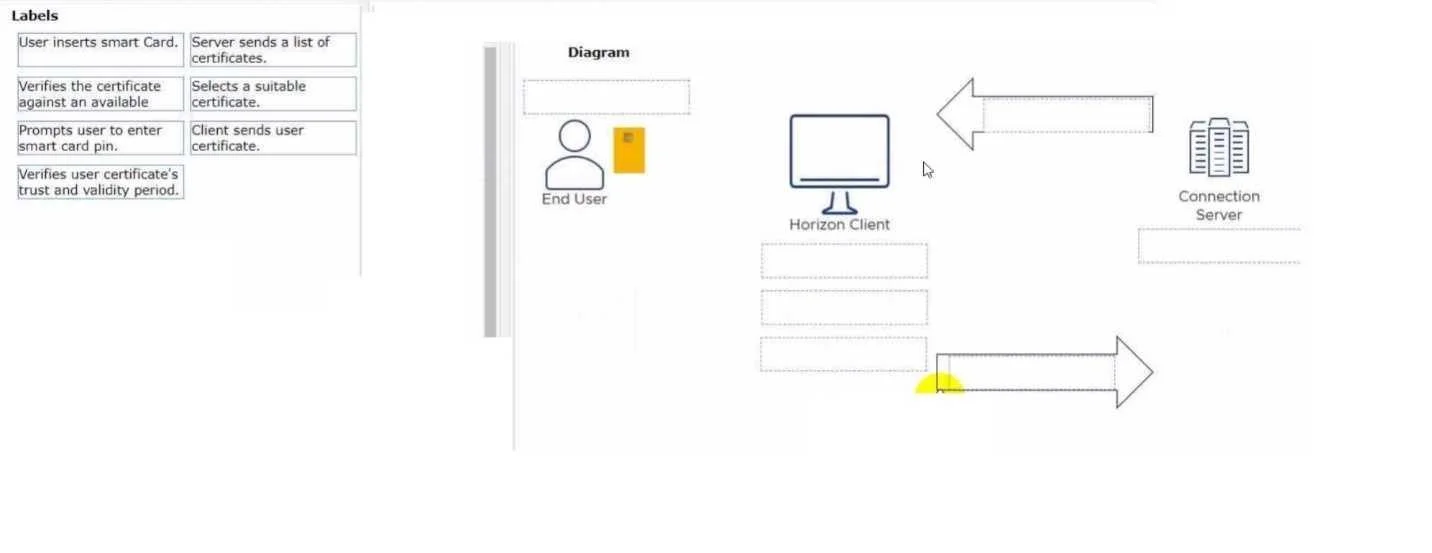
Drag and Drop Question Drag and drop the labels on the left for the authentication flow for smart cards into the correct location in the diagram on the right. Answer:
The correct answer is Obtains a smart card.; Server sends a list of accepted certificates.; Selects a suitable certificate.; Client sends user certificate.; Verifies the certificate against an available trust and validity period.; Prompts user to enter smart card pin. Smart Card Authentication Flow - Explained This flow describes TLS mutual authentication with smart cards, where both the server and client authenticate each other using certificates stored on a physical card. --- Step-by-Step Breakdown 1. Obtains a smart card. > Prerequisite /…
Question
Drag and Drop Question Drag and drop the labels on the left for the authentication flow for smart cards into the correct location in the diagram on the right. Answer:
Exhibit
Answer Area
Drag items
Correct arrangement
- Obtains a smart card.
- Server sends a list of accepted certificates.
- Selects a suitable certificate.
- Client sends user certificate.
- Verifies the certificate against an available trust and validity period.
- Prompts user to enter smart card pin.
Explanation
Smart Card Authentication Flow - Explained
This flow describes TLS mutual authentication with smart cards, where both the server and client authenticate each other using certificates stored on a physical card.
Step-by-Step Breakdown
1. Obtains a smart card.
Prerequisite / out-of-band setup
This happens before any network communication. A certificate authority (CA) issues a certificate and private key, which are provisioned onto the physical smart card. No authentication can begin without this. It's first because it's the foundational prerequisite.
2. Server sends a list of accepted certificates.
TLS handshake - CertificateRequest message
During the TLS handshake, the server sends a CertificateRequest message containing the list of trusted CA Distinguished Names (DNs) it will accept. This is server-initiated - the client cannot act without knowing what the server considers valid.
Common mistake: People assume the client just sends any certificate it has. In reality, the server dictates what it's willing to trust first.
3. Selects a suitable certificate.
Client-side matching
The client (smart card middleware/OS) inspects its available certificates and matches one against the server's accepted CA list. Only after receiving step 2 can the client make an informed selection.
Common mistake: Thinking the client selects a certificate before knowing what the server accepts - this would risk sending a certificate that the server immediately rejects.
4. Client sends user certificate.
TLS Certificate message
The selected certificate (the public part - no private key) is transmitted to the server. This is a standard TLS Certificate message. The certificate is public data and does not require the PIN to read.
Common mistake: Assuming the PIN is needed to send the certificate. The certificate itself is not protected by the PIN - only private key operations are.
5. Verifies the certificate against an available trust and validity period.
Server-side validation
The server validates the received certificate:
- Is it signed by a trusted CA?
- Is it within its validity period (not expired)?
- Has it been revoked (CRL/OCSP check)?
This happens before PIN entry because there is no point prompting the user if the certificate is already invalid or untrusted.
Common mistake: Placing verification after PIN entry. Verification is server-side and purely about the certificate's authenticity - it has nothing to do with the user's PIN.
6. Prompts user to enter smart card PIN.
Private key access - proof of possession
Only after the server confirms the certificate is valid does it request proof that the client actually possesses the corresponding private key (via a CertificateVerify challenge). To sign this challenge, the smart card's private key must be unlocked - which requires the user's PIN.
This step is last because:
- There's no reason to unlock the card if the cert was rejected in step 5
- The PIN gate protects the signing operation, not the certificate itself
Common mistake: Placing PIN entry near the beginning (before sending the certificate). This misunderstands that the PIN guards the private key operation, not reading the certificate.
Key Takeaway
The flow separates two distinct phases:
| Phase | Steps | Purpose |
|---|---|---|
| Certificate negotiation | 2–4 | Agree on and exchange the right certificate |
| Proof of possession | 5–6 | Verify the cert is valid, then prove the user holds the matching private key |
The PIN always comes last because it's the gatekeeper for the private key - and you only need the private key after everything else has been validated.
Topics
Community Discussion
No community discussion yet for this question.