
2V0-51.23 · Question #84
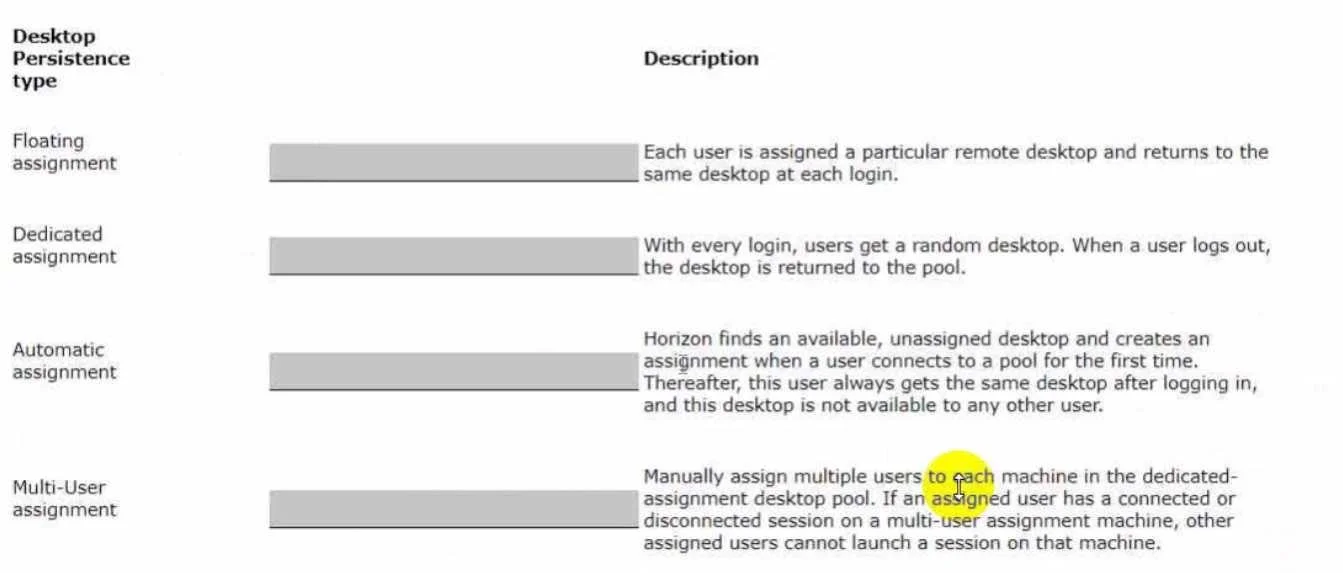
Drag and Drop Question Drag and drop each Desktop Persistence type on the left to its matching description on the right. Answer:
The correct answer is With every login, users get a random desktop. When a user logs out, the desktop is returned to the pool.; Each user is assigned a particular remote desktop and returns to the same desktop at each login.; Horizon finds an available, unassigned desktop and creates an assignment when a user connects to a pool for the first time. Therefore, the user always gets the same desktop after logging in, and this desktop is not available to any other user.; Manually assign multiple users to a specific machine in the dedicated-assignment desktop pool. If an assigned user has a connected or disconnected session on a multi-user machine, then other assigned users cannot launch a session on that machine. VMware Horizon Desktop Persistence Types This question tests understanding of how VMware Horizon manages desktop assignments in virtual desktop infrastructure (VDI). Here's each placement explained: --- 1. Floating Assignment → "Random desktop each login; returned to pool on…
Question
Drag and Drop Question Drag and drop each Desktop Persistence type on the left to its matching description on the right. Answer:
Exhibit
Answer Area
Drag items
Correct arrangement
- With every login, users get a random desktop. When a user logs out, the desktop is returned to the pool.
- Each user is assigned a particular remote desktop and returns to the same desktop at each login.
- Horizon finds an available, unassigned desktop and creates an assignment when a user connects to a pool for the first time. Therefore, the user always gets the same desktop after logging in, and this desktop is not available to any other user.
- Manually assign multiple users to a specific machine in the dedicated-assignment desktop pool. If an assigned user has a connected or disconnected session on a multi-user machine, then other assigned users cannot launch a session on that machine.
Explanation
VMware Horizon Desktop Persistence Types
This question tests understanding of how VMware Horizon manages desktop assignments in virtual desktop infrastructure (VDI). Here's each placement explained:
1. Floating Assignment → "Random desktop each login; returned to pool on logout"
Why: The word "floating" describes an assignment that never sticks - it floats back to the pool. Users get whichever desktop is available at login and have no persistent relationship with any specific machine. Think of it like a hotel room: you get one for the night, then it's reassigned.
Key indicator in the description: "returned to the pool" - no other type returns the desktop to a shared pool.
2. Dedicated Assignment → "User always returns to the same desktop"
Why: "Dedicated" means one machine is permanently dedicated to one user. This is an admin-configured, manual assignment. The user owns that desktop exclusively.
Key indicator: "assigned a particular remote desktop" - the word "particular" signals a specific, pre-configured pairing.
3. Automatic Assignment → "Horizon auto-assigns on first connection; exclusive thereafter"
Why: "Automatic" describes how the assignment is created - Horizon does it automatically on first login without admin intervention. After that, behavior mirrors Dedicated (same desktop every time, exclusive to that user).
Key indicator: "creates an assignment when a user connects for the first time" - the one-time auto-creation event is the defining trait.
4. Multi-User Assignment → "Multiple users manually assigned to one machine; only one session at a time"
Why: "Multi-User" signals that multiple users share rights to one machine, but it's not concurrent - it's sequential. Users are manually assigned by an admin. If one user is connected or disconnected (but session persists), others are blocked.
Key indicator: "other assigned users cannot launch a session" - the blocking behavior distinguishes it from floating pools.
Common Mistakes & Misconceptions
| Confusion | Clarification |
|---|---|
| Automatic vs. Dedicated | Both give the user the same desktop every time. The difference: Dedicated is admin-assigned manually; Automatic is assigned by Horizon on first login. |
| Floating vs. Automatic | Both use an available pool desktop. The difference: Floating never creates a permanent bond; Automatic creates a permanent exclusive assignment after the first login. |
| Multi-User vs. Floating | Both involve multiple users, but Multi-User has explicit named assignments to a specific machine and only one session at a time. Floating is anonymous and concurrent across the pool. |
| Multi-User = concurrent users | Wrong. Only one user can hold a session on the machine at a time - it's about multiple assigned users, not simultaneous users. |
Topics
Community Discussion
No community discussion yet for this question.