
2V0-51.23 · Question #86
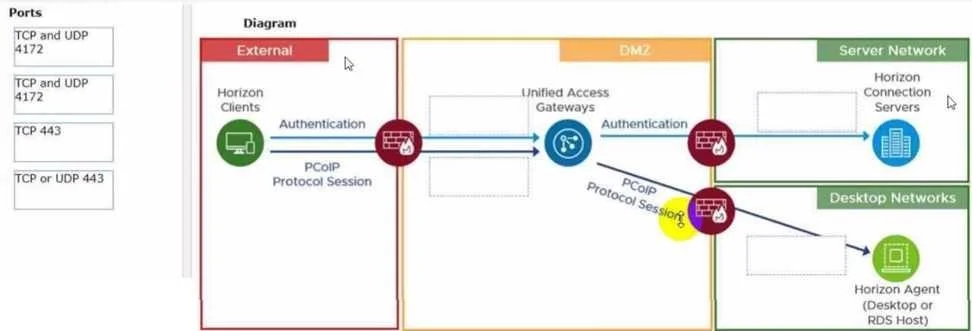
Drag and Drop Question Drag and drop the ports on the left to allow an external PCoIP connection through Unified Access Gateway (UAG) into the diagram on the right. Answer:
The correct answer is TCP and UDP 4172; TCP 443; TCP or UDP 443. PCoIP Through UAG - Port Placement Explained This question maps three ports to specific segments of the network path for an external PCoIP connection through VMware's Unified Access Gateway. Architecture Context The typical diagram shows: `` [External Client] → [External…
Question
Drag and Drop Question Drag and drop the ports on the left to allow an external PCoIP connection through Unified Access Gateway (UAG) into the diagram on the right. Answer:
Exhibit
Answer Area
Drag items
Correct arrangement
- TCP and UDP 4172
- TCP 443
- TCP or UDP 443
Explanation
PCoIP Through UAG - Port Placement Explained
This question maps three ports to specific segments of the network path for an external PCoIP connection through VMware's Unified Access Gateway.
Architecture Context
The typical diagram shows:
[External Client] → [External Firewall] → [UAG in DMZ] → [Internal Firewall] → [Connection Server / VDI]
There are three drop zones corresponding to connections at different segments of this path.
Item-by-Item Breakdown
1. TCP and UDP 4172 - External firewall / client-to-UAG segment
PCoIP is a dual-transport protocol. It uses:
- TCP 4172 for the control/signaling channel
- UDP 4172 for the actual display data stream (low-latency, high-throughput)
Both must be open at the external-facing firewall. This is the "heaviest" traffic path and goes first because without it, no remote desktop session can be established at all - authentication alone doesn't deliver a desktop.
Common mistake: Opening only TCP 4172. Without UDP 4172, PCoIP display traffic is blocked and the session either fails or falls back poorly. Both transports are required.
2. TCP 443 - UAG HTTPS listener
TCP 443 is the initial HTTPS connection the Horizon Client makes to UAG. It handles:
- Authentication
- XML-API brokering
- Session negotiation / desktop assignment
This is a strict TCP-only connection. The client must reach UAG on TCP 443 before a PCoIP session can be launched.
Common mistake: Confusing this with "TCP or UDP 443." At the UAG entry point for PCoIP brokering, it is TCP only - HTTPS does not use UDP here.
3. TCP or UDP 443 - UAG to internal network (Connection Server)
On the internal side, UAG communicates back to the Connection Server. Depending on configuration and Horizon version, this communication can use either TCP 443 (HTTPS/WebSocket) or UDP 443 (DTLS/QUIC for newer Blast-adjacent tunneling). The flexibility of "TCP or UDP" reflects that the internal leg's transport depends on the protocol mode negotiated.
Common mistake: Assuming internal UAG-to-Connection Server traffic is always strictly TCP. Modern UAG deployments increasingly use UDP 443 for the internal tunnel leg, so both must be accounted for.
Why This Order?
The arrangement follows the left-to-right flow of the network diagram:
| Position | Port | Reason |
|---|---|---|
| 1 | TCP and UDP 4172 | External firewall - PCoIP display protocol in |
| 2 | TCP 443 | UAG listener - HTTPS broker connection |
| 3 | TCP or UDP 443 | Internal leg - UAG back to Connection Server |
The key distinction between items 2 and 3 is TCP-only vs. TCP-or-UDP - external brokering is always TCP 443, while internal communication allows both transport types.
Topics
Community Discussion
No community discussion yet for this question.